
監視カメラの映像を画像で連続保存する
実行画面
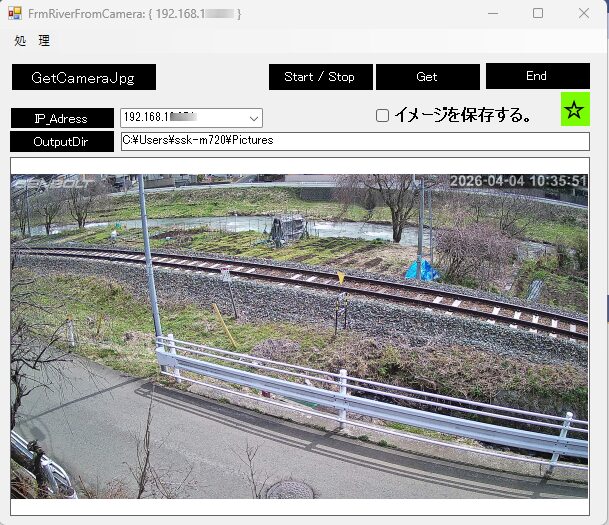
タイマー機能を利用して連続保存します。
Form1
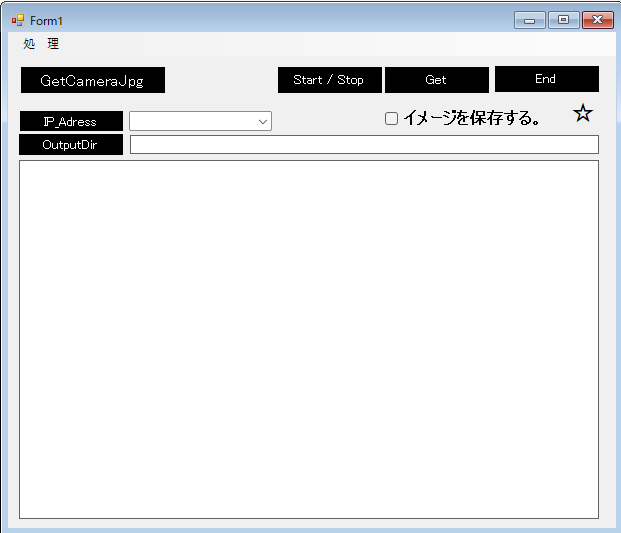
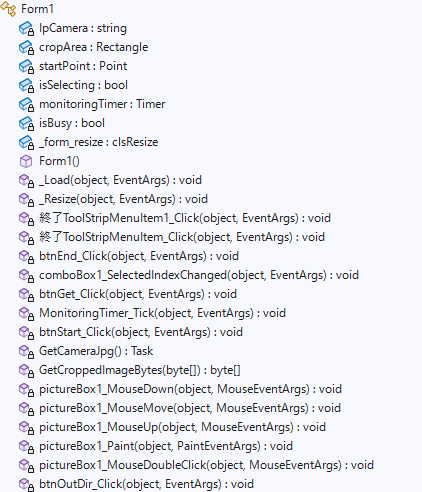
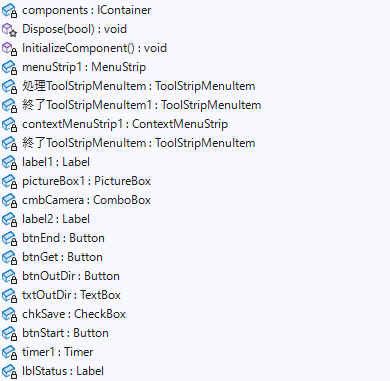
Form1.cs
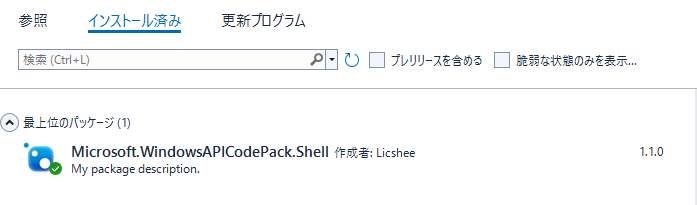
using Microsoft.WindowsAPICodePack.Dialogs;
using System;
using System.Collections.Generic;
using System.ComponentModel;
using System.Data;
using System.Drawing;
using System.IO;
using System.Linq;
using System.Net.Http;
using System.Runtime.InteropServices.ComTypes;
using System.Text;
using System.Threading.Tasks;
using System.Windows.Forms;
using static System.Net.Mime.MediaTypeNames;
namespace FrmGetCameraJpg
{
public partial class Form1 : Form
{
string IpCamera;
private Rectangle cropArea; // 選択された範囲を保持
private Point startPoint; // マウスを押し下げた位置
private bool isSelecting = false; // 選択中かどうか
// --- 追加変数 ---
private Timer monitoringTimer;
private bool isBusy = false; // 二重実行防止フラグ
// ----------------
//control clsResize 画面表示を拡大縮小します。
clsResize _form_resize;
public Form1()
{
InitializeComponent();
//clsResize
_form_resize = new clsResize(this); //I put this after the initialize event to be sure that all controls are initialized properly
this.Load += new EventHandler(_Load); //This will be called after the initialization // form_load
this.Resize += new EventHandler(_Resize); //form_resize
//
cmbCamera.Items.Add("192.168.xx.xx0");
cmbCamera.Items.Add("192.168.xx.xx1");
cmbCamera.Items.Add("192.168.xx.xx2");
cmbCamera.Items.Add("192.168.xx.xx3");
cmbCamera.SelectedIndex = 1;
IpCamera = cmbCamera.GetItemText(cmbCamera.SelectedItem);
//Console.WriteLine(IpCamera);
this.Text = @"FrmRiverFromCamera: { " + IpCamera + @" }";
txtOutDir.Text = @"C:\Users\ssk-m720\Pictures";
string configPath = AppDomain.CurrentDomain.BaseDirectory + "Teisu.txt";
int interval = 2000;
if (File.Exists(configPath))
{
string[] lines = File.ReadAllLines(configPath);
if (lines.Length >= 4)
{
cmbCamera.Text = lines[0];
this.IpCamera = lines[0]; // 192.168.xx.xx1
this.txtOutDir.Text = lines[1]; // 保存先パス
interval = int.Parse(lines[2]); // 2000
string cameraName = lines[3]; // 川上流
this.Text = $"監視:{cameraName} ({this.IpCamera})";
}
}
// タイマーの初期設定
monitoringTimer = new Timer();
monitoringTimer.Interval = interval; // 2秒間隔(環境に合わせて調整してください)
monitoringTimer.Tick += MonitoringTimer_Tick;
}
//clsResize _Load
private void _Load(object sender, EventArgs e)
{
_form_resize._get_initial_size();
}
//clsResize _Resize
private void _Resize(object sender, EventArgs e)
{
_form_resize._resize();
}
private void 終了ToolStripMenuItem1_Click(object sender, EventArgs e)
{
this.Close();
}
private void 終了ToolStripMenuItem_Click(object sender, EventArgs e)
{
this.Close();
}
private void btnEnd_Click(object sender, EventArgs e)
{
this.Close();
}
private void comboBox1_SelectedIndexChanged(object sender, EventArgs e)
{
IpCamera = IpCamera = cmbCamera.GetItemText(cmbCamera.SelectedItem);
this.Text = @"FrmRiverFromCamera: { " + IpCamera + @" }";
}
private async void btnGet_Click(object sender, EventArgs e)
{
await GetCameraJpg();
}
// タイマーイベント(ここでGetCameraJpgを呼ぶ)
private async void MonitoringTimer_Tick(object sender, EventArgs e)
{
if (isBusy) return; // 前の処理中ならスキップ
try
{
isBusy = true;
// --- ランプを点灯(明るい緑) ---
lblStatus.BackColor = Color.LawnGreen;
await GetCameraJpg(); // 既存のメソッドを呼び出す
// 成功したら少し待ってから消灯(暗い緑)させると「チカッ」と見えます
await Task.Delay(200);
lblStatus.BackColor = SystemColors.Control;//Color.LightGray;
}catch
{
// 失敗した時は「赤」にすると異常がすぐわかります
lblStatus.BackColor = Color.Red;
}
finally
{
isBusy = false; // 終わったらフラグを下ろす
}
}
// モニタリング開始/停止ボタン(新設する場合)
private void btnStart_Click(object sender, EventArgs e)
{
if (!monitoringTimer.Enabled)
{
monitoringTimer.Start();
btnStart.Text = "停止";
btnStart.BackColor = Color.Red; // 動作中を強調
}
else
{
monitoringTimer.Stop();
btnStart.Text = "モニタリング開始";
btnStart.BackColor = SystemColors.ActiveCaptionText;
}
}
// GetCameraJpg 内の注意点:
// 既存のコードにある「client.DefaultRequestHeaders.ConnectionClose = true;」は
// 連続取得時の「セッション詰まり」を防ぐために非常に有効です。そのまま維持してください。
private async Task GetCameraJpg()
{
string cameraUrl = $@"http://{IpCamera}/tmpfs/auto.jpg";
// 毎回新しくハンドラーとクライアントを作る(250番のセッションをリセットするため)
var handler = new HttpClientHandler()
{
Credentials = new System.Net.NetworkCredential("userxxxxxx", "passwordyyyyyyyy"),
PreAuthenticate = true
};
try
{
using (var client = new HttpClient(handler))
{
// ブラウザのふり
client.DefaultRequestHeaders.UserAgent.ParseAdd("Mozilla/5.0 (Windows NT 10.0; Win64; x64) AppleWebKit/537.36 (KHTML, like Gecko) Chrome/122.0.0.0 Safari/537.36");
// 接続を維持せず、終わったらすぐ切る
client.DefaultRequestHeaders.ConnectionClose = true;
client.Timeout = TimeSpan.FromSeconds(5);
using (var stream = await client.GetStreamAsync(cameraUrl))
using (var ms = new MemoryStream())
{
try
{
// 4KBずつ「手動」でコピーする
byte[] buffer = new byte[4096];
int read;
// ここでエラーが出ても catch に飛ばず、読み込めた分だけで処理を続行
while ((read = await stream.ReadAsync(buffer, 0, buffer.Length)) > 0)
{
ms.Write(buffer, 0, read);
}
}
catch (Exception copyEx)
{
// 「コピー中にエラー」が出ても無視!
Console.WriteLine("サイズオーバー?:コピー中断。強行します: " + copyEx.Message);
}
// ★ ここで rawBytes を作成!
// ms に入っている現在のデータをすべてバイト配列として取り出す
byte[] rawBytes = ms.ToArray();
// 1バイトでも届いていれば画像化を試みる
if (ms.Length > 0)
{
ms.Position = 0;
using (var img = System.Drawing.Image.FromStream(ms))
{
pictureBox1.Invoke(new Action(() => {
if (pictureBox1.Image != null) pictureBox1.Image.Dispose();
pictureBox1.Image = (System.Drawing.Image)img.Clone();
pictureBox1.SizeMode = PictureBoxSizeMode.Zoom;
}));
lblStatus.BackColor = Color.LawnGreen;
// ファイルとして保存(ここではJPEGで保存)
if (chkSave.Checked == true)
{
// 保存先のパスを日付フォルダ付きにする例
string dateDir = Path.Combine(txtOutDir.Text, DateTime.Now.ToString("yyyyMMdd"));
if (!Directory.Exists(dateDir)) Directory.CreateDirectory(dateDir);
// 現在時刻
string timeText = DateTime.Now.ToString("yyyyMMdd_HHmmss");
string filePath = dateDir + @"\" + IpCamera + @"_" + timeText + @".jpg";
img.Save(filePath, System.Drawing.Imaging.ImageFormat.Jpeg);
}
// 2. 写真用トリミング
if (rawBytes.Length > 0)
{
byte[] photoBytes = GetCroppedImageBytes(rawBytes);
using (var msCrop = new MemoryStream(photoBytes))
{
System.Drawing.Image img2 = System.Drawing.Image.FromStream(msCrop);
if (chkSave.Checked == true)
{
// 保存先のパスを日付フォルダ付きにする例
string dateDir = Path.Combine(txtOutDir.Text, DateTime.Now.ToString("yyyyMMdd"));
if (!Directory.Exists(dateDir)) Directory.CreateDirectory(dateDir);
// 現在時刻
string timeText = DateTime.Now.ToString("yyyyMMdd_HHmmss");
string filePath = dateDir + @"\" + IpCamera + @"_" + timeText + "_crop.jpg";
img2.Save(filePath, System.Drawing.Imaging.ImageFormat.Jpeg);
}
}
}
}
}
}
}
}
catch (Exception ex)
{
// ログイン自体に失敗した場合などはここ
Console.WriteLine("致命的エラー: " + ex.Message);
lblStatus.BackColor = Color.Red;
}
}
private byte[] GetCroppedImageBytes(byte[] originalBytes)
{
// 【重要】PCで別作業中にウィンドウが最小化されると、サイズが0になり計算が狂います。
// その場合は、座標計算をせず、前回の正常な設定で無理やり切り出すか、処理をスキップします。
if (pictureBox1.ClientSize.Width <= 0 || pictureBox1.ClientSize.Height <= 0)
{
// もしサイズが取れないなら、今回はアップロードを諦めて終了する
return null;
}
using (var ms = new MemoryStream(originalBytes))
using (var originalBitmap = new Bitmap(ms))
{
if (cropArea.Width <= 0 || cropArea.Height <= 0) return originalBytes;
// 1. 座標計算(以前のロジック維持)
float pbRatio = (float)pictureBox1.ClientSize.Width / pictureBox1.ClientSize.Height;
float imgRatio = (float)originalBitmap.Width / originalBitmap.Height;
float displayWidth, displayHeight, offsetX = 0, offsetY = 0;
if (imgRatio > pbRatio)
{
displayWidth = pictureBox1.ClientSize.Width;
displayHeight = displayWidth / imgRatio;
offsetY = (pictureBox1.ClientSize.Height - displayHeight) / 2;
}
else
{
displayHeight = pictureBox1.ClientSize.Height;
displayWidth = displayHeight * imgRatio;
offsetX = (pictureBox1.ClientSize.Width - displayWidth) / 2;
}
double ratio = (double)originalBitmap.Width / displayWidth;
Rectangle realArea = new Rectangle(
(int)((cropArea.X - offsetX) * ratio),
(int)((cropArea.Y - offsetY) * ratio),
(int)(cropArea.Width * ratio),
(int)(cropArea.Height * ratio)
);
realArea.Intersect(new Rectangle(0, 0, originalBitmap.Width, originalBitmap.Height));
if (realArea.Width <= 0 || realArea.Height <= 0) return originalBytes;
// 追加:計算後の切り出し範囲が異常(例えば全画面の真ん中など)になっていないかチェック
if (realArea.Width <= 10 || realArea.Height <= 10)
{
// 異常に小さい場合は、あえて転送せずにログを残す
return null;
}
// --- ここから描画処理を追加 ---
using (Bitmap cropped = originalBitmap.Clone(realArea, originalBitmap.PixelFormat))
{
using (Graphics g = Graphics.FromImage(cropped))
{
// アンチエイリアス設定(文字を滑らかにする)
g.TextRenderingHint = System.Drawing.Text.TextRenderingHint.AntiAlias;
string timeText = DateTime.Now.ToString("yyyy-MM-dd HH:mm:ss");
// フォントサイズは画像の高さに合わせて自動調整(画像の高さの約10%)
float fontSize = cropped.Height * 0.1f;
if (fontSize < 12) fontSize = 12; // 小さすぎ防止
if (fontSize > 24) fontSize = 24; // 大きすぎ防止
using (Font drawFont = new Font("Arial", fontSize, FontStyle.Bold))
{
// 右上に配置するための座標計算
SizeF textSize = g.MeasureString(timeText, drawFont);
//float x = cropped.Width - textSize.Width - 10;
//float y = 10;
// 【右下】に配置するための座標計算
// 右下の配置計算(マージンを少し多めの20pxに設定)
float marginx = 20;//<--- 20
float marginy = 20;//<---20
// 計算したx, yがマイナスにならないようにMath.Maxでガード
float x = Math.Max(5, (cropped.Width - textSize.Width) / 2 - marginx);
float y = Math.Max(5, cropped.Height - textSize.Height - marginy);
//日付追加
// 1. 影(黒)を描画して視認性を確保
//g.DrawString(timeText, drawFont, Brushes.Black, new PointF(x + 1, y + 1));
// 2. 本文(黄色)を描画
//g.DrawString(timeText, drawFont, Brushes.Yellow, new PointF(x, y));
}
}
using (var msOutput = new MemoryStream())
{
cropped.Save(msOutput, System.Drawing.Imaging.ImageFormat.Jpeg);
return msOutput.ToArray();
}
}
// --- 描画処理ここまで ---
}
}
private void pictureBox1_MouseDown(object sender, MouseEventArgs e)
{
isSelecting = true;
startPoint = e.Location;
}
private void pictureBox1_MouseMove(object sender, MouseEventArgs e)
{
if (isSelecting)
{
int x = Math.Min(startPoint.X, e.X);
int y = Math.Min(startPoint.Y, e.Y);
int width = Math.Abs(startPoint.X - e.X);
int height = Math.Abs(startPoint.Y - e.Y);
cropArea = new Rectangle(x, y, width, height);
pictureBox1.Invalidate(); // 再描画を指示
}
}
private void pictureBox1_MouseUp(object sender, MouseEventArgs e)
{
// MouseUpイベントなどでチェック
if (cropArea.Width < 100 || cropArea.Height < 50)
{
MessageBox.Show("選択範囲が小さすぎます。もう少し広く囲んでください。");
cropArea = Rectangle.Empty; // リセット
}
isSelecting = false;
}
private void pictureBox1_Paint(object sender, PaintEventArgs e)
{
if (cropArea != null && cropArea.Width > 0 && cropArea.Height > 0)
{
using (Pen pen = new Pen(Color.Red, 1))
{
e.Graphics.DrawRectangle(pen, cropArea);
}
}
}
private void pictureBox1_MouseDoubleClick(object sender, MouseEventArgs e)
{
// PictureBox上の描画を消去して再描画
pictureBox1.Invalidate();
}
private void btnOutDir_Click(object sender, EventArgs e)
{
using (CommonOpenFileDialog cofd = new CommonOpenFileDialog())
{
cofd.Title = "保存用フォルダーを選択。";
cofd.InitialDirectory = @"c:\";
// フォルダを選択できるようにする
cofd.IsFolderPicker = true;
if (cofd.ShowDialog() == CommonFileDialogResult.Ok)
{
//選択されたフォルダを表示する
txtOutDir.Text = cofd.FileName;
}
}
}
}
}
