
PIP形式 メディアプレーヤー
C#でピクチャーインピクチャー(PiP)機能を持つメディアプレーヤーを実装するには、WindowsのネイティブAPIを利用するか、サードパーティ製のライブラリを使用するのが一般的です。
WPF / Windows Formsの場合
デスクトップアプリには標準のPiP APIがないため、自作する必要があります。
- 基本的な仕組み:
- 再生専用の小さな「サブフォーム」を作成します。
TopMost = trueに設定して、常に最前面に表示されるようにします。FormBorderStyle = FormBorderStyle.Noneにして枠を消し、マウスドラッグで移動できるように実装します。
- ライブラリの利用: Media Player SDK .NET などのサードパーティ製SDKには、標準でPiP機能が含まれているものがあります。
- 動画再生エンジン自体に何を使うかも重要です。
- LibVLCSharp (VLC): 非常に多機能で、WPF/WinForms両対応。ウィンドウサイズを自由に変えられるため、独自のPiPウィンドウを作りやすいです。
- WebView2: Microsoft Edge WebView2 を使い、ブラウザベースのプレーヤー(YouTubeなど)を埋め込む場合、ブラウザ標準のPiP機能を利用できることがあります。
実行画面
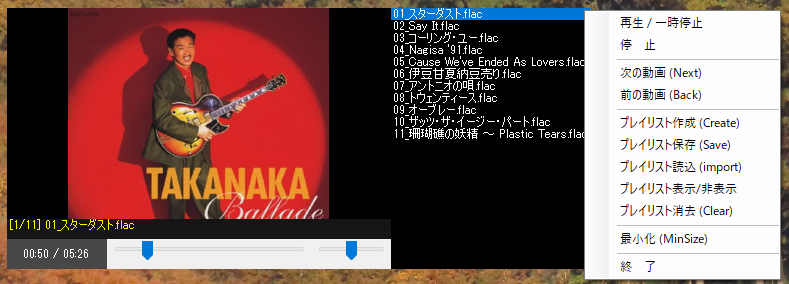
満足できるレベルのMediaPlayerになりました。
右クリックメニューで作成しました。
Form1
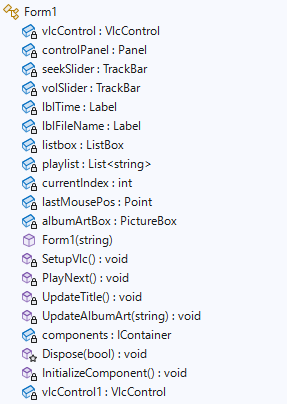
Form1.cs
using System;
using System.Collections.Generic;
using System.ComponentModel;
using System.Data;
using System.Drawing;
using System.IO;
using System.Linq;
using System.Security.Cryptography;
using System.Text;
using System.Threading.Tasks;
using System.Windows.Forms;
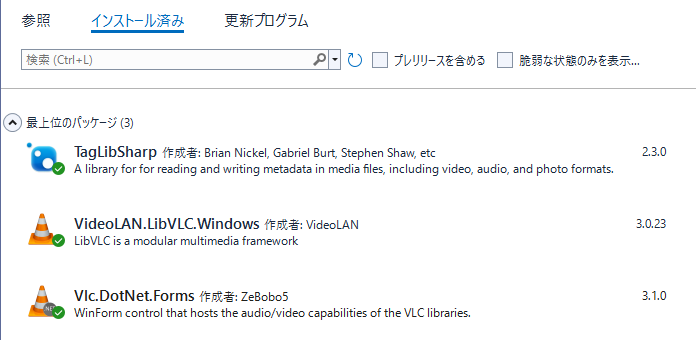
using Vlc.DotNet.Forms;
using static System.Net.Mime.MediaTypeNames;
using static System.Windows.Forms.VisualStyles.VisualStyleElement.StartPanel;
namespace FrmPipPlayer
{
public partial class Form1 : Form
{
VlcControl vlcControl;
Panel controlPanel;
TrackBar seekSlider;
TrackBar volSlider;
Label lblTime;
Label lblFileName;
ListBox listbox;
List<string> playlist = new List<string>();
int currentIndex = 0;
Point lastMousePos;
PictureBox albumArtBox;
public Form1(string startupFilePath)
{
InitializeComponent();
// 1. フォームの基本設定
this.Text = "PiP Player";
this.Size = new System.Drawing.Size(400, 300); // 16:12 (16:9 400x225)
this.TopMost = true; // 常に最前面
this.FormBorderStyle = FormBorderStyle.None; // 枠なし
this.AllowDrop = true; // ドラッグ&ドロップ許可
SetupVlc();
if (!string.IsNullOrEmpty(startupFilePath) && File.Exists(startupFilePath))
{
if (Path.GetExtension(startupFilePath)==".plt")
{
// 全行を読み込んで配列にする(文字コードがUTF-8の場合)
string[] lines = File.ReadAllLines(startupFilePath);
// ListBoxをクリア
listbox.Items.Clear();
playlist.Clear();
// ListBoxに配列を一括追加
foreach (string item in lines)
{
string[] parts = item.Split('\\');
string result = parts[parts.Length - 1];
listbox.Items.Add(result);
}
playlist.AddRange(lines);
currentIndex = 0;
vlcControl.Play(new FileInfo(playlist[currentIndex]));
UpdateTitle(); // タイトル更新
}
else
{
// プレイリストに追加して再生
playlist.Add(startupFilePath);
listbox.Items.Add(Path.GetFileName(startupFilePath));
currentIndex = 0;
// VLCが初期化完了するまで少し待つ必要がある場合があるため
// HandleCreated などの後に呼ぶか、直接 Play する
vlcControl.Play(new FileInfo(startupFilePath));
UpdateTitle();
}
}
}
private void SetupVlc()
{
vlcControl = new VlcControl { Dock = DockStyle.Fill };
// --- VLC初期化 (パスはご自身の環境に合わせてください) ---
var vlcLibPath = new DirectoryInfo(Path.Combine(@"E:\vs2022\source\repos\FrmPipPlayer\FrmPipPlayer\bin\Debug\", "libvlc", IntPtr.Size == 4 ? "win-x86" : "win-x64"));
vlcControl.BeginInit();
vlcControl.VlcLibDirectory = vlcLibPath;
vlcControl.EndInit();
vlcControl.Video.IsMouseInputEnabled = false;
vlcControl.Video.IsKeyInputEnabled = false;
this.Controls.Add(vlcControl);
// --- プレイリスト ---
listbox = new ListBox { Dock = DockStyle.Right, Width = 200, Visible = false, BackColor = Color.Black, ForeColor = Color.White, BorderStyle = BorderStyle.None };
this.Controls.Add(listbox);
listbox.BringToFront();
// アルバムアート用の箱を作る
albumArtBox = new PictureBox
{
Dock = DockStyle.Fill,
SizeMode = PictureBoxSizeMode.Zoom,
BackColor = Color.Black,
Visible = false,
Enabled = false // ★重要:これ自体はマウスに反応させず、背後にスルーさせる
};
this.Controls.Add(albumArtBox);
// --- 操作パネルの作成 ---
controlPanel = new Panel { Dock = DockStyle.Bottom, Height = 50, BackColor = Color.FromArgb(180, 0, 0, 0) };
seekSlider = new TrackBar { Dock = DockStyle.Fill, Maximum = 1000, TickStyle = TickStyle.None };
volSlider = new TrackBar { Dock = DockStyle.Right, Width = 80, Maximum = 100, Value = 50, TickStyle = TickStyle.None };
Label lblTime = new Label();
lblTime.ForeColor = Color.White;
lblTime.BackColor = Color.Transparent;
lblTime.TextAlign = ContentAlignment.MiddleCenter;
lblTime.AutoSize = false;
lblTime.Width = 100;
lblTime.Dock = DockStyle.Left; // 左側に配置
lblTime.Text = "00:00 / 00:00";
lblFileName = new Label { Dock = DockStyle.Top, ForeColor = Color.Yellow, Height = 20, AutoEllipsis = true };
controlPanel.Controls.Add(seekSlider);
controlPanel.Controls.Add(volSlider);
controlPanel.Controls.Add(lblTime);
controlPanel.Controls.Add(lblFileName);
this.Controls.Add(controlPanel);
// 重なり順: [奥] VLC -> albumArtBox -> controlPanel [手前]
vlcControl.SendToBack();
albumArtBox.BringToFront();
controlPanel.BringToFront(); // 操作パネルが常に一番手前
// --- 【重要】移動のイベント (MouseDownでパネルの上なら何もしない) ---
vlcControl.MouseDown += (s, e) => {
if (e.Button == MouseButtons.Left)
{
// マウスがパネルより上(映像部分)の時だけ座標を記録
if (e.Y < this.ClientSize.Height - controlPanel.Height)
{
lastMousePos = e.Location;
}
else
{
lastMousePos = Point.Empty; // パネルの上なら移動させない
}
}
};
vlcControl.MouseMove += (s, e) => {
if (e.Button == MouseButtons.Left && lastMousePos != Point.Empty)
{
this.Left += e.X - lastMousePos.X;
this.Top += e.Y - lastMousePos.Y;
}
};
// --- スライダーと音量のイベント ---
seekSlider.Scroll += (s, e) => { vlcControl.Position = (float)seekSlider.Value / seekSlider.Maximum; };
volSlider.Scroll += (s, e) => { vlcControl.Audio.Volume = volSlider.Value; };
// --- ホイールでサイズと音量 ---
vlcControl.MouseWheel += (s, e) => {
if (ModifierKeys == Keys.Shift)
{
int newVol = Math.Max(0, Math.Min(100, vlcControl.Audio.Volume + (e.Delta > 0 ? 5 : -5)));
vlcControl.Audio.Volume = volSlider.Value = newVol;
}
else
{
int ratio = e.Delta > 0 ? 20 : -20;
this.Width = Math.Max(150, this.Width + ratio);
this.Height = (int)(this.Width * 0.5625);
}
};
// --- ダブルクリックで最大化 ---
vlcControl.MouseDoubleClick += (s, e) => {
this.WindowState = (this.WindowState == FormWindowState.Maximized) ? FormWindowState.Normal : FormWindowState.Maximized;
};
// 2. 再生位置が変わるたびに時間を更新
vlcControl.PositionChanged += (s, e) => {
this.BeginInvoke(new Action(() => {
// ミリ秒を TimeSpans に変換してフォーマット
var current = TimeSpan.FromMilliseconds(vlcControl.Time);
var total = TimeSpan.FromMilliseconds(vlcControl.Length);
// ラベルを更新 (例: 01:23 / 05:00)
lblTime.Text = string.Format("{0:mm\\:ss} / {1:mm\\:ss}", current, total);
// スライダーも同期
if (!seekSlider.Capture && vlcControl.Length > 0)
{
seekSlider.Value = (int)(vlcControl.Position * seekSlider.Maximum);
}
}));
};
// 再生終了イベントの登録
vlcControl.EndReached += (s, e) => {
this.BeginInvoke(new Action(() => {
PlayNext();
}));
};
// リスト内の項目がダブルクリックされたら再生
listbox.DoubleClick += (s, e) => {
if (listbox.SelectedIndex != -1)
{
currentIndex = listbox.SelectedIndex;
vlcControl.Play(new FileInfo(playlist[currentIndex]));
UpdateTitle();
}
};
// イベント登録
this.DragEnter += (s, e) => { if (e.Data.GetDataPresent(DataFormats.FileDrop)) e.Effect = DragDropEffects.Copy; };
this.DragDrop += (s, e) => {
string[] files = (string[])e.Data.GetData(DataFormats.FileDrop);
if (files.Length > 0)
{
//playlist.Clear();
//listbox.Items.Clear(); // リストボックスも清掃
foreach (var f in files)
{
playlist.Add(f);
listbox.Items.Add(Path.GetFileName(f)); // ファイル名だけ表示
}
currentIndex = 0;
vlcControl.Play(new FileInfo(playlist[currentIndex]));
UpdateTitle();
}
};
// --- 右クリックメニューの拡張 ---
var contextMenu = new ContextMenuStrip();
contextMenu.Items.Add("再生 / 一時停止", null, (s, e) => {
if (vlcControl.IsPlaying) vlcControl.Pause(); else vlcControl.Play();
});
contextMenu.Items.Add("停 止", null, (s, e) => {
if (vlcControl.IsPlaying) vlcControl.Stop();
});
contextMenu.Items.Add(new ToolStripSeparator());
// 「次へ」ボタン
contextMenu.Items.Add("次の動画 (Next)", null, (s, e) => {
if (playlist.Count > 0) PlayNext();
UpdateTitle(); // タイトル更新
});
// 「前へ」ボタン
contextMenu.Items.Add("前の動画 (Back)", null, (s, e) => {
if (playlist.Count > 0)
{
currentIndex--;
if (currentIndex < 0) currentIndex = playlist.Count - 1; // 最初なら最後へ戻る
vlcControl.Play(new FileInfo(playlist[currentIndex]));
}
});
contextMenu.Items.Add(new ToolStripSeparator());
// 「追加」ボタン
contextMenu.Items.Add("プレイリスト作成 (Create)", null, (s, e) => {
using (var ofd = new OpenFileDialog { Multiselect = true, Filter = "Video Files|*.265;*.mp4;*.mkv;*.avi;*.mov;*.hevc;*.flac;*.mp3|All Files|*.*" })
{
if (ofd.ShowDialog() == DialogResult.OK)
{
// 選択されたファイルパスをすべて追加
foreach (var f in ofd.FileNames)
{
playlist.Add(f);
listbox.Items.Add(Path.GetFileName(f)); // ファイル名だけ表示
}
currentIndex = 0;
vlcControl.Play(new FileInfo(playlist[currentIndex]));
UpdateTitle(); // タイトル更新
}
}
});
// 「保存」ボタン
contextMenu.Items.Add("プレイリスト保存 (Save)", null, (s, e) => {
using (var sfd = new SaveFileDialog { Filter = "PlayList Files(*.plt)|*.plt;" })
{
if (sfd.ShowDialog() == DialogResult.OK)
{
string[] lines = playlist.Cast<object>().Select(x => x.ToString()).ToArray();
System.IO.File.WriteAllLines(sfd.FileName, lines);
}
}
});
// 「読込」ボタン
contextMenu.Items.Add("プレイリスト読込 (import)", null, (s, e) => {
using (var ofd = new OpenFileDialog { Filter = "PlayList Files(*.plt)|*.plt;" })
{
if (ofd.ShowDialog() == DialogResult.OK)
{
// 全行を読み込んで配列にする(文字コードがUTF-8の場合)
string[] lines = File.ReadAllLines(ofd.FileName);
// ListBoxをクリア
listbox.Items.Clear();
playlist.Clear();
// ListBoxに配列を一括追加
foreach (string item in lines)
{
string[] parts = item.Split('\\');
string result = parts[parts.Length - 1];
listbox.Items.Add(result);
}
playlist.AddRange(lines);
currentIndex = 0;
vlcControl.Play(new FileInfo(playlist[currentIndex]));
UpdateTitle(); // タイトル更新
}
}
});
contextMenu.Items.Add("プレイリスト表示/非表示", null, (s, e) => {
listbox.Visible = !listbox.Visible;
// リスト分だけウィンドウ幅を広げる(PiPっぽさを維持)
if (listbox.Visible) this.Width += listbox.Width;
else this.Width -= listbox.Width;
});
// 「消去」ボタン
contextMenu.Items.Add("プレイリスト消去 (Clear)", null, (s, e) => {
if (vlcControl.IsPlaying) vlcControl.Stop();
playlist.Clear();
listbox.Items.Clear();
vlcControl.Play("");
});
contextMenu.Items.Add(new ToolStripSeparator());
// 「最小化」ボタン
contextMenu.Items.Add("最小化 (MinSize)", null, (s, e) => {
this.WindowState = FormWindowState.Minimized;
});
contextMenu.Items.Add(new ToolStripSeparator());
contextMenu.Items.Add("終 了", null, (s, e) => System.Windows.Forms.Application.Exit());
this.ContextMenuStrip = contextMenu;
}
// 次のファイルを再生するメソッド
void PlayNext()
{
if (playlist.Count == 0) return;
currentIndex++;
// 最後まで行ったら最初に戻る(ループ)
if (currentIndex >= playlist.Count) currentIndex = 0;
vlcControl.Play(new FileInfo(playlist[currentIndex]));
UpdateTitle();
}
private void UpdateTitle()
{
if (playlist.Count > 0)
{
string name = Path.GetFileName(playlist[currentIndex]);
lblFileName.Text = $"[{currentIndex + 1}/{playlist.Count}] {name}";
Console.WriteLine(playlist[currentIndex]);
Console.WriteLine(lblFileName.Text);
UpdateAlbumArt(playlist[currentIndex]);
// リストボックスの選択状態を同期
if (listbox.Items.Count > currentIndex)
{
listbox.SelectedIndex = currentIndex;
}
}
}
private void UpdateAlbumArt(string filePath)
{
// メモリ解放(重要)
if (albumArtBox.Image != null) { albumArtBox.Image.Dispose(); albumArtBox.Image = null; }
try
{
using (var tfile = TagLib.File.Create(filePath))
{
// 画像がある場合のみ表示
if (tfile.Tag.Pictures.Length > 0)
{
var bin = tfile.Tag.Pictures[0].Data.Data;
using (var ms = new MemoryStream(bin))
{
albumArtBox.Image = System.Drawing.Image.FromStream(ms);
albumArtBox.Visible = true;
}
}
else
{
albumArtBox.Visible = false; // 動画や画像なしなら隠す
}
}
}
catch
{
albumArtBox.Visible = false;
}
}
}
}
機能を持つメディアプレーヤーを実装するには、WindowsのネイティブAPIを利用するか、サードパーティ製のライブラリを使用する)