
アイコンの作成
アイコンには、標準的な画像(PNG/JPG)ではなく、専用の.ico形式が必要です。
画像から変換して作成する。
Windowsの仕様により、アイコンを変更してもデスクトップ上の表示が変わらない場合は、エクスプローラーのキャッシュが原因のことがあります。その際は、一度ファイル名を変更するか、PCを再起動して確認してください。
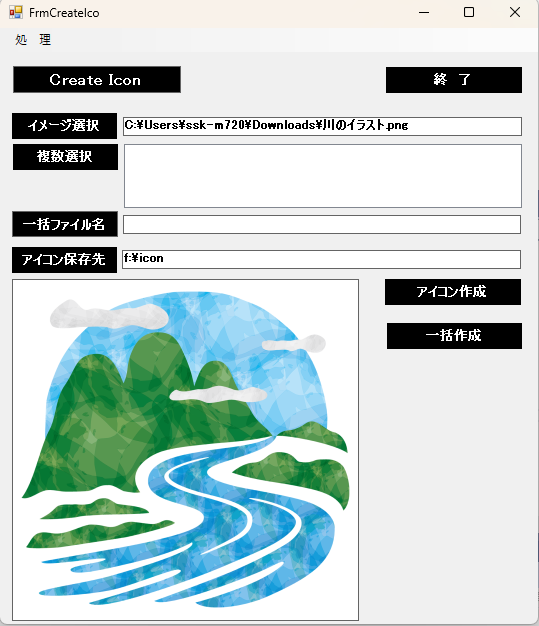
解像度の異なる画像から一つのアイコンを作成できます。
Form1
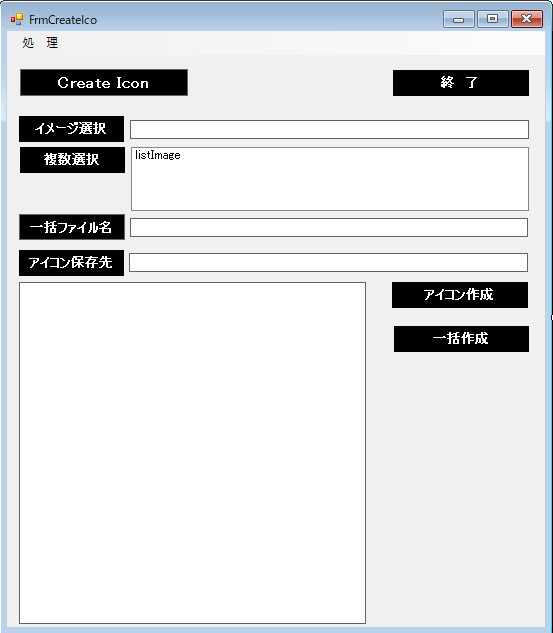
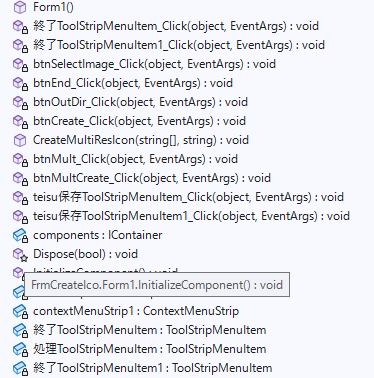
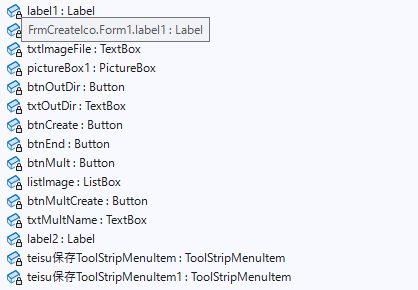
Form1.cs
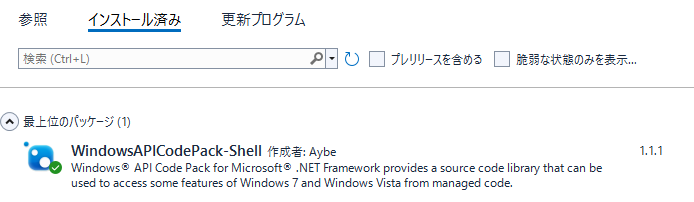
using Microsoft.WindowsAPICodePack.Dialogs;
using System;
using System.Collections.Generic;
using System.ComponentModel;
using System.Data;
using System.Drawing;
using System.Drawing.Imaging;
using System.IO;
using System.Linq;
using System.Text;
using System.Threading.Tasks;
using System.Windows.Forms;

namespace FrmCreateIco
{
    public partial class Form1 : Form
    {
        public Form1()
        {
            InitializeComponent();

            //Limit Count
            string filePath2 = System.Windows.Forms.Application.StartupPath + "\\Teisu.txt";

            try
            {
                // 全ての行を配列に読み込む
                string[] lines = System.IO.File.ReadAllLines(filePath2);

                // 内容を取得
                txtOutDir.Text = lines[0];
            }
            catch (IOException e)
            {
                MessageBox.Show("Teisuファイルが読めませんでした");

                txtOutDir.Text = @"c:\ico";

            }

        }

        private void 終了ToolStripMenuItem_Click(object sender, EventArgs e)
        {
            this.Close();
        }

        private void 終了ToolStripMenuItem1_Click(object sender, EventArgs e)
        {
            this.Close();
        }

        private void btnSelectImage_Click(object sender, EventArgs e)
        {
            using (CommonOpenFileDialog cofd = new CommonOpenFileDialog())
            {
                cofd.Title = "イメージファイルを選択。";
                cofd.InitialDirectory = @"c:\";

                // ファイルを選択できるようにする
                cofd.IsFolderPicker = false;
                if (cofd.ShowDialog() == CommonFileDialogResult.Ok)
                {
                    //選択されたファイルを表示する
                    txtImageFile.Text = cofd.FileName;
                    // 画像を読み込んで表示
                    pictureBox1.Image = Image.FromFile(txtImageFile.Text);
                }
            }
        }

        private void btnEnd_Click(object sender, EventArgs e)
        {
            this.Close();
        }

        private void btnOutDir_Click(object sender, EventArgs e)
        {
            using (CommonOpenFileDialog cofd = new CommonOpenFileDialog())
            {
                cofd.Title = "Icon用フォルダーを選択。";
                cofd.InitialDirectory = @"c:\";

                // フォルダを選択できるようにする
                cofd.IsFolderPicker = true;

                if (cofd.ShowDialog() == CommonFileDialogResult.Ok)
                {
                    //選択されたフォルダを表示する
                    txtOutDir.Text = cofd.FileName;

                }
            }
        }

        private void btnCreate_Click(object sender, EventArgs e)
        {
            using (Bitmap bmp = new Bitmap(txtImageFile.Text))
            {
                // 出力パスの作成
                string outfile;
                if  (txtOutDir.Text.Length > 0)
                {
                    outfile = txtOutDir.Text + @"\" + Path.GetFileNameWithoutExtension(txtImageFile.Text) + ".ico";
                }
                else
                {
                    outfile = Path.ChangeExtension(txtImageFile.Text, ".ico");
                }

                using (Stream s = File.Create(outfile))
                using (BinaryWriter writer = new BinaryWriter(s))
                {
                    try
                    {
                        // 1. 画像を一度PNGとしてメモリに保存(色と透明度を保持するため)
                        byte[] pngData;
                        using (MemoryStream ms = new MemoryStream())
                        {
                            bmp.Save(ms, System.Drawing.Imaging.ImageFormat.Png);
                            pngData = ms.ToArray();
                        }

                        // 2. ICONヘッダー (6バイト)
                        writer.Write((short)0);      // 予約済み
                        writer.Write((short)1);      // 1 = アイコン
                        writer.Write((short)1);      // 画像の数(今回は1枚)

                        // 3. アイコンディレクトリ (16バイト)
                        writer.Write((byte)(bmp.Width >= 256 ? 0 : bmp.Width));   // 幅
                        writer.Write((byte)(bmp.Height >= 256 ? 0 : bmp.Height)); // 高さ
                        writer.Write((byte)0);       // カラーパレット
                        writer.Write((byte)0);       // 予約
                        writer.Write((short)1);      // カラープレーン
                        writer.Write((short)32);     // ★ここが重要:32bit(フルカラー)を指定
                        writer.Write(pngData.Length); // データサイズ
                        writer.Write(6 + 16);        // データ開始位置(ヘッダー6 + ディレクトリ16)

                        // 4. PNGデータ本体
                        writer.Write(pngData);
                        MessageBox.Show("アイコンを保存しました。");
                    }
                    catch (Exception)
                    {
                        MessageBox.Show("アイコン保存を失敗しました。");
                    }

                }
            }
        }

        public void CreateMultiResIcon(string[] pngFiles, string outputPath)
        {
            using (var fs = new FileStream(outputPath, FileMode.Create))
            using (var writer = new BinaryWriter(fs))
            {
                // 1. ヘッダー (6バイト)
                writer.Write((short)0);           // 予約済み
                writer.Write((short)1);           // 1 = アイコン
                writer.Write((short)pngFiles.Length); // 詰め込む数

                int offset = 6 + (pngFiles.Length * 16);

                // 2. ディレクトリエントリ (各16バイト)
                foreach (var file in pngFiles)
                {
                    using (var img = Image.FromFile(file))
                    {
                        writer.Write((byte)(img.Width >= 256 ? 0 : img.Width)); // 256は0と書く決まり
                        writer.Write((byte)(img.Height >= 256 ? 0 : img.Height));
                        writer.Write((byte)0); // パレット
                        writer.Write((byte)0); // 予約
                        writer.Write((short)1); // カラープレーン
                        writer.Write((short)32); // ビット数

                        long len = new FileInfo(file).Length;
                        writer.Write((int)len);    // データサイズ
                        writer.Write(offset);      // オフセット位置
                        offset += (int)len;
                    }
                }

                // 3. PNGバイナリをそのまま書き込む
                foreach (var file in pngFiles)
                {
                    writer.Write(File.ReadAllBytes(file));
                }

                MessageBox.Show("アイコンを保存しました。");
            }
        }

        private void btnMult_Click(object sender, EventArgs e)
        {
            using (CommonOpenFileDialog cofd = new CommonOpenFileDialog())
            {
                cofd.Title = "複数Icon用ファイル選択";
                cofd.InitialDirectory = @"c:\";
                // 複数選択を許可する
                cofd.Multiselect = true;
                // フォルダを選択できるようにする
                cofd.IsFolderPicker = false;

                if (cofd.ShowDialog() == CommonFileDialogResult.Ok)
                {
                    // 選択された全ファイルを取得
                    listImage.Items.Clear();
                    foreach (string file in cofd.FileNames)
                    {
                        listImage.Items.Add(file);
                    }
                    // 画像を読み込んで表示
                    pictureBox1.Image = Image.FromFile(listImage.Items[0].ToString());
                    txtMultName.Text = Path.GetFileNameWithoutExtension(listImage.Items[0].ToString()) + @".ico";
                }

            }
        }

        private void btnMultCreate_Click(object sender, EventArgs e)
        {
            // string型の配列に変換する場合
            string[] pngFiles = listImage.Items
                                          .Cast<object>()
                                          .Select(item => item.ToString())
                                          .ToArray();

            string outputPath;
            if (txtMultName.Text.Length > 0)
            { outputPath = txtOutDir.Text + @"\" + txtMultName.Text; }
            else
            { outputPath = txtOutDir.Text + @"\multi.ico"; }

            CreateMultiResIcon(pngFiles, outputPath);


        }

        private void teisu保存ToolStripMenuItem_Click(object sender, EventArgs e)
        {
            //Teisu.txtの保存

            try
            {
                // ファイル書き出し
                System.IO.File.WriteAllText("Teisu.txt",txtOutDir.Text, Encoding.UTF8);

                MessageBox.Show("Teisu.txtを保存しました。");

            }
            catch (Exception ex)
            {
                // 保存失敗でメイン処理を止めないよう、エラーはログに留める
                Console.WriteLine("Tesisu.txtの保存エラー: " + ex.Message);
            }

        }

        private void teisu保存ToolStripMenuItem1_Click(object sender, EventArgs e)
        {
            //Teisu.txtの保存

            try
            {
                // ファイル書き出し
                System.IO.File.WriteAllText("Teisu.txt", txtOutDir.Text, Encoding.UTF8);

                MessageBox.Show("Teisu.txtを保存しました。");

            }
            catch (Exception ex)
            {
                // 保存失敗でメイン処理を止めないよう、エラーはログに留める
                Console.WriteLine("Tesisu.txtの保存エラー: " + ex.Message);
            }
        }
    }
}
ではなく、専用の.ico形式が必要です。 画像から変換して作成する。 Windowsの仕様により、アイコンを変更してもデスクトップ上の表示が)