
音声でアプリ起動・終了
実行画面
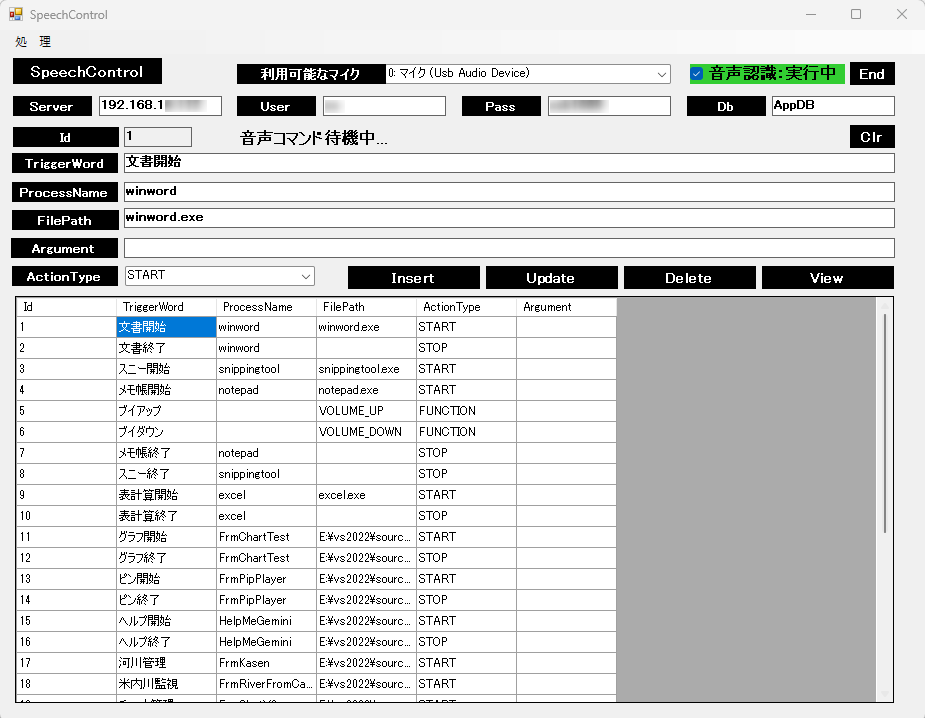
TriggerWord でアプリ起動・終了します。
Argument 引数を登録することで例えばプレイリストで音楽再生できます。
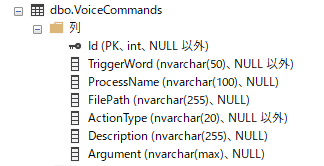
データベースAppDBへ登録することでアプリを変更することなく音声認識を追加更新できます。
音声認識をOFFでも、セルダブルクリックでアプリを起動・終了できます。
ActionType FUNCTIONでボリュームの上げ下げ等ができます。
FrmSpeechControl
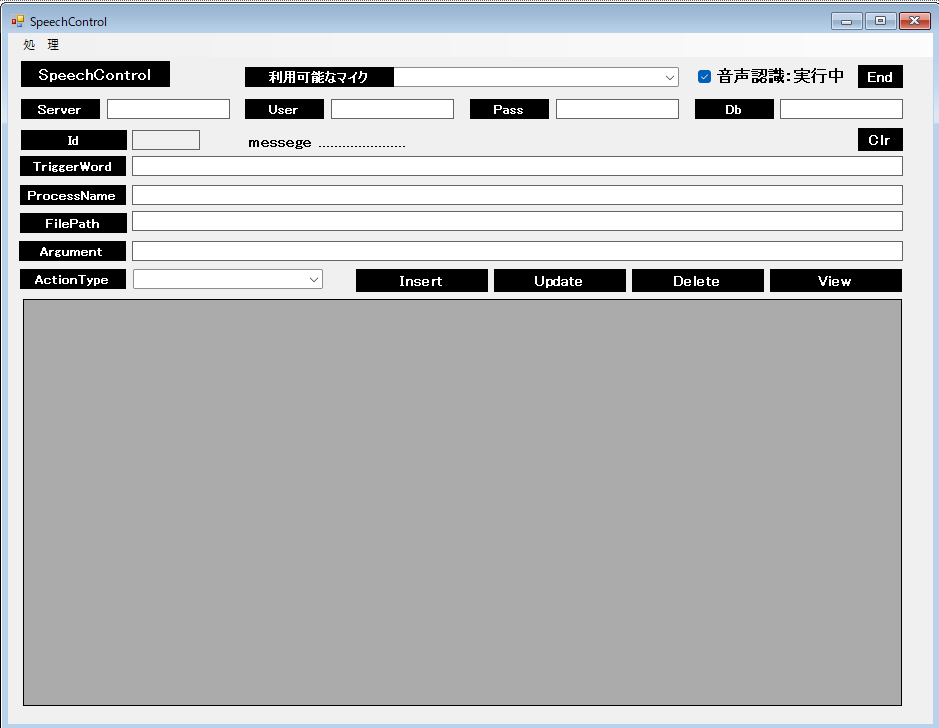
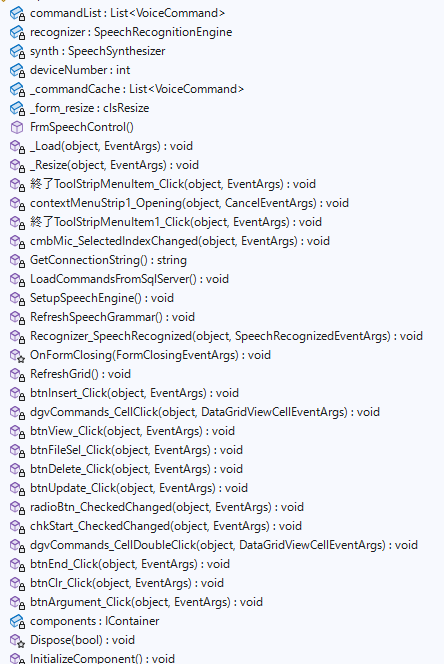
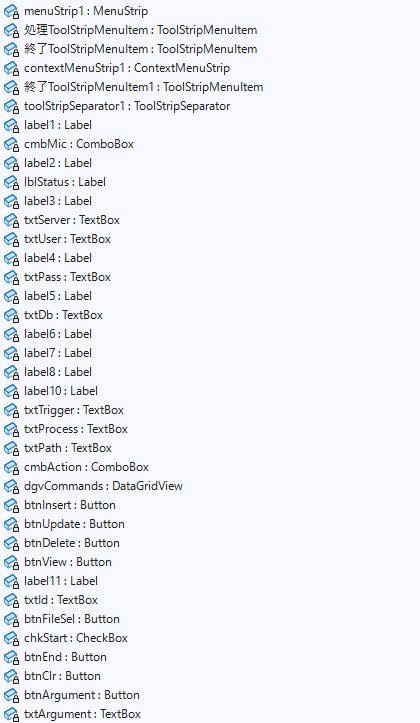
AppDB テーブル VoiceCommands
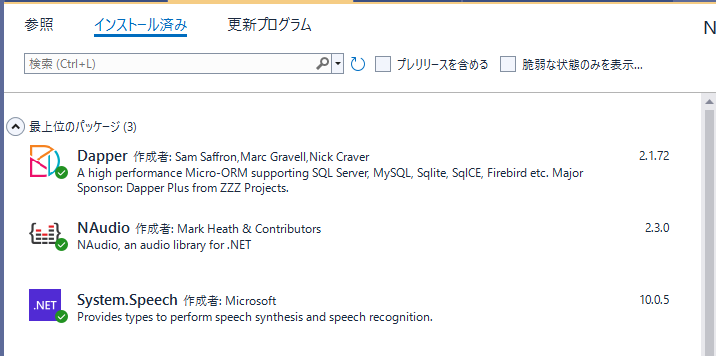
FrmSpeechControl.cs
using Dapper;
using NAudio.Wave; // デバイス探索用
using System;
using System.Collections.Generic;
using System.ComponentModel;
using System.Data;
using System.Data.SqlClient;
using System.Diagnostics;
using System.Drawing;
using System.Drawing.Imaging;
using System.IO;
using System.Linq;
using System.Runtime.InteropServices; // これが必要
using System.Speech.Recognition;
using System.Speech.Synthesis;
using System.Text;
using System.Threading.Tasks;
using System.Windows.Forms;
using System.Xml.Linq;
namespace FrmSpeechControl
{
public partial class FrmSpeechControl : Form
{
// ★ ここで定義する(クラス内のどこからでも見えるようにする)
List<VoiceCommand> commandList = new List<VoiceCommand>();
// 音声認識エンジンの定義
SpeechRecognitionEngine recognizer = new SpeechRecognitionEngine(new System.Globalization.CultureInfo("ja-JP"));
// 音声読み上げ
SpeechSynthesizer synth = new SpeechSynthesizer();
// マイクNO
private int deviceNumber;
// クラスレベルでリストを保持(キャッシュ用)
List<VoiceCommand> _commandCache = new List<VoiceCommand>();
//control clsResize
clsResize _form_resize;
public FrmSpeechControl()
{
InitializeComponent();
_form_resize = new clsResize(this); //I put this after the initialize event to be sure that all controls are initialized properly
this.Load += new EventHandler(_Load); //This will be called after the initialization // form_load
this.Resize += new EventHandler(_Resize); //form_resize
// 1. 利用可能な入力デバイスをリストアップ
//Console.WriteLine("--- 利用可能なマイク一覧 ---");
for (int i = 0; i < WaveIn.DeviceCount; i++)
{
var capabilities = WaveIn.GetCapabilities(i);
cmbMic.Items.Add($"{i}: {capabilities.ProductName}");
//Console.WriteLine($"{i}: {capabilities.ProductName}");
}
cmbMic.SelectedIndex = 0;
// 2. 使用したいマイクの番号を指定 (例: 0番)
deviceNumber = 0;// cmbMic.SelectedIndex;
//SpeechCtl();
//SqlServer Connection
string filePath = System.Windows.Forms.Application.StartupPath + "\\Server.txt";
try
{
// 全ての行を配列に読み込む
string[] lines = System.IO.File.ReadAllLines(filePath);
// 内容を取得
txtServer.Text = lines[0];
txtUser.Text = lines[1];
txtPass.Text = lines[2];
txtDb.Text = lines[3];
}
catch (IOException e)
{
MessageBox.Show("Serverファイルが読めませんでした");
txtServer.Text = "192.168.1x.xxx";
txtUser.Text = "xxxxxxxxxxxx";
txtPass.Text = "xxxxxxxxxxxx";
txtDb.Text = "AppDb";
}
cmbAction.Items.Add("START");
cmbAction.Items.Add("STOP");
cmbAction.Items.Add("FUNCTIO");
lblStatus.Text = "音声コマンド待機中...";
chkStart.BackColor = Color.LimeGreen;
chkStart.Checked = true;
// 1. DBからデータを読み込む
LoadCommandsFromSqlServer();
// 2. 音声認識の設定
SetupSpeechEngine();
// 音声を出力するデバイスの設定(デフォルト)
synth.SetOutputToDefaultAudioDevice();
//
RefreshGrid();
//
synth.Speak("こんにちは。スピーチコントロールです。");
}
//clsResize _Load
private void _Load(object sender, EventArgs e)
{
_form_resize._get_initial_size();
}
//clsResize _Resize
private void _Resize(object sender, EventArgs e)
{
_form_resize._resize();
}
private void 終了ToolStripMenuItem_Click(object sender, EventArgs e)
{
this.Close();
}
private void contextMenuStrip1_Opening(object sender, CancelEventArgs e)
{
}
private void 終了ToolStripMenuItem1_Click(object sender, EventArgs e)
{
this.Close();
}
private void cmbMic_SelectedIndexChanged(object sender, EventArgs e)
{
// 使用したいマイクの番号を指定
deviceNumber = 0;// cmbMic.SelectedIndex;
}
//Connection
private string GetConnectionString()
{
SqlConnectionStringBuilder builder = new SqlConnectionStringBuilder();
builder.DataSource = txtServer.Text; //
builder.InitialCatalog = txtDb.Text; //
builder.UserID = txtUser.Text; //
builder.Password = txtPass.Text; //
// タイムアウト設定なども共有できる
builder.ConnectTimeout = 30;
return builder.ConnectionString;
}
// --- DBからデータを読み込むメソッド ---
private void LoadCommandsFromSqlServer()
{
commandList.Clear();
string connStr = GetConnectionString(); // ここを実際の環境に合わせて書き換え
using (SqlConnection conn = new SqlConnection(connStr))
{
conn.Open();
string sql = "SELECT TriggerWord, ProcessName, FilePath, ActionType, Argument FROM VoiceCommands";
using (SqlCommand cmd = new SqlCommand(sql, conn))
using (SqlDataReader reader = cmd.ExecuteReader())
{
while (reader.Read())
{
commandList.Add(new VoiceCommand
{
TriggerWord = reader["TriggerWord"].ToString(),
ProcessName = reader["ProcessName"].ToString(),
FilePath = reader["FilePath"]?.ToString(),
ActionType = reader["ActionType"].ToString(),
Argument = reader["Argument"].ToString()
});
}
}
}
}
// --- 音声認識の初期設定 ---
private void SetupSpeechEngine()
{
Choices choices = new Choices();
// DBから読み込んだ「声のリスト」を登録
choices.Add(commandList.Select(c => c.TriggerWord).ToArray());
GrammarBuilder gb = new GrammarBuilder();
gb.Append(choices);
recognizer.LoadGrammar(new Grammar(gb));
// イベント登録
recognizer.SpeechRecognized += Recognizer_SpeechRecognized;
recognizer.SetInputToDefaultAudioDevice();
recognizer.RecognizeAsync(RecognizeMode.Multiple);
}
private void RefreshSpeechGrammar()
{
// 一旦、今の辞書をすべて捨てる
recognizer.UnloadAllGrammars();
// 最新の commandList から新しい辞書を作成
Choices choices = new Choices();
if (commandList.Count > 0)
{
choices.Add(commandList.Select(c => c.TriggerWord).ToArray());
GrammarBuilder gb = new GrammarBuilder();
gb.Append(choices);
// 新しい辞書をセット
recognizer.LoadGrammar(new Grammar(gb));
}
}
// --- 実際に声を聞き取った時の処理 ---
private void Recognizer_SpeechRecognized(object sender, SpeechRecognizedEventArgs e)
{
if (e.Result.Confidence < 0.7) return; // 判定が甘い時は無視
string recognizedWord = e.Result.Text;
this.Text = "SpeechControl 認識:{ " + recognizedWord + " } ( "+ Convert.ToInt16(e.Result.Confidence*100) + " %)";
// ★ここで「commandList」を使ってDBの指示内容を探す
var cmd = commandList.FirstOrDefault(c => c.TriggerWord == recognizedWord);
if (cmd != null)
{
if (cmd.ActionType == "START")
{
//Process.Start(cmd.FilePath);
ProcessStartInfo startInfo = new ProcessStartInfo
{
FileName = cmd.FilePath,
// Argument が null でなければセットする
Arguments = cmd.Argument ?? "",
UseShellExecute = true // 関連付け実行の場合に必要
};
Process.Start(startInfo);
lblStatus.Text = $"{cmd.TriggerWord} を引数付きで実行しました。";
}
else if (cmd.ActionType == "STOP")
{
foreach (var p in Process.GetProcessesByName(cmd.ProcessName))
{
p.CloseMainWindow();
p.Dispose();
}
}
// ★ ここに追加! 特殊な「機能」を呼び出す判定
else if (cmd.ActionType == "FUNCTION")
{
if (cmd.FilePath == "VOLUME_UP")
{
for (int i = 0; i < 10; i++)
{
VolumeControl.Up();
// ★ ここに少しだけ待ち時間を入れる(20〜50ms程度)
System.Threading.Thread.Sleep(30);
}
lblStatus.Text = "ボリュームを上げました。";
}
else if (cmd.FilePath == "VOLUME_DOWN")
{
for (int i = 0; i < 10; i++)
{
VolumeControl.Down();
// ★ ここに少しだけ待ち時間を入れる(20〜50ms程度)
System.Threading.Thread.Sleep(30);
}
lblStatus.Text = "ボリュームを下げました。";
}
}
}
}
// フォームが閉じるときにエンジンを正しく解放
protected override void OnFormClosing(FormClosingEventArgs e)
{
if (recognizer != null)
{
recognizer.Dispose();
}
base.OnFormClosing(e);
}
// --- 1. 一覧を表示する ---
private void RefreshGrid()
{
using (var conn = new SqlConnection(GetConnectionString()))
{
var list = conn.Query<VoiceCommand>("SELECT * FROM VoiceCommands").ToList();
dgvCommands.DataSource = list;
}
txtId.Text = "";
txtProcess.Text = "";
txtTrigger.Text = "";
txtPath.Text = "";
txtId.Text = "";
cmbAction.Text = "";
txtArgument.Text = "";
}
// --- 2. データを登録・更新する ---
private void btnInsert_Click(object sender, EventArgs e)
{
if (txtId.Text.Length > 0 || txtTrigger.Text.Length==0) return;
using (SqlConnection conn = new SqlConnection(GetConnectionString()))
{
conn.Open();
string sql = " Insert Into VoiceCommands (TriggerWord, ProcessName, FilePath, ActionType, Argument) " +
" VALUES ( '" + txtTrigger.Text +
"','" + txtProcess.Text +
"','" + txtPath.Text +
"','" + cmbAction.Text +
"','" + txtArgument.Text +
"' ) ";
using (SqlCommand cmd = new SqlCommand(sql, conn))
{
//MessageBox.Show(sql);
if (sql.Length > 0)
{
//トランザクションの開始
cmd.Transaction = conn.BeginTransaction();
try
{
//SQLの実行
cmd.ExecuteNonQuery();
}
catch (Exception ex)
{
//変更を取り消しする
cmd.Transaction.Rollback();
MessageBox.Show(sql + " / " + ex + ":更新中エラー", "Transaction");
}
//変更を確定する
cmd.Transaction.Commit();
}
}
}
RefreshGrid();
LoadCommandsFromSqlServer();
RefreshSpeechGrammar();
}
private void dgvCommands_CellClick(object sender, DataGridViewCellEventArgs e)
{
// ヘッダー(列名)をクリックした時は何もしない
if (e.RowIndex < 0) return;
// クリックされた行を取得
DataGridViewRow row = dgvCommands.Rows[e.RowIndex];
// 各テキストボックスに値をセット(DBの列名に合わせて調整してください)
txtTrigger.Text = row.Cells["TriggerWord"].Value?.ToString();
txtProcess.Text = row.Cells["ProcessName"].Value?.ToString();
txtPath.Text = row.Cells["FilePath"].Value?.ToString();
cmbAction.Text = row.Cells["ActionType"].Value?.ToString();
txtArgument.Text = row.Cells["Argument"].Value?.ToString();
// ID(主キー)を保持しておくと、後の「更新」が楽になります
txtId.Text = row.Cells["Id"].Value?.ToString();
}
private void btnView_Click(object sender, EventArgs e)
{
RefreshGrid();
}
private void btnFileSel_Click(object sender, EventArgs e)
{
using (OpenFileDialog ofd = new OpenFileDialog())
{
ofd.Filter = "実行ファイル (*.exe)|*.exe|すべてのファイル (*.*)|*.*";
if (ofd.ShowDialog() == DialogResult.OK)
{
txtPath.Text = ofd.FileName;
// ついでにファイル名からプロセス名を推測して自動入力
txtProcess.Text = System.IO.Path.GetFileNameWithoutExtension(ofd.FileName);
}
}
}
private void btnDelete_Click(object sender, EventArgs e)
{
if (txtId.Text.Length == 0) return;
using (SqlConnection conn = new SqlConnection(GetConnectionString()))
{
conn.Open();
string sql = "Delete From VoiceCommands where Id =" + Convert.ToInt16(txtId.Text) ;
using (SqlCommand cmd = new SqlCommand(sql, conn))
{
//MessageBox.Show(sql);
if (sql.Length > 0)
{
//トランザクションの開始
cmd.Transaction = conn.BeginTransaction();
try
{
//SQLの実行
cmd.ExecuteNonQuery();
}
catch (Exception ex)
{
//変更を取り消しする
cmd.Transaction.Rollback();
MessageBox.Show(sql + " / " + ex + ":更新中エラー", "Transaction");
}
//変更を確定する
cmd.Transaction.Commit();
}
}
}
RefreshGrid();
LoadCommandsFromSqlServer();
RefreshSpeechGrammar();
}
private void btnUpdate_Click(object sender, EventArgs e)
{
if (txtId.Text.Length == 0) return;
using (SqlConnection conn = new SqlConnection(GetConnectionString()))
{
conn.Open();
string sql = " Update VoiceCommands SET " +
" TriggerWord = '" + txtTrigger.Text +
"' , ProcessName = '" + txtProcess.Text +
"' , FilePath = '" + txtPath.Text +
"' , ActionType = '" + cmbAction.Text +
"' , Argument = '" + txtArgument.Text +
"' Where Id =" + Convert.ToInt16(txtId.Text);
using (SqlCommand cmd = new SqlCommand(sql, conn))
{
//MessageBox.Show(sql);
if (sql.Length > 0)
{
//トランザクションの開始
cmd.Transaction = conn.BeginTransaction();
try
{
//SQLの実行
cmd.ExecuteNonQuery();
}
catch (Exception ex)
{
//変更を取り消しする
cmd.Transaction.Rollback();
MessageBox.Show(sql + " / " + ex + ":更新中エラー", "Transaction");
}
//変更を確定する
cmd.Transaction.Commit();
}
}
}
RefreshGrid();
LoadCommandsFromSqlServer();
RefreshSpeechGrammar();
}
private void radioBtn_CheckedChanged(object sender, EventArgs e)
{
}
private void chkStart_CheckedChanged(object sender, EventArgs e)
{
if (chkStart.Checked == false)
{
// 一時停止する
recognizer.RecognizeAsyncStop();
chkStart.Text = "音声認識:停止中";
chkStart.BackColor = Color.Gray;
lblStatus.Text = "テレビ対策のため、聞き取りを停止しました。";
lblStatus.BackColor = Color.Red;
lblStatus.ForeColor = Color.White;
}
else
{
// 再開する(非同期・継続モード)
recognizer.RecognizeAsync(RecognizeMode.Multiple);
chkStart.Text = "音声認識:実行中";
chkStart.BackColor = Color.LimeGreen;
lblStatus.Text = "音声コマンド待機中...";
lblStatus.BackColor = Control.DefaultBackColor;
lblStatus.ForeColor = Color.Black;
}
}
private void dgvCommands_CellDoubleClick(object sender, DataGridViewCellEventArgs e)
{
// ヘッダー(列名)をクリックした時は何もしない
if (e.RowIndex < 0) return;
// クリックされた行を取得
DataGridViewRow row = dgvCommands.Rows[e.RowIndex];
// 各テキストボックスに値をセット(DBの列名に合わせて調整してください)
//txtTrigger.Text = row.Cells["TriggerWord"].Value?.ToString();
//txtProcess.Text = row.Cells["ProcessName"].Value?.ToString();
//txtPath.Text = row.Cells["FilePath"].Value?.ToString();
//cmbAction.Text = row.Cells["ActionType"].Value?.ToString();
// ID(主キー)を保持しておくと、後の「更新」が楽になります
//txtId.Text = row.Cells["Id"].Value?.ToString();
txtTrigger.Text = "";
txtProcess.Text = "";
txtPath.Text = "";
cmbAction.Text = "";
txtArgument.Text = "";
// ID(主キー)を保持しておくと、後の「更新」が楽になります
txtId.Text = "";
if (row.Cells["ActionType"].Value?.ToString() == "START")
{
ProcessStartInfo startInfo = new ProcessStartInfo
{
FileName = row.Cells["filePAth"].Value.ToString(), //cmd.FilePath,
// Argument が null でなければセットする
Arguments = row.Cells["Argument"].Value?.ToString() ?? "", //cmd.Argument ?? "",
UseShellExecute = true // 関連付け実行の場合に必要
};
Process.Start(startInfo);
lblStatus.Text = $"{row.Cells["TriggerWord"].Value.ToString()} を引数付きで実行しました。";
}
}
private void btnEnd_Click(object sender, EventArgs e)
{
this.Close();
}
private void btnClr_Click(object sender, EventArgs e)
{
txtId.Text = "";
txtProcess.Text = "";
txtTrigger.Text = "";
txtPath.Text = "";
txtId.Text = "";
cmbAction.Text = "";
txtArgument.Text = "";
}
private void btnArgument_Click(object sender, EventArgs e)
{
using (OpenFileDialog ofd = new OpenFileDialog())
{
ofd.Filter = "引数ファイル (*.plt)|*.exe|すべてのファイル (*.*)|*.*";
if (ofd.ShowDialog() == DialogResult.OK)
{
txtArgument.Text = ofd.FileName;
}
}
}
}
class VolumeControl
{
// Windowsの機能を呼び出すための定義
[DllImport("user32.dll")]
public static extern void keybd_event(byte bVk, byte bScan, uint dwFlags, int dwExtraInfo);
// 音量操作用の仮想キーコード
private const byte VK_VOLUME_MUTE = 0xAD; // ミュート
private const byte VK_VOLUME_DOWN = 0xAE; // 音量ダウン
private const byte VK_VOLUME_UP = 0xAF; // 音量アップ
public static void Up() => keybd_event(VK_VOLUME_UP, 0, 0, 0);
public static void Down() => keybd_event(VK_VOLUME_DOWN, 0, 0, 0);
public static void Mute() => keybd_event(VK_VOLUME_MUTE, 0, 0, 0);
}
// DBのレコードを保持するクラス
public class VoiceCommand
{
public string Id { get; set; }
public string TriggerWord { get; set; }
public string ProcessName { get; set; }
public string FilePath { get; set; }
public string ActionType { get; set; }
public string Argument { get; set; }
}
}
