
監視カメラの265映像をエンコード ffmpeg
実行画面
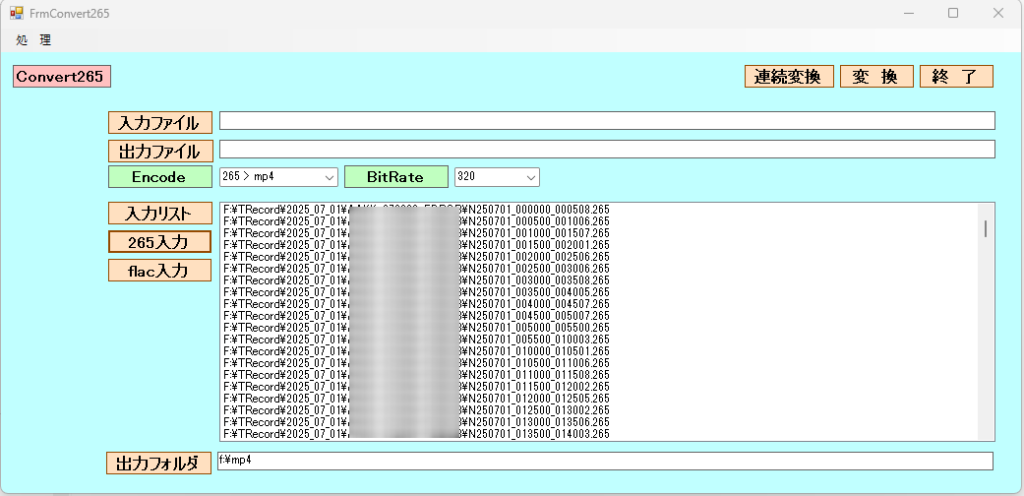
ffmpegを使用して、265ファイル(取り扱いが面倒)をmp4へエンコード。FLACをmp3へエンコード。
FFmpegは強力な動画変換ツールであり、C#の System.Diagnostics.Process クラスを使ってFFmpegコマンドを実行するのが最も簡単です。
FFmpeg公式サイトからFFmpegのバイナリをダウンロードし、パスを通します。
-vcodec libx264: 映像をH.264 (汎用的なMP4) に変換。-crf 23: 画質設定(18-28が推奨、数値が小さいほど高画質)。
FrmConvert
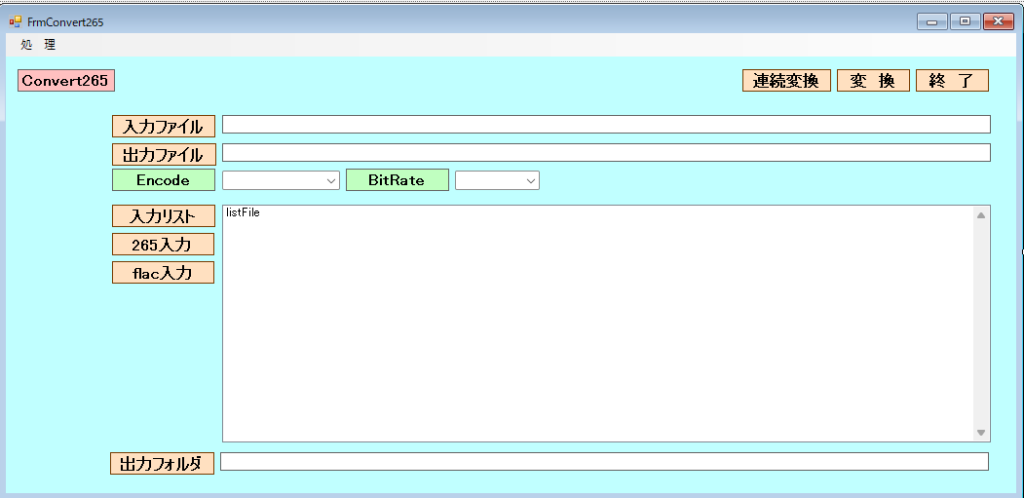
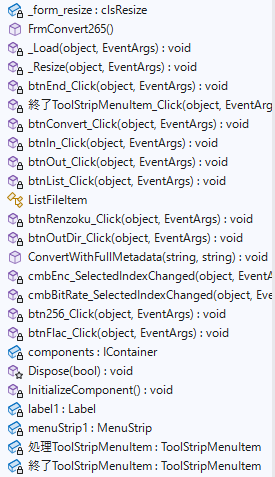
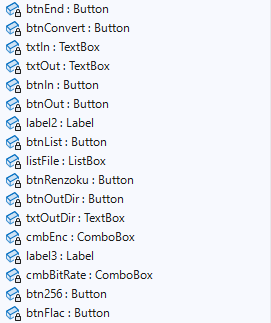
FrmConvert.cs
using System;
using System.Collections.Generic;
using System.ComponentModel;
using System.Data;
using System.Diagnostics;
using System.Diagnostics.Eventing.Reader;
using System.Drawing;
using System.IO;
using System.Linq;
using System.Text;
using System.Threading.Tasks;
using System.Windows.Forms;
using NAudio.Flac;
using NAudio.Lame;
using NAudio.Wave;
using TagLib;
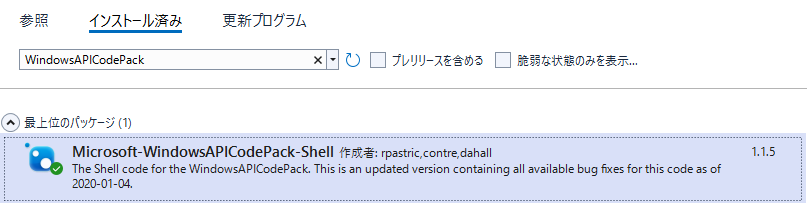
using Microsoft.WindowsAPICodePack.Dialogs;

namespace FrmConvert265
{
    public partial class FrmConvert265 : Form
    {
        //control clsResize
        clsResize _form_resize;

        public FrmConvert265()
        {
            InitializeComponent();

            _form_resize = new clsResize(this); //I put this after the initialize event to be sure that all controls are initialized properly

            this.Load += new EventHandler(_Load); //This will be called after the initialization // form_load
            this.Resize += new EventHandler(_Resize); //form_resize

            cmbEnc.Items.Add("265 > mp4");
            cmbEnc.Items.Add("flac > mp3");
            cmbEnc.Items.Add("wav > wav16");
            cmbEnc.Items.Add("wav > mp3_16");
            cmbEnc.SelectedIndex = 0;
            txtOutDir.Text = @"f:\mp4";

            cmbBitRate.Items.Add("320");
            cmbBitRate.Items.Add("256");
            cmbBitRate.Items.Add("192");
            cmbBitRate.SelectedIndex = 0;

        }

        //clsResize _Load
        private void _Load(object sender, EventArgs e)
        {
            _form_resize._get_initial_size();

        }

        //clsResize _Resize
        private void _Resize(object sender, EventArgs e)
        {
            _form_resize._resize();

        }

        private void btnEnd_Click(object sender, EventArgs e)
        {
            this.Close();
        }

        private void 終了ToolStripMenuItem_Click(object sender, EventArgs e)
        {
            this.Close();
        }

        private void btnConvert_Click(object sender, EventArgs e)
        {
            if (cmbEnc.Text != "flac > mp3")
            {

                string ffmpegPath = @"ffmpeg.exe"; // ffmpeg.exeのパス
                string inputFilePath = txtIn.Text;
                string outputFilePath = txtOut.Text;
                string arguments="";
                // -c:v libx264で映像をH.264に変換、-c:a aacで音声をAACに変換
                //string arguments = $"-i \"{inputFilePath}\" -c:v libx264 -c:a aac \"{outputFilePath}\"";
                // libx264をh264_qsvに変えるだけで、IntelのGPU加速が効きます
                if (cmbEnc.Text == "265 > mp4")
                {
                    arguments = $"-i \"{inputFilePath}\" -c:v h264_qsv -c:a aac -y \"{outputFilePath}\"";

                }
                else if (cmbEnc.Text == "wav > wav16")
                {
                    arguments = $"-i \"{inputFilePath}\" -ar 16000 -ac 1 -c:a pcm_s16le -y \"{outputFilePath}\"";

                }
                else if (cmbEnc.Text == "wav > mp3_16")
                {
                    // Gemini用に最適化した引数
                    // -vn: 映像なし / -ar 44100: 標準サンプリング / -ac 2: ステレオ / -b:a 128k: 十分な圧縮率
                    arguments = $"-i \"{inputFilePath}\" -vn -ar 44100 -ac 2 -b:a 128k -y \"{outputFilePath}\""; ;

                }

                Console.WriteLine(arguments);

                ProcessStartInfo startInfo = new ProcessStartInfo
                {
                    FileName = ffmpegPath,
                    Arguments = arguments,
                    RedirectStandardOutput = true,
                    RedirectStandardError = true,
                    UseShellExecute = false,
                    CreateNoWindow = true
                };

                using (Process process = Process.Start(startInfo))
                {
                    // 必要に応じてエラー出力を取得
                    string error = process.StandardError.ReadToEnd();
                    process.WaitForExit();
                    Console.WriteLine("変換が完了しました。");
                }
            }
            else if (cmbEnc.Text == "flac > mp3")
            {
                string inputFilePath = txtIn.Text;
                string outputFilePath = txtOut.Text;

                ConvertWithFullMetadata(inputFilePath, outputFilePath);

            }
            MessageBox.Show("処理が終了しました。");

        }


        private void btnIn_Click(object sender, EventArgs e)
        {
            // Create an instance of OpenFileDialog
            OpenFileDialog ofd = new OpenFileDialog();

            // Set properties
            ofd.InitialDirectory = "c:\\"; // Optional: set initial directory
            ofd.Filter = "txt files (*.txt)|*.txt|All files (*.*)|*.*";
            ofd.FilterIndex = 2; // Optional: default filter to "All files"
            ofd.RestoreDirectory = true;

            // Show the dialog and check if the user clicked OK
            if (ofd.ShowDialog() == DialogResult.OK)
            {
                txtIn.Text = ofd.FileName;
                txtOut.Text = ofd.FileName;
            }
        }

        private void btnOut_Click(object sender, EventArgs e)
        {
            // Create an instance of OpenFileDialog
            SaveFileDialog sfd = new SaveFileDialog();

            // Set properties
            sfd.InitialDirectory = "c:\\"; // Optional: set initial directory
            sfd.Filter = "txt files (*.txt)|*.txt|All files (*.*)|*.*";
            sfd.FilterIndex = 2; // Optional: default filter to "All files"
            sfd.RestoreDirectory = true;

            // Show the dialog and check if the user clicked OK
            if (sfd.ShowDialog() == DialogResult.OK)
            {
                txtOut.Text = sfd.FileName;
            }
        }


        private void btnList_Click(object sender, EventArgs e)
        {
            using (var ofd = new OpenFileDialog { Multiselect = true, Filter = "Video Files|*.265;*.mp4;*.mkv;*.avi;*.mov;*.hevc;*.flac;*.mp3|All Files|*.*" })
            {
                if (ofd.ShowDialog() == DialogResult.OK)
                {

                        // 選択されたファイルパスをすべて追加
                        listFile.Items.AddRange(ofd.FileNames);

                        // ファイル名だけを追加したい場合はループを使用
                        // foreach (string file in openFileDialog.SafeFileNames) {
                        //     listBox1.Items.Add(file);
                        // }

                }
            }
        }


        public class ListFileItem
        {
            public string FilePath { get; set; }
            public string FileName { get; set; }
            public override string ToString() => FileName;
        }

        private void btnRenzoku_Click(object sender, EventArgs e)
        {

            string[] files = listFile.Items.Cast<string>().ToArray();

            foreach (var inputFile in files)
            {

                if (cmbEnc.Text == "265 > mp4")
                {

                    string ffmpegPath = @"ffmpeg.exe"; // ffmpeg.exeのパス
                    string inputFilePath = inputFile;

                    string outputFilePath = txtOutDir.Text + @"\" + Path.GetFileName(Path.ChangeExtension(inputFilePath, "mp4"));
                    //MessageBox.Show(inputFilePath + " / " + outputFilePath);

                    // -c:v libx264で映像をH.264に変換、-c:a aacで音声をAACに変換
                    //string arguments = $"-i \"{inputFilePath}\" -c:v libx264 -c:a aac \"{outputFilePath}\"";
                    // libx264をh264_qsvに変えるだけで、IntelのGPU加速が効きます
                    string arguments = $"-i \"{inputFilePath}\" -c:v h264_qsv -c:a aac -y \"{outputFilePath}\"";
                    Console.WriteLine(inputFile);

                    ProcessStartInfo startInfo = new ProcessStartInfo
                    {
                        FileName = ffmpegPath,
                        Arguments = arguments,
                        RedirectStandardOutput = true,
                        RedirectStandardError = true,
                        UseShellExecute = false,
                        CreateNoWindow = true
                    };

                    using (Process process = Process.Start(startInfo))
                    {
                        // 必要に応じてエラー出力を取得
                        string error = process.StandardError.ReadToEnd();
                        process.WaitForExit();
                        Console.WriteLine("変換が完了しました。");
                    }
                }
                else
                {
                    string inputFilePath = inputFile;
                    string outputFilePath = txtOutDir.Text + @"\" + Path.GetFileName(Path.ChangeExtension(inputFilePath, "mp3"));

                    ConvertWithFullMetadata(inputFilePath, outputFilePath);

                }
            }
            MessageBox.Show("すべての処理が終了しました。");

        }

        private void btnOutDir_Click(object sender, EventArgs e)
        {

            using (CommonOpenFileDialog cofd = new CommonOpenFileDialog())
            {
                cofd.Title = "フォルダを選択してください";
                cofd.InitialDirectory = @"f:\mp4";        // System.IO.Directory.GetCurrentDirectory(); ;
                // 複数の拡張子を一つの項目にまとめる場合(セミコロンで区切る)
                //cofd.Filters.Add(new CommonFileDialogFilter("画像/PDF/TEXTファイル", "*.jpg;*.jpeg;*.png;*.pdf;*.txt"));

                // フォルダを選択できるようにする
                cofd.IsFolderPicker = true;
                if (cofd.ShowDialog() == CommonFileDialogResult.Ok)
                {
                    txtOutDir.Text = cofd.FileName; // 選択されたフォルダパス

                }
            }
        }

        public void ConvertWithFullMetadata(string inputFlac, string outputMp3)
        {
            // --- STEP 1: NAudioで音声データをMP3に変換 ---
            int bitrate = Convert.ToInt32(cmbBitRate.Text);

            using (var reader = new FlacReader(inputFlac))
            {
                Console.WriteLine(inputFlac);
                // 24bit -> 16bit への変換(ここは以前の通り)
                var pcm16 = reader.ToSampleProvider().ToWaveProvider16();

                // 出力先のMP3ライターを作成
                using (var writer = new LameMP3FileWriter(outputMp3, pcm16.WaveFormat, bitrate))
                {
                    // CopyTo の代わりに、バッファを使って手動で転送
                    byte[] buffer = new byte[4096]; // 4KB程度のバッファ
                    int bytesRead;

                    while ((bytesRead = pcm16.Read(buffer, 0, buffer.Length)) > 0)
                    {
                        writer.Write(buffer, 0, bytesRead);
                    }
                }
            }

            // --- STEP 2: TagLib#でメタデータ(アルバムアート含む)をコピー ---
            using (var flacFile = TagLib.File.Create(inputFlac))
            using (var mp3File = TagLib.File.Create(outputMp3))
            {
                // 基本情報のコピー
                mp3File.Tag.Title = flacFile.Tag.Title;
                mp3File.Tag.Album = flacFile.Tag.Album;
                mp3File.Tag.Performers = flacFile.Tag.Performers;
                mp3File.Tag.AlbumArtists = flacFile.Tag.AlbumArtists;
                mp3File.Tag.Genres = flacFile.Tag.Genres;
                mp3File.Tag.Year = flacFile.Tag.Year;
                mp3File.Tag.Track = flacFile.Tag.Track;

                // アルバムアート(画像)のコピー
                if (flacFile.Tag.Pictures.Length > 0)
                {
                    // すべての画像をコピー
                    mp3File.Tag.Pictures = flacFile.Tag.Pictures;
                }

                // 変更を保存
                mp3File.Save();
                Console.WriteLine("変換が完了しました。");
            }
        }

        private void cmbEnc_SelectedIndexChanged(object sender, EventArgs e)
        {

        }

        private void cmbBitRate_SelectedIndexChanged(object sender, EventArgs e)
        {

        }

        private void btn256_Click(object sender, EventArgs e)
        {
            using (CommonOpenFileDialog cofd = new CommonOpenFileDialog())
            {
                cofd.Title = "フォルダを選択してください";
                cofd.InitialDirectory = @"F:\TRecord";        // System.IO.Directory.GetCurrentDirectory(); ;
                // 複数の拡張子を一つの項目にまとめる場合(セミコロンで区切る)
                //cofd.Filters.Add(new CommonFileDialogFilter("画像/PDF/TEXTファイル", "*.jpg;*.jpeg;*.png;*.pdf;*.txt"));

                // フォルダを選択できるようにする
                cofd.IsFolderPicker = true;
                if (cofd.ShowDialog() == CommonFileDialogResult.Ok)
                {
                    listFile.Items.Clear();

                    // 4. 結果取得
                    System.IO.DirectoryInfo di = new System.IO.DirectoryInfo(cofd.FileName);
                    System.IO.FileInfo[] files =
                        di.GetFiles("*.265", System.IO.SearchOption.AllDirectories);

                    //ListBox1に結果を表示する
                    foreach (System.IO.FileInfo f in files)
                    {
                        listFile.Items.Add(f.FullName);
                    }

                }
            }

        }

        private void btnFlac_Click(object sender, EventArgs e)
        {
            using (CommonOpenFileDialog cofd = new CommonOpenFileDialog())
            {
                cofd.Title = "フォルダを選択してください";
                cofd.InitialDirectory = @"F:\amxxxx";        // System.IO.Directory.GetCurrentDirectory(); ;
                // 複数の拡張子を一つの項目にまとめる場合(セミコロンで区切る)
                //cofd.Filters.Add(new CommonFileDialogFilter("画像/PDF/TEXTファイル", "*.jpg;*.jpeg;*.png;*.pdf;*.txt"));

                // フォルダを選択できるようにする
                cofd.IsFolderPicker = true;
                if (cofd.ShowDialog() == CommonFileDialogResult.Ok)
                {
                    listFile.Items.Clear();

                    // 4. 結果取得
                    System.IO.DirectoryInfo di = new System.IO.DirectoryInfo(cofd.FileName);
                    System.IO.FileInfo[] files =
                        di.GetFiles("*.flac", System.IO.SearchOption.AllDirectories);

                    //ListBox1に結果を表示する
                    foreach (System.IO.FileInfo f in files)
                    {
                        listFile.Items.Add(f.FullName);
                    }

                }
            }

        }
    }
}
をmp4へエンコード。FLACをmp3へエンコード。 FFmpegは強力な動画変換ツ)