
Google AI によるマイク音声よりテキスト化と翻訳 C#
AI による概要
GoogleのAI音声認識「Speech-to-Text」は、最新AI技術を活用した高精度な文字起こしサービスです。125以上の言語・方言に対応し、リアルタイムのストリーミングや、録音された音声ファイルのバッチ処理(高精度モデルはAPIで最大100万分まで)が可能です。
主な特徴と機能
- 高精度・高速処理: ノイズの多い環境や多様なアクセントでも高い認識率を誇る。
- 自動句読点補完: 自然な文章に自動で編集する機能を持つ。
- 多言語・方言対応: 日本語を含む125以上の言語に対応。
- 利用シーン: ビデオ会議の字幕、コールセンターの通話ログ解析、自動テキスト入力など。
- 開発者向け: REST APIやgRPCを通じて、既存アプリケーションへ容易に統合可能。
- 料金体系: 標準モデルと拡張モデルがあり、標準モデルは短時間の音声に無料枠がある。
さらに、Google Cloud 上では「Vertex AI」を通して、AIによる文字生成や音声処理機能も利用できる。
GoogleのAI音声認識技術は、日常的なツールから開発者向けの高度なサービスまで幅広く展開されています。用途に合わせて最適なものを選択できます。
1. 主な AI 音声認識サービス
- Speech-to-Text AI(Google Cloud)
- 125 以上の言語に対応した開発者向け API。
- リアルタイムの文字起こしや、録音ファイルのバッチ処理が可能。
- 料金: 毎月 60 分までの無料枠があり、超過分は従量課金(例:標準モデルで 15 秒あたり約 0.009 ドル)。
- Gemini API / Google AI Studio
- 最新の AI モデル「Gemini」を使用して、音声ファイルを直接読み込み、要約や内容把握が可能。
- Google AI Studio では、プログラミングなしで音声の文字起こしを試すことができる。
2. 身近な音声認識ツール
- Google ドキュメント: 「ツール」メニューの「音声入力」から、無料でリアルタイム文字起こしが可能。
- Google アシスタント: 「OK Google」で操作する音声 AI で、スマートフォンやスマートスピーカーで利用可能。
- Google 翻訳: 音声入力を通じて、リアルタイムで他言語への翻訳・発話が可能。
- レコーダー(Pixel 専用): 録音と同時に、非常に精度の高いリアルタイム文字起こしと話者分離を行う。
3. 特徴
- 高精度な多言語対応: 日本語を含む多くの言語で、句読点の自動挿入や話者識別(誰が話しているかの特定)が可能。
- ノイズへの強さ: 周囲の雑音がある環境でも、特定の音声を識別する機械学習モデルが活用されている。
目的に応じて、Google Cloud コンソール で API を導入するか、Google AI Studio で最新の AI を試すことができる。
実行画面
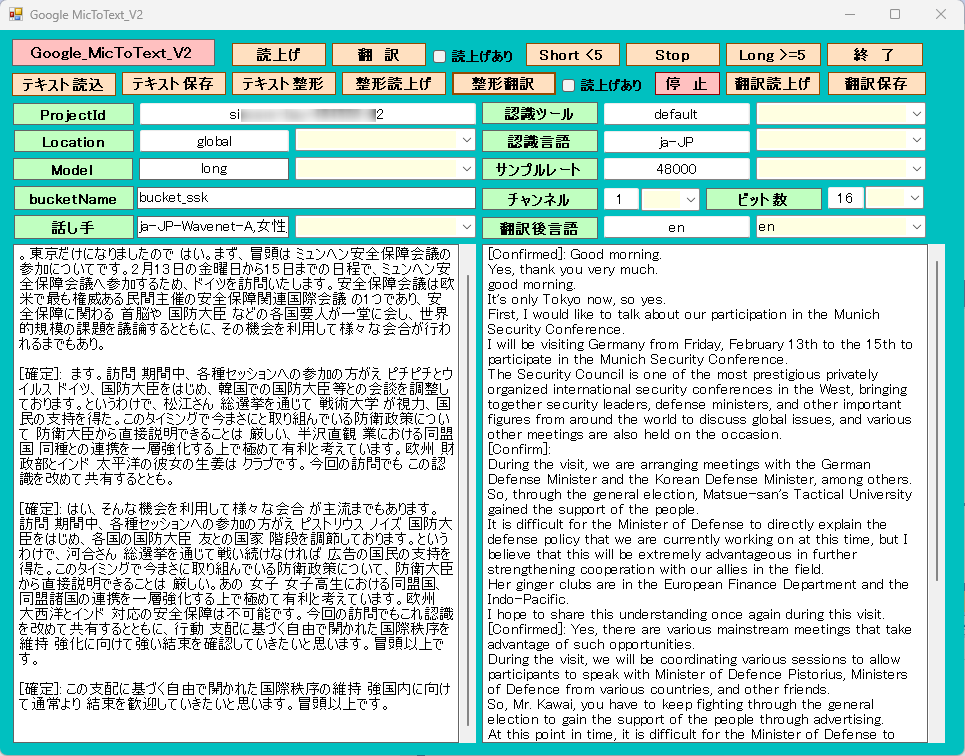
マイク音声入力
通常は、音声入力5分以内と制限があります。それの制限を超えるように処理しました。
マイクのサンプルレート、チャンネル(モノラルが望ましい)とビット数は、正確に指定します。それ以外は、認識が不正確になります。
Modelは、longが妥当と思います。chirp は精度が良いようですがlocationが遠いので反応が鈍く聞き取りミスする可能性があります。
[ Short < 5 ]ボタンは、5分以内の会話で終了。12345で終了します。(日本語の場合は)
[ Long > 5 ]ボタンは、5分以上の会話が可能です。[ stop ]ボタンで終了します。
認識は、かなり正確です。AZUREより良いようです。
[ 整形翻訳 ]ボタンでテキスト化された内容を、指定言語へ翻訳します。
[ テキスト整形 ]ボタンでテキスト化された内容を句読点等を付加します。
[ 読上げ ]ボタン あるいは、[ 整形読上げ ]ボタンで選択された話し手でテキストボックスの内容を読み上げます。
翻 訳
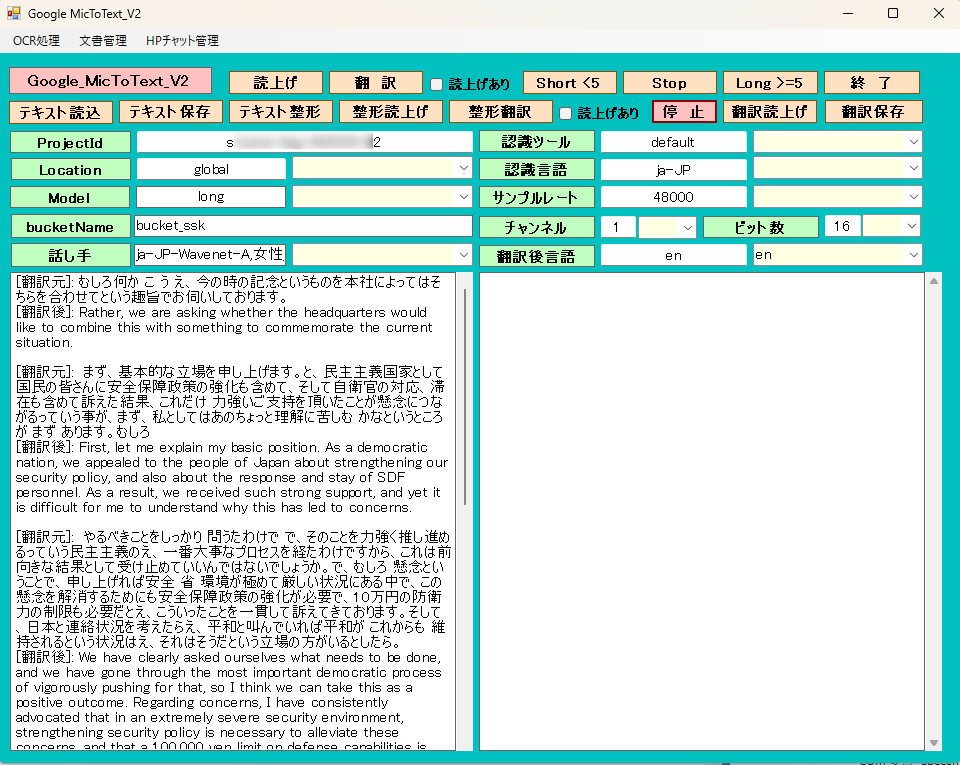
[ 翻 訳 ]ボタンは、選択された認識言語と翻訳後言語に基づいてマイク音声入力よりテキスト化と同時に翻訳します。
[ テキスト読込 ]ボタンは、テキストファイルをテキストボックスへ読込みます。その内容を話し手で読み上げたり、翻訳後言語に翻訳できます。
OCR処理でテキスト化した内容をテキストボックスへ転送できるのでそのまま読上げたり、翻訳できます。
[ 翻訳読上げ ]ボタンは、翻訳された内容を、選択した話し手で読み上げできます。
各機能の費用目安(Google Cloud API)
| 機能 | 項目 | 無料枠(月間) | 超過後の料金(目安) |
| OCR(読み取り) | Cloud Vision API | 最初の1,000ページ | 1,000ページごとに約$1.50(約230円) |
| 翻訳 | Cloud Translation API | 最初の50万文字 | 100万文字ごとに$20(約3,000円) |
| 読み上げ | Text-to-Speech API | 最初の100万〜400万文字 ※ | 100万文字ごとに$4〜$16 |
Form1
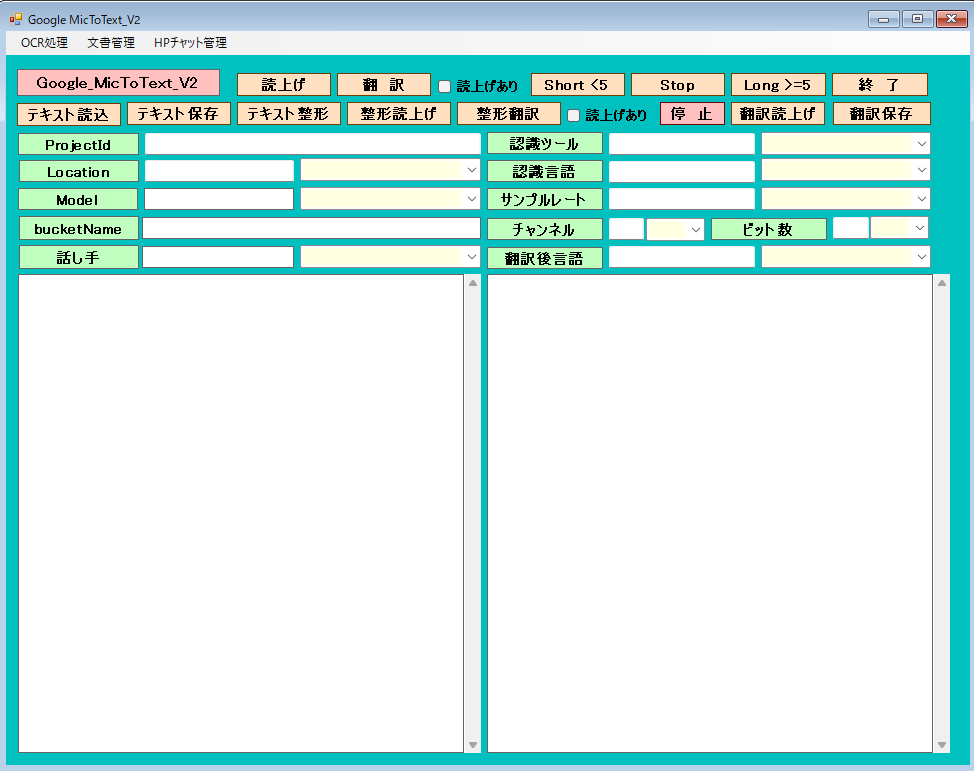
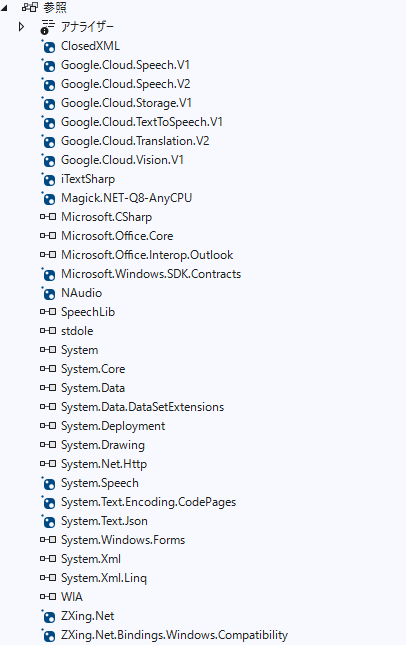
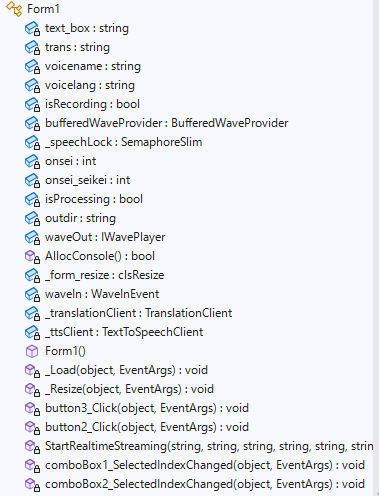
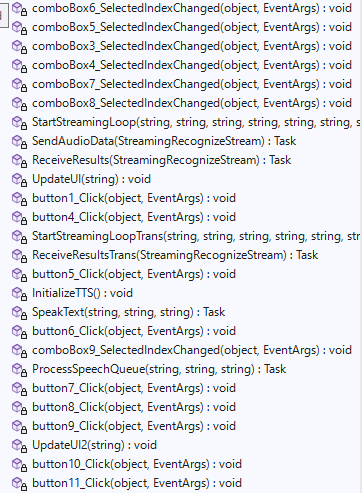
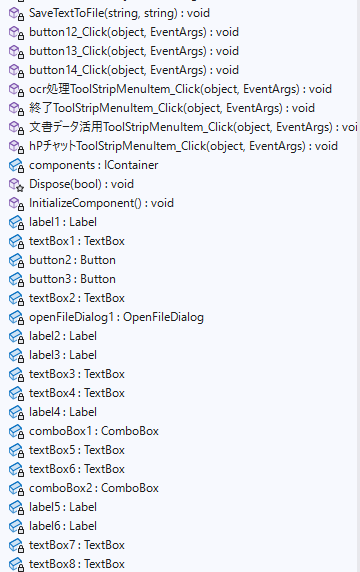
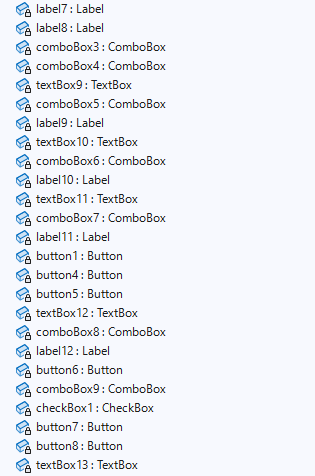
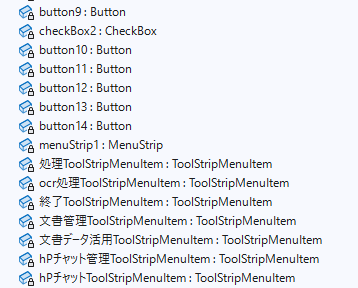
Form1.cs
using Google.Api.Gax.Grpc;
using Google.Cloud.Speech.V2;
using Google.Cloud.Storage.V1;
using Google.Cloud.TextToSpeech.V1;
using Google.Cloud.Translation.V2; // 追加
using Google.LongRunning;
using Google.Protobuf;
using Grpc.Core; // ← これが抜けていると MoveNext 等でエラーになることがあります
// 名前空間のエイリアスを使うと混乱を防げます
//using SpeechV2 = Google.Cloud.Speech.V2;
using NAudio.Wave;
using Newtonsoft.Json;
using Newtonsoft.Json.Linq;
using System;
using System.Collections.Generic;
using System.ComponentModel;
using System.Data;
using System.Drawing;
using System.IO;
using System.Linq;
using System.Net.Http;
using System.Security.AccessControl;
using System.Text;
using System.Threading;
using System.Threading.Tasks;
using System.Windows.Forms;
using System.Xml.Linq;
using static System.Net.Mime.MediaTypeNames;
using static System.Windows.Forms.VisualStyles.VisualStyleElement;
using Application = System.Windows.Forms.Application;
namespace GoogleFileToText
{
public partial class Form1 : Form
{
private static string text_box; //結果用テキスト
private static string trans; //翻訳言語
private static string voicename; //読上げ者名
private static string voicelang; //読上げ言語
private static bool isRecording; //処理停止
private NAudio.Wave.BufferedWaveProvider bufferedWaveProvider;
private static readonly SemaphoreSlim _speechLock = new SemaphoreSlim(1, 1);
private static int onsei; //翻訳時の読上げフラグ 1:読上げ
private static int onsei_seikei; //翻訳時の読上げフラグ 1:読上げ
private static bool isProcessing = false; // 実行中かどうかを管理
private string outdir = ""; //出力フォルダ
private IWavePlayer waveOut; //音声停止用
[System.Runtime.InteropServices.DllImport("kernel32.dll")]
private static extern bool AllocConsole();
//control clsResize
clsResize _form_resize;
private WaveInEvent waveIn;
private TranslationClient _translationClient;
private TextToSpeechClient _ttsClient;
public Form1()
{
InitializeComponent();
// Windows の WinHttpHandler で HTTP/2 を強制的に有効にする
AppContext.SetSwitch("System.Net.Http.SocketsHttpHandler.Http2UnencryptedSupport", true);
// TLS1.2以上を確実に使う設定
System.Net.ServicePointManager.SecurityProtocol = System.Net.SecurityProtocolType.Tls12 | System.Net.SecurityProtocolType.Tls13;
//AllocConsole();
// プロセス環境変数の設定
string secretPath = Application.StartupPath + "\\sxxxxxx-xxx-xxxxxx-xx-xxxxxxxxxxxxx.json";
System.Environment.SetEnvironmentVariable("GOOGLE_APPLICATION_CREDENTIALS", secretPath, EnvironmentVariableTarget.Process);
//認識ツール
comboBox1.Items.Add("default");
comboBox1.Items.Add("recochirp");
textBox5.Text = "default"; //"recochirp";// "default";
//認識言語、翻訳元言語
try
{
StreamReader sr = new StreamReader(Application.StartupPath + "\\lang_src.txt", Encoding.GetEncoding("UTF-8"));
while (sr.Peek() != -1)
{
comboBox2.Items.Add(sr.ReadLine());
}
sr.Close();
}
catch
{
comboBox2.Items.Add("ja-JP");
comboBox2.Items.Add("en-US");
comboBox2.Items.Add("ko-KR");
}
textBox6.Text = "ja-JP";
//Model
comboBox3.Items.Add("long");
comboBox3.Items.Add("chirp");
textBox1.Text = "long";
//既定bucket
textBox3.Text = "bucket_ssk";
//projectId
textBox7.Text = "sxxxxxx-xxx-xxxxxx-x2"; //プロジェクトId
//location
comboBox4.Items.Add("global");
comboBox4.Items.Add("asia-southeast1");
textBox8.Text = "global"; //"asia-southeast1";// "global";
//サンプルレート
comboBox5.Items.Add("16000");
comboBox5.Items.Add("44100");
comboBox5.Items.Add("48000");
textBox9.Text = "48000";
//チャンネル
comboBox6.Items.Add("1");
comboBox6.Items.Add("2");
textBox10.Text = "1";
//ビット数
comboBox7.Items.Add("16");
comboBox7.Items.Add("24");
textBox11.Text = "16";
//翻訳後言語
try
{
StreamReader sr1 = new StreamReader(Application.StartupPath + "\\lang_trn.txt", Encoding.GetEncoding("UTF-8"));
while (sr1.Peek() != -1)
{
comboBox8.Items.Add(sr1.ReadLine());
}
sr1.Close();
}
catch
{
comboBox8.Items.Add("ja");
comboBox8.Items.Add("en");
comboBox8.Items.Add("ko");
}
textBox12.Text = "ja";
//話し手、性別、読上げ用言語
try
{
StreamReader sr2 = new StreamReader(Application.StartupPath + "\\speaker.txt", Encoding.GetEncoding("UTF-8"));
while (sr2.Peek() != -1)
{
comboBox9.Items.Add(sr2.ReadLine());
}
sr2.Close();
}
catch
{
comboBox9.Items.Add("ja-JP-Wavenet-C,男性,ja-JP");
comboBox9.Items.Add("ja-JP-Wavenet-A,女性,ja-JP");
comboBox9.Items.Add("ja-JP-Wavenet-D,男性,ja-JP");
comboBox9.Items.Add("en-US-Wavenet-D,男性,en-US");
comboBox9.Items.Add("en-US-Wavenet-C,女性,en-US");
comboBox9.Items.Add("ko-KR-Wavenet-C,男性,ko-KR");
comboBox9.Items.Add("ko-KR-Wavenet-A,女性,ko-KR");
}
textBox4.Text = "ja-JP-Wavenet-A,女性,ja-JP";
//既定出力フォルダ
try
{
StreamReader sr3 = new StreamReader(Application.StartupPath + "\\teisu.txt", Encoding.GetEncoding("UTF-8"));
int i = 1;
while (sr3.Peek() != -1)
{
if (i == 1) { outdir = sr3.ReadLine(); }
i += 1;
}
sr3.Close();
}
catch
{
outdir = @"d:\temp";
}
_form_resize = new clsResize(this); //I put this after the initialize event to be sure that all controls are initialized properly
this.Load += new EventHandler(_Load); //This will be called after the initialization // form_load
this.Resize += new EventHandler(_Resize); //form_resize
//text-to-speech初期化
InitializeTTS();
//初期化 翻訳装置
_translationClient = TranslationClient.Create();
}
//clsResize _Load
private void _Load(object sender, EventArgs e)
{
_form_resize._get_initial_size();
}
//clsResize _Resize
private void _Resize(object sender, EventArgs e)
{
_form_resize._resize();
}
//認識開始 長時間5分以上
private async void button3_Click(object sender, EventArgs e)
{
if (textBox3.Text.Length == 0)
{
//MessageBox.Show("フォルダー(パケット)名が空です。");
//return;
}
if (textBox4.Text.Length == 0)
{
//MessageBox.Show("ファイル名が空です。");
//return;
}
// プロジェクトID、リージョン。認識の設定します。あらかじめ認識の設定が必要です。
string projectId = textBox7.Text; //プロジェクト名ではなく、ID
string location = textBox8.Text; // "global"
string recognizerId = textBox5.Text; // "default" 認識名 用途別に設定できます。
//string outputGcs = @"gs://" + textBox3.Text + @"/output/"; //認識結果を保存するフォルダー名(バケット名)
string lang = textBox6.Text; //認識言語 "ja-JP"
string model = textBox1.Text; //long chirp
string reto = textBox9.Text; // 16000 44100 48000
string channel=textBox10.Text; // 1が必須 2
string bitsu = textBox11.Text; // 16 24
await StartStreamingLoop(projectId, location, recognizerId, model, reto, channel, lang, bitsu);
//プロジェクトId、ロケーション、認識ツール、モデル、サンプリングレート、チャンネル、認識言語、ビット数
}
//終 了
private void button2_Click(object sender, EventArgs e)
{
this.Close();
}
//認識 5分制限内
static async Task StartRealtimeStreaming(string ProjectId, string Location, string RecognizerId,string model,string reto,string channel,string lang ,string bitsu)
{
// ★ここが重要:引数の Location に合わせて接続先を自動生成する
var endpoint = ( Location == "global")
? "speech.googleapis.com:443"
: $"{Location}-speech.googleapis.com:443";
// Windows標準の通信を使わず、gRPC純正のエンジン(C-core)を使う
var speechClient = await new SpeechClientBuilder
{
Endpoint = endpoint,
// ここが重要:WinHttpをバイパスしてネイティブのgRPC接続を作る
// Chirpの安定化のために GrpcCoreAdapter を使うのがお勧め
GrpcAdapter = Google.Api.Gax.Grpc.GrpcCoreAdapter.Instance
}.BuildAsync();
var streamingCall = speechClient.StreamingRecognize();
bool isRunning = true; // 終了制御フラグ
text_box = "";
// 1. 受信タスク(文字の表示と終了判定)
var responseTask = Task.Run(async () =>
{
try
{
var streamReader = streamingCall.GrpcCall.ResponseStream;
while (await streamReader.MoveNext(default))
{
if (!isRunning) break;
foreach (var result in streamReader.Current.Results)
{
var transcript = result.Alternatives[0].Transcript;
if (result.IsFinal)
{
//認識結果用
Console.WriteLine($"\n[確定]: {transcript}");
text_box += $" 「 {transcript} 」" + "\r\n";
// 数字だけを抜き出して「12345」が含まれるか判定
string numericText = new string(transcript.Where(char.IsDigit).ToArray());
if (numericText.Contains("12345") || numericText.Contains("1234"))
{
Console.WriteLine("\n>>> キーワード検知!終了処理に入ります...");
isRunning = false;
}
}
else
{
Console.Write($"\r[推測]: {transcript}");
}
}
}
}
catch (Exception ex) { Console.WriteLine($"\n[受信エラー]: {ex.Message}"); }
});
// 2. 初期設定の送信(InvalidArgumentエラー回避用)
await streamingCall.WriteAsync(new StreamingRecognizeRequest
{
Recognizer = $"projects/{ProjectId}/locations/{Location}/recognizers/{RecognizerId}",
StreamingConfig = new StreamingRecognitionConfig
{
Config = new RecognitionConfig
{
Model = model,
LanguageCodes = { lang }, //認識言語 "ja-JP"
// 文法エラーを避けるため、Features経由で指定するか、
// 以下の ExplicitDecodingConfig を正しく設定します
ExplicitDecodingConfig = new ExplicitDecodingConfig
{
Encoding = ExplicitDecodingConfig.Types.AudioEncoding.Linear16,
SampleRateHertz = Convert.ToInt32(reto), //48000
AudioChannelCount = Convert.ToInt32(channel) // ここを1にすればMultiChannelModeは不要です
}
}
}
});//
// 3. マイク入力の設定
using var waveIn = new WaveInEvent();
waveIn.WaveFormat = new WaveFormat(Convert.ToInt32(reto), Convert.ToInt32(bitsu), Convert.ToInt32(channel)); //2->1 48000,16,1
waveIn.DataAvailable += (sender, args) =>
{
if (!isRunning) return;
try
{
// 同期的に送信して確実に届ける
streamingCall.WriteAsync(new StreamingRecognizeRequest
{
Audio = ByteString.CopyFrom(args.Buffer, 0, args.BytesRecorded)
}).GetAwaiter().GetResult();
Console.Write("*");
}
catch { /* 終了時のエラーは無視 */ }
};
await Task.Delay(1000);
Console.WriteLine(">>> 録音開始!「12345」と言うと終了します。");
waveIn.StartRecording();
// 4. メインループの待機
while (isRunning)
{
await Task.Delay(200);
}
// 5. 強制終了の儀式(ここが重要!)
Console.WriteLine("\n>>> デバイスを解放中...");
waveIn.StopRecording();
waveIn.Dispose(); // これで「*」が止まる
try
{
await streamingCall.WriteCompleteAsync();
await Task.WhenAny(responseTask, Task.Delay(1000));
}
catch { }
Console.WriteLine(">>> 認識を終了しました。");
//Environment.Exit(0); // プロセスを完全に閉じる
}
//認識ツール
private void comboBox1_SelectedIndexChanged(object sender, EventArgs e)
{
textBox5.Text = comboBox1.Text;
}
//言語
private void comboBox2_SelectedIndexChanged(object sender, EventArgs e)
{
textBox6.Text = comboBox2.Text;
}
//チャンネル
private void comboBox6_SelectedIndexChanged(object sender, EventArgs e)
{
textBox10.Text = comboBox6.Text;
}
//サンプルレート
private void comboBox5_SelectedIndexChanged(object sender, EventArgs e)
{
textBox9.Text = comboBox5.Text;
}
//モデル
private void comboBox3_SelectedIndexChanged(object sender, EventArgs e)
{
textBox1.Text = comboBox3.Text;
}
//ロケーション
private void comboBox4_SelectedIndexChanged(object sender, EventArgs e)
{
textBox8.Text = comboBox4.Text;
}
//ビット数
private void comboBox7_SelectedIndexChanged(object sender, EventArgs e)
{
textBox11.Text = comboBox7.Text;
}
//翻訳後言語
private void comboBox8_SelectedIndexChanged(object sender, EventArgs e)
{
textBox12.Text = comboBox8.Text;
}
//認識 長時間5分以上 ループ処理
private async Task StartStreamingLoop(string ProjectId, string Location, string RecognizerId, string model, string reto, string channel, string lang, string bitsu)
{
// 1. NAudioの初期化(ここが Null だとエラーになります)
waveIn = new WaveInEvent();
waveIn.WaveFormat = new WaveFormat(48000, 1); // 48kHz, モノラル
// 2. バッファの作成
bufferedWaveProvider = new BufferedWaveProvider(waveIn.WaveFormat);
bufferedWaveProvider.DiscardOnBufferOverflow = true;
// 3. データを受け取ったらバッファに貯める
waveIn.DataAvailable += (s, a) =>
{
bufferedWaveProvider.AddSamples(a.Buffer, 0, a.BytesRecorded);
};
// 4. 録音開始
waveIn.StartRecording();
isRecording = true;
while (isRecording)
{
try
{
// 1. UIのComboBoxから設定を読み取る
string selectedModel = "";
this.Invoke(new Action(() => selectedModel = model));
string endpoint = (selectedModel == "chirp") ? "asia-southeast1-speech.googleapis.com" : "speech.googleapis.com";
//string recognizerPath = (selectedModel == "chirp") ? chirpPath : longPath;
// 2. クライアントとストリームの作成
var speechClient = await new SpeechClientBuilder { Endpoint = endpoint }.BuildAsync();
/*
if (bufferedWaveProvider != null)
{
bufferedWaveProvider.ClearBuffer(); // 溜まった古い音を捨てる
}
*/
// 重要:V2ではストリーム自体が IDisposable なので using で囲む
using (var call = speechClient.StreamingRecognize())
{
// 3. 最初の設定リクエスト(ここがエラーになりやすいので慎重に)
var streamingConfig = new StreamingRecognitionConfig
{
Config = new RecognitionConfig
{
ExplicitDecodingConfig = new ExplicitDecodingConfig
{
Encoding = ExplicitDecodingConfig.Types.AudioEncoding.Linear16,
SampleRateHertz = Convert.ToInt32(reto),//48000
AudioChannelCount = Convert.ToInt32(channel),//1
},
LanguageCodes = { lang },
Model = selectedModel, // "long" または "chirp"//
// ↓これを追加:特定の単語を優先的に認識させる
Features = new RecognitionFeatures
{
EnableAutomaticPunctuation = true
}
},
// ↓ここを修正:StreamingFeatures という階層を挟みます
};
await call.WriteAsync(new StreamingRecognizeRequest
{
Recognizer = $"projects/{ProjectId}/locations/{Location}/recognizers/{RecognizerId}",
StreamingConfig = streamingConfig
});
// 4. 送信と受信を同時に走らせる
// エラーを避けるため、callをそのまま渡します
Task sendTask = SendAudioData(call);
Task receiveTask = ReceiveResults(call);
// どちらかが終わる(またはエラーが出る)まで待機
await Task.WhenAny(sendTask, receiveTask);
UpdateUI("--- ストリーム再起動中 ---");
}
}
catch (Exception ex)
{
UpdateUI($"[接続エラー]: {ex.Message}");
await Task.Delay(2000); // 連続リトライによる負荷防止
}
}
}
//音声データ送信
private async Task SendAudioData(SpeechClient.StreamingRecognizeStream call)
{
// 追加:nullチェック
if (bufferedWaveProvider == null)
{
UpdateUI("エラー:録音デバイスが初期化されていません。");
return;
}
byte[] buffer = new byte[6400]; //6400--->19200--->5200
try
{
while (isRecording)
{
int bytesRead = bufferedWaveProvider.Read(buffer, 0, buffer.Length);
if (bytesRead > 0)
{
// call 自体に WriteAsync が定義されています
await call.WriteAsync(new StreamingRecognizeRequest
{
Audio = Google.Protobuf.ByteString.CopyFrom(buffer, 0, bytesRead)
});
}
await Task.Delay(50); //50--->100
}
}
catch { }
}
//認識結果
private async Task ReceiveResults(SpeechClient.StreamingRecognizeStream call)
{
try
{
// パターンA: MoveNextAsync がダメなら、引数付きの MoveNext を試す
// (using Google.Api.Gax.Grpc; があればこれで通るはずです)
var responseStream = call.GrpcCall.ResponseStream;
while (await responseStream.MoveNext(default(CancellationToken)))
{
var response = responseStream.Current;
if (response.Results != null)
{
/*
foreach (var result in response.Results)
{
UpdateUI("[認識]: " + result.Alternatives[0].Transcript);
}
*/
foreach (var result in response.Results)
{
if (result.Alternatives.Count > 0)
{
string transcript = result.Alternatives[0].Transcript;
if (result.IsFinal)
{
UpdateUI("[確定]: " + transcript + Environment.NewLine); // 確定したら改行
}
else
{
// 途中経過を表示する場合(もし設定を復活させたら)
UpdateUI("[途中]: " + transcript);
}
}
}
}
}
}
catch (Exception ex)
{
// もし A がダメなら、dynamic を使ってコンパイラを黙らせて実行時に解決する
try
{
dynamic dStream = call.GrpcCall.ResponseStream;
while (await dStream.MoveNextAsync())
{
// 実行時に存在すれば動く
}
}
catch
{
UpdateUI("[受信エラー]: " + ex.Message);
}
}
}
//認識表示 テキストボックスへ追加
private void UpdateUI(string message)
{
if (this.InvokeRequired)
{
this.Invoke(new Action(() => UpdateUI(message)));
return;
}
// ここでTextBoxやConsoleに出力
textBox2.AppendText(message + Environment.NewLine);
}
//停止処理
private void button1_Click(object sender, EventArgs e)
{
isRecording = false;
}
//認識開始 Short5分未満
private async void button4_Click(object sender, EventArgs e)
{
// プロジェクトID、リージョン。認識の設定します。あらかじめ認識の設定が必要です。
string projectId = textBox7.Text; //プロジェクト名ではなく、ID
string location = textBox8.Text; // "global"
string recognizerId = textBox5.Text; // "default" 認識名 用途別に設定できます。
//string gcsUri = @"gs://" + textBox3.Text + @"/" + textBox4.Text; //cloud storageのGSCのファイルパス
string outputGcs = @"gs://" + textBox3.Text + @"/output/"; //認識結果を保存するフォルダー名(バケット名)
string lang = textBox6.Text; //対応言語 "ja-JP"
string model = textBox1.Text; //long chirp
string reto = textBox9.Text; // 16000 44100 48000
string channel = textBox10.Text; // 1 2
string bitsu = textBox11.Text; // 16 24
await StartRealtimeStreaming(projectId,location, recognizerId,model,reto,channel,lang,bitsu);
textBox2.Text = text_box;
}
//翻訳開始
private async Task StartStreamingLoopTrans(string ProjectId, string Location, string RecognizerId, string model, string reto, string channel, string lang, string bitsu)
{
// 1. NAudioの初期化(ここが Null だとエラーになります)
waveIn = new WaveInEvent();
waveIn.WaveFormat = new WaveFormat(48000, 1); // 48kHz, モノラル
// 2. バッファの作成
bufferedWaveProvider = new BufferedWaveProvider(waveIn.WaveFormat);
bufferedWaveProvider.DiscardOnBufferOverflow = true;
// 3. データを受け取ったらバッファに貯める
waveIn.DataAvailable += (s, a) =>
{
bufferedWaveProvider.AddSamples(a.Buffer, 0, a.BytesRecorded);
};
// 初期化 LOAD時に変更 音声認識の認証と同じ仕組みで動きます
//_translationClient = TranslationClient.Create();
// 4. 録音開始
waveIn.StartRecording();
isRecording = true;
while (isRecording)
{
try
{
// 1. UIのComboBoxから設定を読み取る
string selectedModel = "";
this.Invoke(new Action(() => selectedModel = model));
string endpoint = (selectedModel == "chirp") ? "asia-southeast1-speech.googleapis.com" : "speech.googleapis.com";
//string recognizerPath = (selectedModel == "chirp") ? chirpPath : longPath;
// 2. クライアントとストリームの作成
var speechClient = await new SpeechClientBuilder { Endpoint = endpoint }.BuildAsync();
/*
if (bufferedWaveProvider != null)
{
bufferedWaveProvider.ClearBuffer(); // 溜まった古い音を捨てる
}
*/
// 重要:V2ではストリーム自体が IDisposable なので using で囲む
using (var call = speechClient.StreamingRecognize())
{
// 3. 最初の設定リクエスト(ここがエラーになりやすいので慎重に)
var streamingConfig = new StreamingRecognitionConfig
{
Config = new RecognitionConfig
{
ExplicitDecodingConfig = new ExplicitDecodingConfig
{
Encoding = ExplicitDecodingConfig.Types.AudioEncoding.Linear16,
SampleRateHertz = Convert.ToInt32(reto),//48000
AudioChannelCount = Convert.ToInt32(channel),//1
},
LanguageCodes = { lang },
Model = selectedModel, // "long" または "chirp"//
// ↓これを追加:特定の単語を優先的に認識させる
Features = new RecognitionFeatures
{
EnableAutomaticPunctuation = true
}
},
// ↓ここを修正:StreamingFeatures という階層を挟みます
};
await call.WriteAsync(new StreamingRecognizeRequest
{
Recognizer = $"projects/{ProjectId}/locations/{Location}/recognizers/{RecognizerId}",
StreamingConfig = streamingConfig
});
// 4. 送信と受信を同時に走らせる
// エラーを避けるため、callをそのまま渡します
Task sendTask = SendAudioData(call);
Task receiveTask = ReceiveResultsTrans(call);
// どちらかが終わる(またはエラーが出る)まで待機
await Task.WhenAny(sendTask, receiveTask);
UpdateUI("--- ストリーム再起動中 ---");
}
}
catch (Exception ex)
{
UpdateUI($"[接続エラー]: {ex.Message}");
await Task.Delay(2000); // 連続リトライによる負荷防止
}
}
}
//翻訳結果 onsei=1は、読上げる
private async Task ReceiveResultsTrans(SpeechClient.StreamingRecognizeStream call)
{
try
{
var responseStream = call.GrpcCall.ResponseStream;
while (await responseStream.MoveNext(default(CancellationToken)))
{
var response = responseStream.Current;
foreach (var result in response.Results)
{
if (result.Alternatives.Count > 0)
{
string transcript = result.Alternatives[0].Transcript;
if (result.IsFinal)
{
// 1. 翻訳元を確定表示
UpdateUI($"[翻訳元]: {transcript}");
// 2. 即座に翻訳を実行
var translation = _translationClient.TranslateText(transcript,trans );//LanguageCodes.English
// 3. 翻訳を表示(改行を入れて見やすく)
UpdateUI($"[翻訳後]: {translation.TranslatedText}{Environment.NewLine}");
string sptext = $"{translation.TranslatedText}";
if (onsei == 1)
{
//読み上げ追加 4
// 4. 読み上げ(Task.Runで投げることで、音声認識のループを止めない)
_ = Task.Run(() => ProcessSpeechQueue(sptext,voicename,voicelang));
}
}
}
}
}
}
catch (Exception ex)
{
UpdateUI($"[エラー]: {ex.Message}");
}
}
//翻訳処理
private async void button5_Click(object sender, EventArgs e)
{
if (textBox3.Text.Length == 0)
{
//MessageBox.Show("フォルダー(パケット)名が空です。");
//return;
}
if (textBox4.Text.Length == 0)
{
//MessageBox.Show("ファイル名が空です。");
//return;
}
// プロジェクトID、リージョン。認識の設定します。あらかじめ認識の設定が必要です。
string projectId = textBox7.Text; //プロジェクト名ではなく、ID
string location = textBox8.Text; // "global"
string recognizerId = textBox5.Text; // "default" 認識名 用途別に設定できます。
//string gcsUri = @"gs://" + textBox3.Text + @"/" + textBox4.Text; //cloud storageのGSCのファイルパス
string outputGcs = @"gs://" + textBox3.Text + @"/output/"; //認識結果を保存するフォルダー名(バケット名)
string lang = textBox6.Text; //対応言語 "ja-JP"
string model = textBox1.Text; //long chirp
string reto = textBox9.Text; // 16000 44100 48000
string channel = textBox10.Text; // 1 2
string bitsu = textBox11.Text; // 16 24
trans = textBox12.Text; // 翻訳後言語
//話し手
string[] voice = textBox4.Text.Split(',');
voicename = voice[0];
voicelang = voice[2];
onsei = 0;
if (checkBox1.Checked == true)
{
onsei = 1;
}
//await StartRealtimeStreaming(projectId, location, recognizerId, model, reto, channel, lang, bitsu);
//isRecording = true;
await StartStreamingLoopTrans(projectId, location, recognizerId, model, reto, channel, lang, bitsu);
}
//読み上げ用
private void InitializeTTS()
{
_ttsClient = TextToSpeechClient.Create();
}
// 読み上げ実行メソッド
private async Task SpeakText(string text, string pvoicename,string pvoicelang)
{
try
{
// 1. リクエストの作成
var response = await _ttsClient.SynthesizeSpeechAsync(new SynthesizeSpeechRequest
{
Input = new SynthesisInput { Text = text },
// 声の選択(言語コードは ja-JP, en-US など)
Voice = new VoiceSelectionParams
{
LanguageCode = pvoicelang,
Name = pvoicename,
SsmlGender = SsmlVoiceGender.Neutral
},
// オーディオ設定(Linear16形式)
AudioConfig = new AudioConfig {
AudioEncoding = AudioEncoding.Linear16
}
});
// 2. 音声データの再生(NAudioを使用)
using (var ms = new MemoryStream(response.AudioContent.ToByteArray()))
// GoogleのLinear16は通常24000Hz、1ch、16bitです
using (var rs = new RawSourceWaveStream(ms, new WaveFormat(24000, 16, 1)))
using (var waveOut = new WaveOutEvent())
{
waveOut.Init(rs);
waveOut.Play();
// 再生が終わるまで待機
while (waveOut.PlaybackState == PlaybackState.Playing)
{
await Task.Delay(100);
}
}
}
catch (Exception ex)
{
MessageBox.Show("TTSエラー: " + ex.Message);
}
}
//読み上げ開始 テキストボックス内
private async void button6_Click(object sender, EventArgs e)
{
string lang = textBox6.Text; //対応言語 "ja-JP"
// 現在 comboxAfter で選ばれている言語を使って読み上げる
// ※もし comboxAfter の Tag や Value に "ja-JP" 形式が入っている場合
var selectedLang = lang;
//話し手
string[] voice = textBox4.Text.Split(',');
voicename = voice[0];
voicelang = voice[2];
string textToSpeak = textBox2.Text; // 翻訳結果が入っているテキストボックス
if (!string.IsNullOrEmpty(textToSpeak))
{
// 翻訳用コード(ja)ではなく、TTS用コード(ja-JP)が必要な点に注意
// CSVに4列目としてTTS用コードを追加しておくと完璧です
await SpeakText(textToSpeak,voicename,voicelang);
}
}
//話し手
private void comboBox9_SelectedIndexChanged(object sender, EventArgs e)
{
textBox4.Text = comboBox9.Text;
}
//読上げる処理 1件づつ
private async Task ProcessSpeechQueue(string text,string pvoicename,string pvoicelang)
{
Console.WriteLine(text+ "," + pvoicename + "," + pvoicelang);
// 前の読み上げが終わるまでここで待機
await _speechLock.WaitAsync();
try
{
// 以前の再生が残っていたら強制終了
if (waveOut != null)
{
waveOut.Stop();
waveOut.Dispose();
}
// ここで共通の変数 waveOut に代入する
waveOut = new WaveOutEvent();
// 1. Google TTSで音声合成
var response = await _ttsClient.SynthesizeSpeechAsync(new SynthesizeSpeechRequest
{
Input = new SynthesisInput { Text = text },
Voice = new VoiceSelectionParams { LanguageCode = pvoicelang, Name = pvoicename },
AudioConfig = new AudioConfig {
AudioEncoding = AudioEncoding.Linear16}
});
// 2. NAudioで再生
using (var ms = new MemoryStream(response.AudioContent.ToByteArray()))
using (var rs = new RawSourceWaveStream(ms, new WaveFormat(24000, 16, 1)))
using (var waveOut = new WaveOutEvent())
{
waveOut.Init(rs);
waveOut.Play();
// 再生が終わるまでこのメソッド内で待つ
while (waveOut.PlaybackState == PlaybackState.Playing)
{
await Task.Delay(100);
}
}
// 文の間に少しだけ「間」を置くとより自然です
await Task.Delay(300);
}
finally
{
// 次の文章の読み上げを許可する
_speechLock.Release();
}
}
//整形処理
private void button7_Click(object sender, EventArgs e)
{
// 1. 整形:改行を「。」に置換したり、連続する空白を詰めたりする
textBox2.Text = textBox2.Text.Replace("\r\n", "。").Replace("\n", "。").Replace("[確定]: ","");
// 2.「。。」など、2つ以上重なった句点を1つにまとめる(正規表現を使うと楽です)
textBox2.Text = System.Text.RegularExpressions.Regex.Replace(textBox2.Text, "。+", "。");
}
//整形後読上げ
private async void button8_Click(object sender, EventArgs e)
{
isProcessing = true; // ★これが必要!これを入れないと最初から停止扱いになってしまいます。
//話し手
string[] voice = textBox4.Text.Split(',');
voicename = voice[0];
voicelang = voice[2];
// 3. 分割:。!?などの句読点で区切る
string[] sentences = textBox2.Text.Split(new[] { "。", "!", "?", "!", "?" }, StringSplitOptions.RemoveEmptyEntries);
// 4. 読み上げループ
foreach (var sentence in sentences)
{
// ★ここが重要:ループの先頭で「停止ボタンが押されていないか」チェック
if (!isProcessing)
{
break; // ループを中断して終了
}
string targetSentence = sentence.Trim();
if (string.IsNullOrEmpty(targetSentence)) continue;
// 読み上げキューに投入
// 末尾に「。」を付け直すとTTSのイントネーションが安定します
await Task.Run(() => ProcessSpeechQueue(targetSentence + "。", voicename, voicelang));
// 投入間隔を少し空ける(APIの連打防止)
await Task.Delay(100);
}
}
//整形翻訳
private async void button9_Click(object sender, EventArgs e)
{
isProcessing = true; // 実行開始!
trans = textBox12.Text; // 翻訳後言語
//話し手
string[] voice = textBox4.Text.Split(',');
voicename = voice[0];
voicelang = voice[2];
onsei_seikei = 0;
if (checkBox2.Checked == true)
{
onsei_seikei = 1;
}
textBox13.Clear(); // 消去
// 初期化 音声認識の認証と同じ仕組みで動きます
// Load時に変更
// _translationClient = TranslationClient.Create();
// 3. 分割:。!?などの句読点で区切る
string[] sentences = textBox2.Text.Split(new[] { "。", "!", "?", "!", "?" }, StringSplitOptions.RemoveEmptyEntries);
// 4. 翻訳ループ
foreach (var sentence in sentences)
{
// ★ここが重要:ループの先頭で「停止ボタンが押されていないか」チェック
if (!isProcessing)
{
break; // ループを中断して終了
}
string targetSentence = sentence.Trim();
if (string.IsNullOrEmpty(targetSentence)) continue;
// 翻訳が必要ならここで実行
//var translated = _translationClient.TranslateText(targetSentence + "。", trans);
// 非同期版の呼び出し例(もしライブラリが対応していれば)
var translated = await _translationClient.TranslateTextAsync(targetSentence + "。", trans);
UpdateUI2($"{translated.TranslatedText}");
if (onsei_seikei == 1)
{
//読み上げ追加
await Task.Run(() => ProcessSpeechQueue($"{translated.TranslatedText}", voicename, voicelang));
}
// 投入間隔を少し空ける(APIの連打防止)
await Task.Delay(100);
}
}
//認識表示2 テキストボックスへ追加
private void UpdateUI2(string message)
{
if (this.InvokeRequired)
{
this.Invoke(new Action(() => UpdateUI2(message)));
return;
}
// ここでTextBoxやConsoleに出力
textBox13.AppendText(message + Environment.NewLine);
}
//整形翻訳停止
private void button10_Click(object sender, EventArgs e)
{
isProcessing = false; // 「止まれ」のサインを出す
//UpdateUI2("--- 停止しました ---");
// もし再生用のオブジェクト(waveOut)がクラス全体から見える場所にあるなら
// 【即時停止の要】今鳴っているデバイスを直接止める
if (waveOut != null)
{
try
{
waveOut.Stop(); // 音を止める
waveOut.Dispose(); // デバイスを解放する
waveOut = null; // 空にする
}
catch { /* 停止時の軽微なエラーは無視 */ }
}
MessageBox.Show("--- 停止しました ---");
}
//テキスト読込
private void button11_Click(object sender, EventArgs e)
{
using (OpenFileDialog openFileDialog = new OpenFileDialog())
{
openFileDialog.Filter = "テキストファイル (*.txt)|*.txt|すべてのファイル (*.*)|*.*";
if (openFileDialog.ShowDialog() == DialogResult.OK)
{
// ファイルを読み込んで整形用テキストボックスへ
textBox2.Text = System.IO.File.ReadAllText(openFileDialog.FileName, System.Text.Encoding.UTF8);
MessageBox.Show("ファイルを読み込みました。");
}
}
}
// 保存用共通メソッド
private void SaveTextToFile(string content, string defaultName)
{
if (string.IsNullOrWhiteSpace(content))
{
MessageBox.Show("保存する内容がありません。");
return;
}
using (SaveFileDialog saveFileDialog = new SaveFileDialog())
{
saveFileDialog.InitialDirectory = outdir + "\\"; // System.Environment.CurrentDirectory + @"\";
saveFileDialog.FileName = defaultName;
saveFileDialog.Filter = "テキストファイル (*.txt)|*.txt";
if (saveFileDialog.ShowDialog() == DialogResult.OK)
{
System.IO.File.WriteAllText(saveFileDialog.FileName, content);
MessageBox.Show("保存が完了しました。");
}
}
}
//テキスト保存
private void button12_Click(object sender, EventArgs e)
{
//日付時刻取得
DateTime nowTime;
string str_nowTime;
nowTime = DateTime.Now;
str_nowTime = nowTime.ToString("yyyyMMdd_HHmmss");
SaveTextToFile(textBox2.Text, "整形済みテキスト_" + str_nowTime + ".txt");
}
//整形翻訳保存
private void button13_Click(object sender, EventArgs e)
{
//日付時刻取得
DateTime nowTime;
string str_nowTime;
nowTime = DateTime.Now;
str_nowTime = nowTime.ToString("yyyyMMdd_HHmmss");
SaveTextToFile(textBox13.Text, "翻訳ログ_" + str_nowTime + ".txt");
}
//整形翻訳読上げ
private async void button14_Click(object sender, EventArgs e)
{
isProcessing = true; // ★これが必要!これを入れないと最初から停止扱いになってしまいます。
//話し手
string[] voice = textBox4.Text.Split(',');
voicename = voice[0];
voicelang = voice[2];
// 3. 分割:。!?などの句読点で区切る
string[] sentences = textBox13.Text.Split(new[] { "。", "!", "?", "!", "?" }, StringSplitOptions.RemoveEmptyEntries);
// 4. 読み上げループ
foreach (var sentence in sentences)
{
// ★ここが重要:ループの先頭で「停止ボタンが押されていないか」チェック
if (!isProcessing)
{
break; // ループを中断して終了
}
string targetSentence = sentence.Trim();
if (string.IsNullOrEmpty(targetSentence)) continue;
// 読み上げキューに投入
// 末尾に「。」を付け直すとTTSのイントネーションが安定します
_ = Task.Run(() => ProcessSpeechQueue(targetSentence + "。", voicename, voicelang));
// 投入間隔を少し空ける(APIの連打防止)
await Task.Delay(100);
}
}
private void ocr処理ToolStripMenuItem_Click(object sender, EventArgs e)
{
FrmOcr f = new FrmOcr();
// 4. 子フォームのイベントを購読(予約)する
f.TextConfirmed += (receivedText) =>
{
// 子フォームから送られてきたテキストを自分のtextBox2にセット
this.textBox2.Text = receivedText;
};
f.Show();
}
private void 終了ToolStripMenuItem_Click(object sender, EventArgs e)
{
this.Close();
}
private void 文書データ活用ToolStripMenuItem_Click(object sender, EventArgs e)
{
FrmDoc f = new FrmDoc();
f.Show();
}
private void hPチャットToolStripMenuItem_Click(object sender, EventArgs e)
{
FrmChat f = new FrmChat();
f.Show();
}
}
}
