
Google Speech-to-Text 音声ファイルをテキスト化 C#
AI による概要
C#でGoogle Speech-to-Textを使うには、Google Cloud Speech-to-Text APIの公式クライアントライブラリ(Google.Cloud.Speech.V1など)をNuGetでインストールし、認証設定(環境変数など)を行い、APIを呼び出して音声ファイルを送信し、結果のテキストを受け取ります。公式のCodelabsでC#での実装方法(音声ファイルからの文字起こし)を詳しく学べ、簡単なAPI呼び出しから高度な設定まで可能です。
基本的な手順
- Google Cloud プロジェクトのセットアップ:
- Google Cloud Platformでプロジェクトを作成し、Speech-to-Text APIを有効にします。
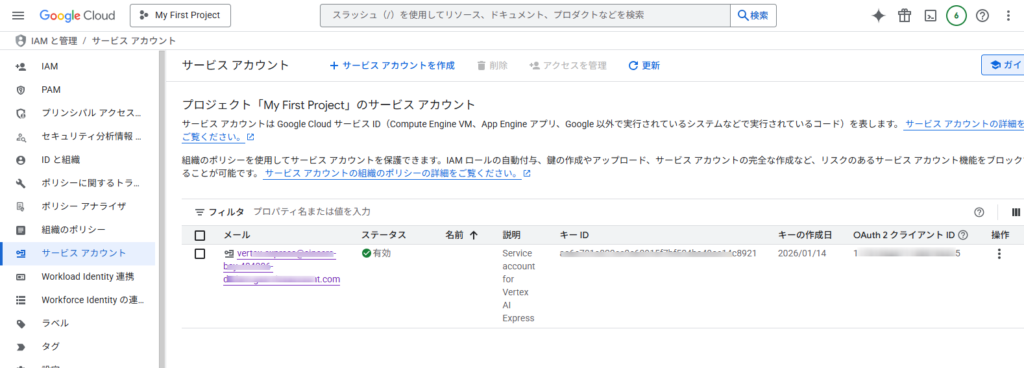
- サービスアカウントを作成し、認証キー(JSONファイル)をダウンロードします。
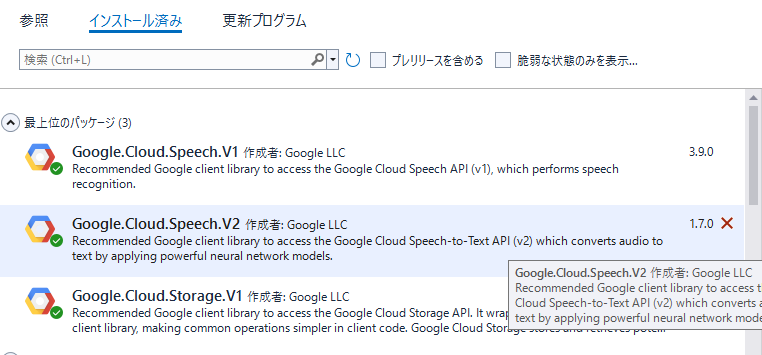
- ライブラリのインストール:
- Visual StudioのNuGetパッケージマネージャーで
Google.Cloud.Speech.V1パッケージをインストールします。
- Visual StudioのNuGetパッケージマネージャーで
- 環境変数の設定:
- ダウンロードしたサービスアカウントキーのパスを
GOOGLE_APPLICATION_CREDENTIALS環境変数に設定します。
- ダウンロードしたサービスアカウントキーのパスを
- C#コードの実装:
SpeechClientを作成し、Recognizeメソッドなどで音声ファイルを送信します。RecognitionConfigで言語(例:ja-JP)や音声の特性を設定します。RecognitionAudioで音声ファイル(WAV形式などが推奨)を指定します。- 返される
SpeechRecognitionResultからテキストを取得します。
参考リソース
- C# で Speech-to-Text API を使用する (Codelabs): C#で実際にAPIを呼び出すコード例が豊富です。
- Cloud Speech-to-Text クライアント ライブラリ (公式ドキュメント): 各言語のライブラリ情報や最新のバージョンについて確認できます。
ポイント
- V1とV2: APIのバージョンがあり、V2では音声仕様の自動検出機能などが追加されています。
- 無料枠と料金: 月間60分までは無料で利用でき、以降は従量課金制です。
- 対応言語: 日本語を含む120以上の言語に対応しています。
実行画面
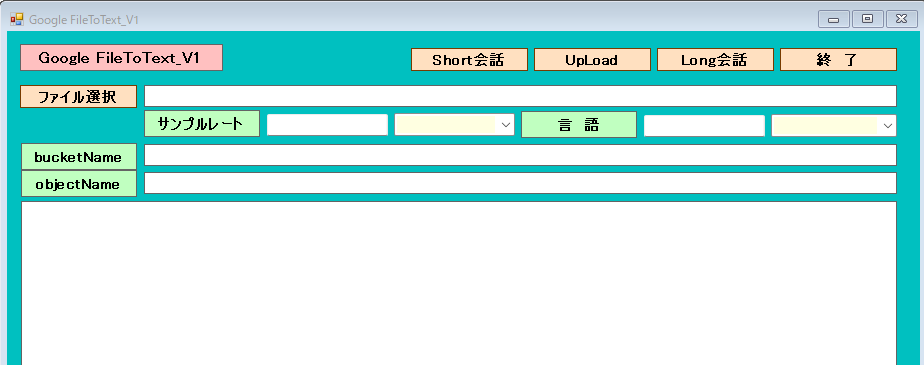
1.[ファイル選択]ボタンで音声ファイルを選択します。(今回は、Wave形式のみとしました)
2.サンプルレート、言語を入力します。
3.[Short会話]ボタンでテキスト化します。但し、ファイルサイズは、約10MB以下の制限があります。
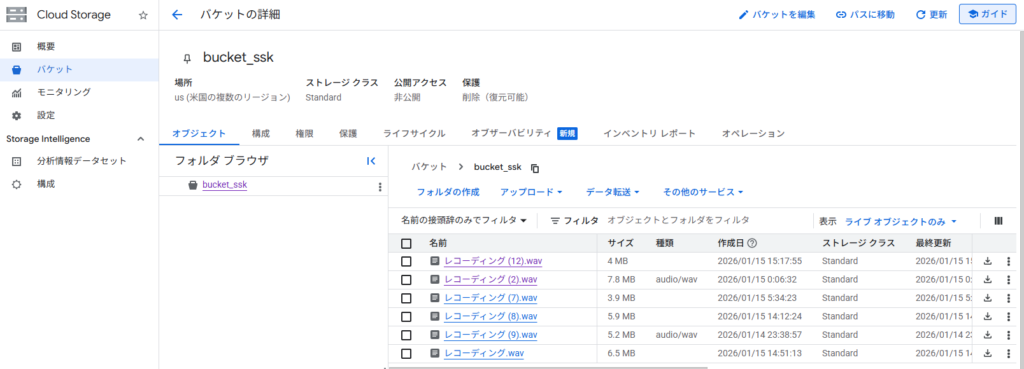
4.ファイルサイズが、大きいものはグラウド(Cloud Storage)にアップロード後に[Long会話]ボタンでテキスト化します。
5.アップロードは、bucketNmae(パケットフォルダ)とobjectName(ファイル名)を入力後[UpLoad]ボタンで実行します。
アドレスは、 gs://bucket_ssk/レコーディング (3).wav となります。
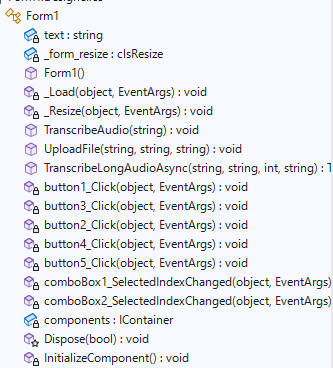
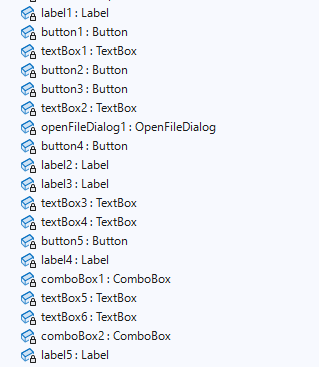
Form1
IAMと管理/サービスアカウント
Cloud Storage
アカウントには、権限の付加が必要となります。
Form1.cs
using Google.Cloud.Speech.V1;
using Google.Cloud.Storage.V1;
//using Google.Cloud.Speech.V2;
using System;
using System.Collections.Generic;
using System.ComponentModel;
using System.Data;
using System.Drawing;
using System.IO;
using System.Linq;
using System.Security.AccessControl;
using System.Text;
using System.Threading.Tasks;
using System.Windows.Forms;
using static System.Windows.Forms.VisualStyles.VisualStyleElement;

namespace GoogleFileToText
{
    public partial class Form1 : Form
    {

        private static string text;

        //control clsResize
        clsResize _form_resize;

        public Form1()
        {
            InitializeComponent();

            // プロセス環境変数の設定
            string secretPath = Application.StartupPath + "\\sincere-xxx-xxxxxx-xx-xxxxxxxxxxxxx.json"; //ダンロードしたキーのパス
            System.Environment.SetEnvironmentVariable("GOOGLE_APPLICATION_CREDENTIALS", secretPath, EnvironmentVariableTarget.Process);

            //サンプルレート
            comboBox1.Items.Add("44100");
            comboBox1.Items.Add("48000");

            textBox5.Text = "48000";

            //サンプルレート
            comboBox2.Items.Add("ja-JP");
            comboBox2.Items.Add("eg-EN");

            textBox6.Text = "ja-JP";

            _form_resize = new clsResize(this); //I put this after the initialize event to be sure that all controls are initialized properly

            this.Load += new EventHandler(_Load); //This will be called after the initialization // form_load
            this.Resize += new EventHandler(_Resize); //form_resize

        }

        //clsResize _Load
        private void _Load(object sender, EventArgs e)
        {
            _form_resize._get_initial_size();

        }

        //clsResize _Resize
        private void _Resize(object sender, EventArgs e)
        {
            _form_resize._resize();

        }

        //Short Audio
        public void TranscribeAudio(string filePath)
        {
            try
            {
                text = "";
                var client = SpeechClient.Create();
                var response = client.Recognize(new RecognitionConfig
                {
                    Encoding = RecognitionConfig.Types.AudioEncoding.Linear16,
                    SampleRateHertz = Convert.ToInt32(textBox5.Text),
                    LanguageCode = textBox6.Text, // 日本語を指定
                    AudioChannelCount = 2,  //ステレオ
                    Model = "latest_long",
                    UseEnhanced = true,
                }, RecognitionAudio.FromFile(filePath));

                foreach (var result in response.Results)
                {
                    foreach (var alternative in result.Alternatives)
                    {
                        Console.WriteLine($"結果:  「 {alternative.Transcript} 」");
                        text += $"結果:  「 {alternative.Transcript} 」" + "\r\n";
                    }
                }
            }
            catch (Exception ex)
            {
                MessageBox.Show(ex.Message);
            }

        }

        //UpLoadFile
        public void UploadFile(string bucketName, string localPath, string objectName)
        {
            // The StorageClient automatically uses Application Default Credentials (ADC) for authentication.
            var storage = StorageClient.Create();

            // Use a file stream to read the file data.
            var fileStream = File.OpenRead(localPath);

            // Upload the object. The content type can be automatically determined by GCS if null is passed.
            storage.UploadObject(bucketName, objectName, null, fileStream);

            Console.WriteLine($"Uploaded {objectName} to bucket {bucketName}.");
        }

        //Long Audio
        public static async Task TranscribeLongAudioAsync(string bucketName ,string objectName,int reto,string lang)
        {

            // 音声ファイルをGCSにアップロード(例: 事前にアップロード済みとしてURIを生成)
            //var gcsUri = @"gs://bucket_ssk/レコーディング.wav";
            var gcsUri = @"gs://" + bucketName + @"/" + objectName;

            var speechClient = await SpeechClient.CreateAsync();

            // 非同期認識リクエストを作成します。
            var request = new LongRunningRecognizeRequest
            {
                Config = new RecognitionConfig
                {
                    Encoding = RecognitionConfig.Types.AudioEncoding.Linear16,
                    SampleRateHertz = reto, // 音声ファイルのサンプルレートに合わせます
                    LanguageCode = lang, // 音声ファイルの言語コードに合わせます
                    AudioChannelCount = 2,  //ステレオ
                    Model = "latest_long",
                    UseEnhanced = true,
                },
                Audio = new RecognitionAudio
                {
                    Uri = gcsUri
                },
            };

            // 非同期操作を開始します。
            Console.WriteLine($"非同期音声認識を開始します: {gcsUri}");
            var operation = await speechClient.LongRunningRecognizeAsync(request);

            Console.WriteLine("操作が完了するまでポーリングしています...");
            // 操作が完了するまでポーリングします。
            var completedOperation = await operation.PollUntilCompletedAsync();

            // 結果を取得します。
            text = "";
            var result = completedOperation.Result;
            Console.WriteLine("認識結果:");
            foreach (var response in result.Results)
            {
                foreach (var alternative in response.Alternatives)
                {
                    Console.WriteLine($"結果:  「 {alternative.Transcript} 」");
                    text += $"結果:  「 {alternative.Transcript} 」" + "\r\n";
                }
            }

        }

        //select
        private void button1_Click(object sender, EventArgs e)
        {
            //OpenFileDialogクラスのインスタンスを作成
            OpenFileDialog ofd = new OpenFileDialog();

            //はじめのファイル名を指定する
            //はじめに「ファイル名」で表示される文字列を指定する
            ofd.FileName = "";
            //はじめに表示されるフォルダを指定する
            //指定しない(空の文字列)の時は、現在のディレクトリが表示される
            ofd.InitialDirectory = @"C:\";
            //[ファイルの種類]に表示される選択肢を指定する
            //指定しないとすべてのファイルが表示される
            ofd.Filter = "waveファイル(*.wav)|*.wav|すべてのファイル(*.*)|*.*";
            //[ファイルの種類]ではじめに選択されるものを指定する
            //2番目の「Waveファイル」が選択されているようにする
            ofd.FilterIndex = 1;
            //タイトルを設定する
            ofd.Title = "開くファイルを選択してください";
            //ダイアログボックスを閉じる前に現在のディレクトリを復元するようにする
            ofd.RestoreDirectory = true;
            //存在しないファイルの名前が指定されたとき警告を表示する
            //デフォルトでTrueなので指定する必要はない
            ofd.CheckFileExists = true;
            //存在しないパスが指定されたとき警告を表示する
            //デフォルトでTrueなので指定する必要はない
            ofd.CheckPathExists = true;

            //ダイアログを表示する
            if (ofd.ShowDialog() == DialogResult.OK)
            {
                //OKボタンがクリックされたとき、選択されたファイル名を表示する
                Console.WriteLine(ofd.FileName);
                textBox1.Text = ofd.FileName;
            }

        }

        //Long
        private async void button3_Click(object sender, EventArgs e)
        {

            await TranscribeLongAudioAsync(textBox3.Text,textBox4.Text,Convert.ToInt32(textBox5.Text),textBox6.Text);
            textBox2.Text = text;

        }

        //end
        private void button2_Click(object sender, EventArgs e)
        {
           this.Close();

        }

        //UpLoad
        private void button4_Click(object sender, EventArgs e)
        {
           UploadFile(textBox3.Text, textBox1.Text, textBox4.Text);

        }

        //Short
        private void button5_Click(object sender, EventArgs e)
        {
            TranscribeAudio(textBox1.Text);
            textBox2.Text = text;

        }

        private void comboBox1_SelectedIndexChanged(object sender, EventArgs e)
        {
            textBox5.Text=comboBox1.Text;

        }

        private void comboBox2_SelectedIndexChanged(object sender, EventArgs e)
        {
            textBox6.Text = comboBox2.Text;
        }
    }


}
clsResize
using System;
using System.Collections.Generic;
using System.Linq;
using System.Text;
using System.Windows.Forms;

public class clsResize
{
    List<System.Drawing.Rectangle> _arr_control_storage = new List<System.Drawing.Rectangle>();
    private bool showRowHeader = false;
    public clsResize(Form _form_)
    {
        form = _form_; //the calling form
        _formSize = _form_.ClientSize; //Save initial form size
        _fontsize = _form_.Font.Size; //Font size

        //ADD
        var _controls = _get_all_controls(form);//call the enumerator
        FontTable = new Dictionary<string, float>();
        ControlTable = new Dictionary<string, System.Drawing.Rectangle>();
        foreach (Control control in _controls) //Loop through the controls
        {
            FontTable.Add(control.Name, control.Font.Size);
            ControlTable.Add(control.Name, control.Bounds);
        }
        //ADD

    }

    //ADD
    Dictionary<string, float> FontTable;
    Dictionary<string, System.Drawing.Rectangle> ControlTable;
    //ADD

    private float _fontsize { get; set; }

    private System.Drawing.SizeF _formSize { get; set; }

    private Form form { get; set; }

    public void _get_initial_size() //get initial size//
    {
        var _controls = _get_all_controls(form);//call the enumerator
        foreach (Control control in _controls) //Loop through the controls
        {
            _arr_control_storage.Add(control.Bounds); //saves control bounds/dimension
            //If you have datagridview
            if (control.GetType() == typeof(DataGridView))
                _dgv_Column_Adjust(((DataGridView)control), showRowHeader);
        }
    }

    public void _resize() //Set the resize
    {
        double _form_ratio_width = (double)form.ClientSize.Width / (double)_formSize.Width; //ratio could be greater or less than 1
        double _form_ratio_height = (double)form.ClientSize.Height / (double)_formSize.Height; // this one too
        var _controls = _get_all_controls(form); //reenumerate the control collection
        int _pos = -1;//do not change this value unless you know what you are doing
        foreach (Control control in _controls)
        {

            //ADD
            this._fontsize = FontTable[control.Name]; //<-取得したコントロールのフォントサイズ値で上書きするためにこれを追加
            //ADD

            // do some math calc
            _pos += 1;//increment by 1;
            System.Drawing.Size _controlSize = new System.Drawing.Size((int)(_arr_control_storage[_pos].Width * _form_ratio_width),
                (int)(_arr_control_storage[_pos].Height * _form_ratio_height)); //use for sizing

            System.Drawing.Point _controlposition = new System.Drawing.Point((int)
            (_arr_control_storage[_pos].X * _form_ratio_width), (int)(_arr_control_storage[_pos].Y * _form_ratio_height));//use for location

            //set bounds
            control.Bounds = new System.Drawing.Rectangle(_controlposition, _controlSize); //Put together

            //Assuming you have a datagridview inside a form()
            //if you want to show the row header, replace the false statement of
            //showRowHeader on top/public declaration to true;
            if (control.GetType() == typeof(DataGridView))
                _dgv_Column_Adjust(((DataGridView)control), showRowHeader);


            //Font AutoSize
            control.Font = new System.Drawing.Font(form.Font.FontFamily,
             (float)(((Convert.ToDouble(_fontsize) * _form_ratio_width) / 2) +
              ((Convert.ToDouble(_fontsize) * _form_ratio_height) / 2)));

        }
    }

    private void _dgv_Column_Adjust(DataGridView dgv, bool _showRowHeader) //if you have Datagridview
    //and want to resize the column base on its dimension.
    {
        int intRowHeader = 0;
        const int Hscrollbarwidth = 5;
        if (_showRowHeader)
            intRowHeader = dgv.RowHeadersWidth;
        else
            dgv.RowHeadersVisible = false;

        for (int i = 0; i < dgv.ColumnCount; i++)
        {
            if (dgv.Dock == DockStyle.Fill) //in case the datagridview is docked
                dgv.Columns[i].Width = ((dgv.Width - intRowHeader) / dgv.ColumnCount);
            else
                dgv.Columns[i].Width = ((dgv.Width - intRowHeader - Hscrollbarwidth) / dgv.ColumnCount);
        }
    }


    private static IEnumerable<Control> _get_all_controls(Control c)
    {
        return c.Controls.Cast<Control>().SelectMany(item =>
            _get_all_controls(item)).Concat(c.Controls.Cast<Control>()).Where(control =>
            control.Name != string.Empty);
    }
}
