
SQLServerのデータを活用する C#
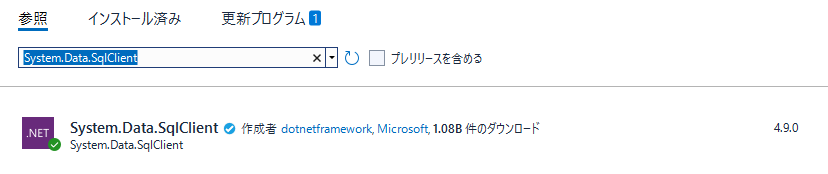
C#でSQL Serverに接続するには、NuGet Package管理画面を開き、「System.Data.SqlClient」をインストールします。
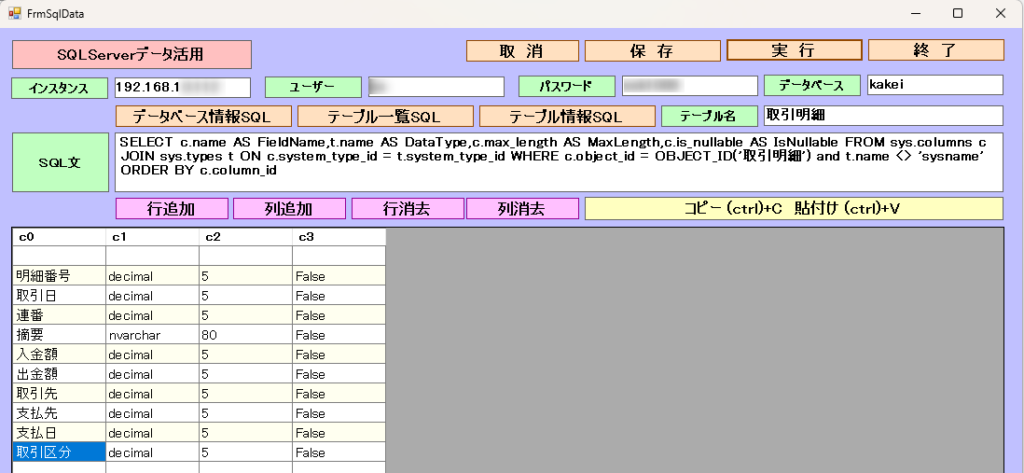
実行画面
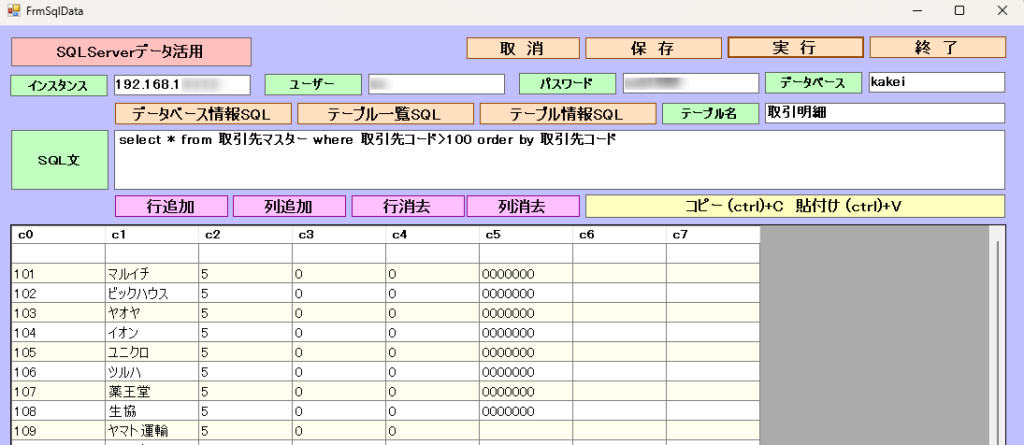
1.インスタンス、ユーザーid、パスワード、データベース名を入力
2.select文を入力
3.[実行]ボタン
4.内容を1行空けて表示
5.1行目は、見出しに利用
6.行追加、列追加、行消去、列消去、セル範囲コピー&貼り付け等で内容修正
7.[保存]ボタンでExcel、Csv形式でデータ保存
8.[データベース情報SQL]ボタンでデータベース情報取得SQLを入力
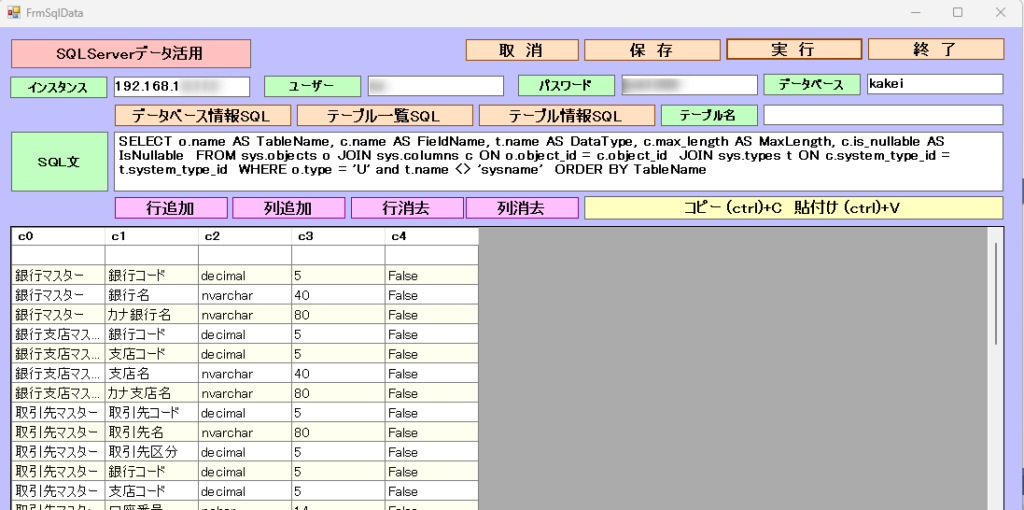
9.[テーブル一覧SQL]ボタンでテーブル一覧取得SQLを入力
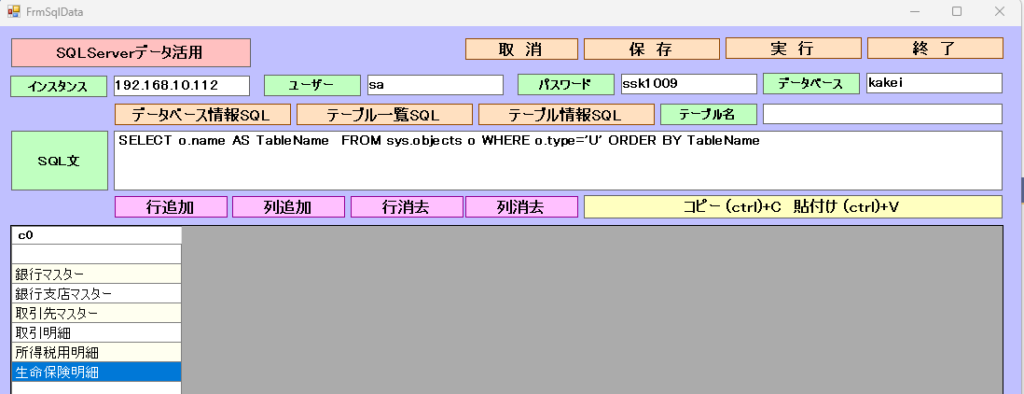
10.テーブル名を入力し[テーブル情報SQL]ボタンでテーブル情報取得SQLを入力
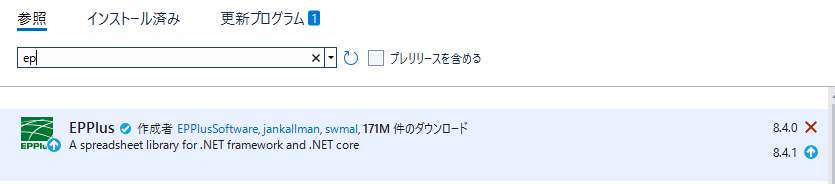
エクセルファイル保存には、EPPlusを使用。
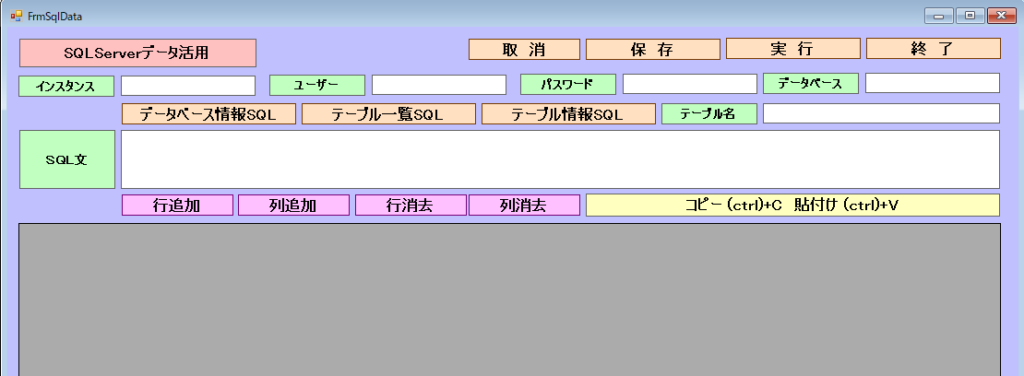
画面 FrmSqlData
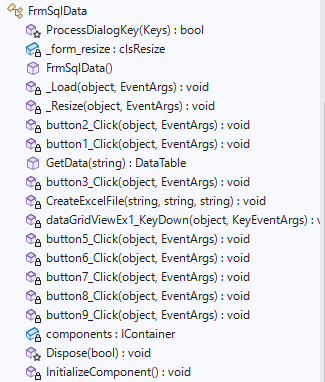
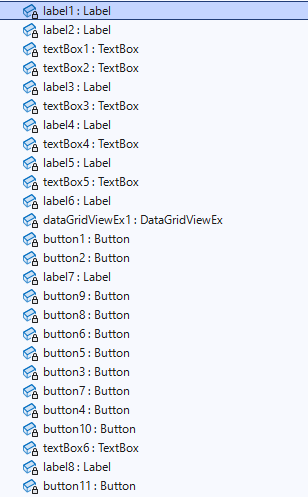
FrmSqlData.cs
using OfficeOpenXml;
using System;
using System.Collections.Generic;
using System.ComponentModel;
using System.Data;
using System.Data.SqlClient;
using System.Data.SqlTypes;
using System.Drawing;
using System.IO;
using System.Linq;
using System.Runtime.InteropServices.WindowsRuntime;
using System.Text;
using System.Threading.Tasks;
using System.Windows.Forms;

namespace KakeiboC_.データ活用
{
    public partial class FrmSqlData : Form
    {
        [System.Security.Permissions.UIPermission(
   System.Security.Permissions.SecurityAction.Demand,
   Window = System.Security.Permissions.UIPermissionWindow.AllWindows)]
        protected override bool ProcessDialogKey(Keys keyData)
        {
            //Returnキーが押されているか調べる
            //AltかCtrlキーが押されている時は、本来の動作をさせる
            if (((keyData & Keys.KeyCode) == Keys.Return) &&
                ((keyData & (Keys.Alt | Keys.Control)) == Keys.None))
            {
                //Tabキーを押した時と同じ動作をさせる
                //Shiftキーが押されている時は、逆順にする
                this.ProcessTabKey((keyData & Keys.Shift) != Keys.Shift);
                //本来の処理はさせない
                return true;
            }
            return base.ProcessDialogKey(keyData);
        }

        //control clsResize 画面表示を拡大縮小します。
        clsResize _form_resize;

        public FrmSqlData()
        {
            InitializeComponent();
            //clsResize
            _form_resize = new clsResize(this); //I put this after the initialize event to be sure that all controls are initialized properly

            this.Load += new EventHandler(_Load); //This will be called after the initialization // form_load
            this.Resize += new EventHandler(_Resize); //form_resize
            //

            string filePath = System.IO.Directory.GetCurrentDirectory() + @"\Teisu.txt";
            if (File.Exists(filePath))
            {

                // 全行を読み込む
                string[] lines = File.ReadAllLines(filePath);
                textBox1.Text = lines[0];
                textBox2.Text = lines[1];
                textBox3.Text = lines[2];
                textBox4.Text = lines[4];

            }
            else
            {
                MessageBox.Show("設定ファイルが存在しません。処理>設定をしてください", "エラー");
            }


        }

        //clsResize _Load
        private void _Load(object sender, EventArgs e)
        {
            _form_resize._get_initial_size();

        }

        //clsResize _Resize
        private void _Resize(object sender, EventArgs e)
        {
            _form_resize._resize();
        }

        //終了
        private void button2_Click(object sender, EventArgs e)
        {
            this.Close();
        }

        //実行
        private void button1_Click(object sender, EventArgs e)
        {
            if (textBox5.Text.Length > 0)
            {
                dataGridViewEx1.Rows.Clear();
                dataGridViewEx1.Columns.Clear();

                DataTable dt = GetData(textBox5.Text);
                if (dt.Rows.Count == 0)
                {
                    textBox5.Focus();
                    return;
                }

                int colCount = dt.Columns.Count;
                int rowCount=dt.Rows.Count;

                //列追加
                for (int col = 0; col < colCount; col++)
                {
                    dataGridViewEx1.Columns.Add("columns" + Convert.ToString(col), "c" + Convert.ToString(col));
                }

                //行追加
                for (int row = 0; row < rowCount+1; row++)
                {
                    dataGridViewEx1.Rows.Add("");
                }

                //データ読み取り
                int i = 0;
                while (i < dt.Rows.Count)
                {

                    int j = i + 1;
                    if (j % 2 == 0)
                    {
                        dataGridViewEx1.Rows[i].DefaultCellStyle.BackColor = Color.Ivory;
                    }

                    //追加した行に値をセット
                    for (int col=0;col <colCount;col++)
                    {
                        dataGridViewEx1.Rows[i+1].Cells[col].Value = Convert.ToString(dt.Rows[i][col]);
                    }

                    i++;

                }

                //追加した行にフォーカスを移す
                dataGridViewEx1.CurrentCell = dataGridViewEx1[0, i];
            }

        }

        //データ取得 SqlDataAdapter
        public DataTable GetData(string sql)
        {
            string _connectionString = "Data Source=" +textBox1.Text
                                        + ";Initial Catalog=" + textBox4.Text
                                        + ";User ID=" + textBox2.Text
                                        + ";Password=" + textBox3.Text;
            DataTable dt = new DataTable();
            try
            {
                using (SqlConnection conn = new SqlConnection(_connectionString))
                {
                    using (SqlCommand cmd = new SqlCommand(sql, conn))
                    {

                        SqlDataAdapter adapter = new SqlDataAdapter(cmd);
                        adapter.Fill(dt);

                    }

                }
            }
            catch (Exception ex)
            {
               MessageBox.Show($"接続エラー: {ex.Message}");
            }
            return dt;
        }

        //保存
        private void button3_Click(object sender, EventArgs e)
        {
            //SaveFileDialogクラスのインスタンスを作成
            SaveFileDialog sfd = new SaveFileDialog();

            //日付時刻取得
            DateTime nowTime;
            string str_nowTime;
            nowTime = DateTime.Now;
            str_nowTime = nowTime.ToString("yyyyMMdd_HHmmss");

            //はじめのファイル名を指定する
            //はじめに「ファイル名」で表示される文字列を指定する
            sfd.FileName = "excelOut_" + str_nowTime;

            //はじめに表示されるフォルダを指定する
            sfd.InitialDirectory = System.Environment.CurrentDirectory + "\\";
            //[ファイルの種類]に表示される選択肢を指定する
            //指定しない(空の文字列)の時は、現在のディレクトリが表示される
            sfd.Filter = "Excelファイル(*.xlsx;*.xlsx)|*.xlsx;*.xlsx|すべてのファイル(*.*)|*.*";
            //[ファイルの種類]ではじめに選択されるものを指定する
            //2番目の「すべてのファイル」が選択されているようにする
            sfd.FilterIndex = 1;
            //タイトルを設定する
            sfd.Title = "保存先のファイルを選択してください";
            //ダイアログボックスを閉じる前に現在のディレクトリを復元するようにする
            sfd.RestoreDirectory = true;
            //既に存在するファイル名を指定したとき警告する
            //デフォルトでTrueなので指定する必要はない
            sfd.OverwritePrompt = true;
            //存在しないパスが指定されたとき警告を表示する
            //デフォルトでTrueなので指定する必要はない
            sfd.CheckPathExists = true;

            //ダイアログを表示する
            if (sfd.ShowDialog() == DialogResult.OK)
            {
                //OKボタンがクリックされたとき、選択されたファイル名を表示する
                //Console.WriteLine(sfd.FileName);
                string sheet_name = "Sheet1"; //+ str_nowTime;
                string fileName2 = Path.GetDirectoryName(sfd.FileName) + "\\csvOut_" + str_nowTime + ".csv";
                CreateExcelFile(sfd.FileName, sheet_name, fileName2);
            }

        }

        //データ保存
        void CreateExcelFile(string filePath, string sheetName, string filePath2)
        {
            //If you are a Noncommercial organization.
            ExcelPackage.License.SetNonCommercialOrganization("My Noncommercial organization"); //This will also set the Company property to the organization name provided in the argument.
            // If you use EPPlus for Noncommercial personal use.
            ExcelPackage.License.SetNonCommercialPersonal("My Name"); //This will also set the Author property to the name provided in the argument.
            using (var package = new ExcelPackage())
            {
                var workbook = package.Workbook;
                var worksheet = workbook.Worksheets.Add(sheetName);

                //MessageBox.Show(Convert.ToString(dataGridViewEx1.Columns.Count) +"," + Convert.ToString(dataGridViewEx1.Rows.Count));

                //列指定
                for (int col = 0; col < dataGridViewEx1.Columns.Count; col++)
                {
                    //行指定
                    for (int row = 0; row < dataGridViewEx1.Rows.Count; row++)
                    {
                        worksheet.Cells[row + 1, col + 1].Value = dataGridViewEx1.Rows[row].Cells[col].Value;
                    }
                }

                // シート全体の範囲を指定してCSVとして書き出し
                var format = new ExcelOutputTextFormat
                {
                    Encoding = Encoding.UTF8,
                    Delimiter = ','
                };
                worksheet.Cells[worksheet.Dimension.Address].SaveToText(
                    new FileInfo(filePath2),
                   format
                );

                // Excelファイルを保存
                package.SaveAs(new FileInfo(filePath));

            }
        }


        //(ctrl) + V で貼り付け        (ctrl) + C でコピー
        private void dataGridViewEx1_KeyDown(object sender, KeyEventArgs e)
        {
            if (e.Control && e.KeyCode == Keys.V)
            {
                //現在のセルのある行から下にペーストする
                if (dataGridViewEx1.CurrentCell == null)
                    return;
                int insertRowIndex = dataGridViewEx1.CurrentCell.RowIndex;
                int insertColIndex = dataGridViewEx1.CurrentCell.ColumnIndex;

                //MessageBox.Show(Convert.ToString(insertRowIndex) + "," + Convert.ToString(insertColIndex));

                //クリップボードの内容を取得して、行で分ける
                string pasteText = Clipboard.GetText();
                if (string.IsNullOrEmpty(pasteText))
                    return;
                pasteText = pasteText.Replace("\r\n", "\n");
                pasteText = pasteText.Replace('\r', '\n');
                pasteText = pasteText.TrimEnd(new char[] { '\n' });
                string[] lines = pasteText.Split('\n');

                foreach (string line in lines)
                {
                    //タブで分割
                    string[] vals = line.Split('\t');

                    DataGridViewRow row = dataGridViewEx1.Rows[insertRowIndex];

                    //各セルの値を設定
                    for (int i = insertColIndex; i < vals.Length + insertColIndex; i++)
                    {
                        row.Cells[i].Value = vals[i - insertColIndex];
                    }
                    //次の行へ
                    insertRowIndex++;
                }
            }
        }

        //行追加
        private void button5_Click(object sender, EventArgs e)
        {
            dataGridViewEx1.Rows.Add("");
        }

        //列追加
        private void button6_Click(object sender, EventArgs e)
        {
            int col = dataGridViewEx1.Columns.Count;
            dataGridViewEx1.Columns.Add("columns" + Convert.ToString(col), "c" + Convert.ToString(col));
        }

        //取消
        private void button7_Click(object sender, EventArgs e)
        {
            dataGridViewEx1.Rows.Clear();
            dataGridViewEx1.Columns.Clear();
            textBox5.Focus();
        }

        //行消去
        private void button8_Click(object sender, EventArgs e)
        {
            int row = dataGridViewEx1.CurrentRow.Index;
            for (int col = 0; col < dataGridViewEx1.Columns.Count; col++)
            {
                dataGridViewEx1.Rows[row].Cells[col].Value = "";
            }
        }

        //列消去
        private void button9_Click(object sender, EventArgs e)
        {
            int col = dataGridViewEx1.CurrentCell.ColumnIndex;
            for (int row = 0; row < dataGridViewEx1.Rows.Count; row++)
            {
                dataGridViewEx1.Rows[row].Cells[col].Value = "";
            }
        }

    //データベース情報SQL
        private void button4_Click(object sender, EventArgs e)
        {
            textBox5.Text = "SELECT o.name AS TableName, c.name AS FieldName," +
                  " t.name AS DataType, c.max_length AS MaxLength, c.is_nullable AS IsNullable " +
                  " FROM sys.objects o JOIN sys.columns c ON o.object_id = c.object_id " +
                  " JOIN sys.types t ON c.system_type_id = t.system_type_id " +
                  " WHERE o.type = 'U' and t.name <> 'sysname' " +
                  " ORDER BY TableName";
        }

    //テーブル情報SQL
        private void button10_Click(object sender, EventArgs e)
        {
            if (textBox6.Text.Length > 0)
            {
                textBox5.Text = "SELECT c.name AS FieldName,t.name AS DataType," +
                        "c.max_length AS MaxLength,c.is_nullable AS IsNullable" +
                        " FROM sys.columns c" +
                        " JOIN sys.types t ON c.system_type_id = t.system_type_id" +
                        " WHERE c.object_id = OBJECT_ID('" + textBox6.Text + "') and t.name <> 'sysname' " +
                        " ORDER BY c.column_id";
            }

        }

    //テーブル一覧SQL
        private void button11_Click(object sender, EventArgs e)
        {
            textBox5.Text = "SELECT o.name AS TableName  FROM sys.objects o WHERE o.type='U' ORDER BY TableName";
        }
    }
}
clsResize
using System;
using System.Collections.Generic;
using System.Linq;
using System.Text;
using System.Windows.Forms;

public class clsResize
{
    List<System.Drawing.Rectangle> _arr_control_storage = new List<System.Drawing.Rectangle>();
    private bool showRowHeader = false;
    public clsResize(Form _form_)
    {
        form = _form_; //the calling form
        _formSize = _form_.ClientSize; //Save initial form size
        _fontsize = _form_.Font.Size; //Font size

        //ADD
        var _controls = _get_all_controls(form);//call the enumerator
        FontTable = new Dictionary<string, float>();
        ControlTable = new Dictionary<string, System.Drawing.Rectangle>();
        foreach (Control control in _controls) //Loop through the controls
        {
            FontTable.Add(control.Name, control.Font.Size);
            ControlTable.Add(control.Name, control.Bounds);
        }
        //ADD

    }

    //ADD
    Dictionary<string, float> FontTable;
    Dictionary<string, System.Drawing.Rectangle> ControlTable;
    //ADD

    private float _fontsize { get; set; }

    private System.Drawing.SizeF _formSize { get; set; }

    private Form form { get; set; }

    public void _get_initial_size() //get initial size//
    {
        var _controls = _get_all_controls(form);//call the enumerator
        foreach (Control control in _controls) //Loop through the controls
        {
            _arr_control_storage.Add(control.Bounds); //saves control bounds/dimension
            //If you have datagridview
            if (control.GetType() == typeof(DataGridViewEx))                    //20251228
                _dgv_Column_Adjust(((DataGridViewEx)control), showRowHeader);   //20251228
        }
    }

    public void _resize() //Set the resize
    {
        double _form_ratio_width = (double)form.ClientSize.Width / (double)_formSize.Width; //ratio could be greater or less than 1
        double _form_ratio_height = (double)form.ClientSize.Height / (double)_formSize.Height; // this one too
        var _controls = _get_all_controls(form); //reenumerate the control collection
        int _pos = -1;//do not change this value unless you know what you are doing
        foreach (Control control in _controls)
        {

            //ADD
            this._fontsize = FontTable[control.Name]; //<-取得したコントロールのフォントサイズ値で上書きするためにこれを追加
            //ADD

            // do some math calc
            _pos += 1;//increment by 1;
            System.Drawing.Size _controlSize = new System.Drawing.Size((int)(_arr_control_storage[_pos].Width * _form_ratio_width),
                (int)(_arr_control_storage[_pos].Height * _form_ratio_height)); //use for sizing

            System.Drawing.Point _controlposition = new System.Drawing.Point((int)
            (_arr_control_storage[_pos].X * _form_ratio_width), (int)(_arr_control_storage[_pos].Y * _form_ratio_height));//use for location

            //set bounds
            control.Bounds = new System.Drawing.Rectangle(_controlposition, _controlSize); //Put together

            //Assuming you have a datagridview inside a form()
            //if you want to show the row header, replace the false statement of
            //showRowHeader on top/public declaration to true;
            if (control.GetType() == typeof(DataGridViewEx))                        //20251228
                _dgv_Column_Adjust(((DataGridViewEx)control), showRowHeader);       //20251228


            //Font AutoSize
            control.Font = new System.Drawing.Font(form.Font.FontFamily,
             (float)(((Convert.ToDouble(_fontsize) * _form_ratio_width) / 2) +
              ((Convert.ToDouble(_fontsize) * _form_ratio_height) / 2)));

        }
    }

    private void _dgv_Column_Adjust(DataGridViewEx dgv, bool _showRowHeader) //if you have Datagridview 20251228
    //and want to resize the column base on its dimension.
    {
        int intRowHeader = 0;
        const int Hscrollbarwidth = 5;
        if (_showRowHeader)
            intRowHeader = dgv.RowHeadersWidth;
        else
            dgv.RowHeadersVisible = false;

        for (int i = 0; i < dgv.ColumnCount; i++)
        {
            if (dgv.Dock == DockStyle.Fill) //in case the datagridview is docked
                dgv.Columns[i].Width = ((dgv.Width - intRowHeader) / dgv.ColumnCount);
            else
                dgv.Columns[i].Width = ((dgv.Width - intRowHeader - Hscrollbarwidth) / dgv.ColumnCount);
        }
    }


    private static IEnumerable<Control> _get_all_controls(Control c)
    {
        return c.Controls.Cast<Control>().SelectMany(item =>
            _get_all_controls(item)).Concat(c.Controls.Cast<Control>()).Where(control =>
            control.Name != string.Empty);
    }
}
DataGridViewの拡張 DataGridViewEx
//コードを隠すコードを選択
using System;
using System.Windows.Forms;

/// <summary>
/// Enterキーが押された時に、Tabキーが押されたのと同じ動作をする
/// (現在のセルを隣のセルに移動する)DataGridView
/// </summary>
public class DataGridViewEx : DataGridView
{
    private DataGridView dataGridView1;

    protected override bool ProcessDialogKey(Keys keyData)
    {
        // セルの編集モード時にEnterが押されると次行に移ってしまうので、右隣のセルに移動させる
        if ((keyData & Keys.KeyCode) == Keys.Enter)
        {
            // Tabキーの処理を行う
            return this.ProcessTabKey(keyData);
        }
        // 既定の処理を行う
        return base.ProcessDialogKey(keyData);
    }
    /// DataGridView での移動に使用されるキーを処理します。
    protected override bool ProcessDataGridViewKey(KeyEventArgs e)
    {
        if (e.KeyCode == Keys.Enter && e.Handled == false)
        {
            // イベントを処理済にする
            e.Handled = true;

            if (this.CurrentCell != null)
            {
                // 右下セルのときは次のコントロールにフォーカス移動
                if (this.CurrentCell.RowIndex == this.Rows.GetLastRow(DataGridViewElementStates.Visible) &&
                    this.CurrentCell.ColumnIndex == this.Columns.GetLastColumn(DataGridViewElementStates.Visible, DataGridViewElementStates.None).Index &&
                    e.Modifiers != Keys.Shift)
                {
                    return this.FindForm().SelectNextControl(this.FindForm().ActiveControl, true, true, true, true);
                }
                // 左上のセルでShift + Enterが押されたときは前のコントロールにフォーカス移動
                if (this.CurrentCell.RowIndex == 0 &&
                    this.CurrentCell.ColumnIndex == 0 &&
                    e.Modifiers == Keys.Shift)
                {
                    return this.FindForm().SelectNextControl(this.FindForm().ActiveControl, false, true, true, true);
                }
            }
            // Enterキーが押されらTabキーの処理を行う
            return this.ProcessTabKey(e.KeyData);
        }
        // 既定の処理を行う
        return base.ProcessDataGridViewKey(e);
    }

    private void InitializeComponent()
    {
            this.dataGridView1 = new System.Windows.Forms.DataGridView();
            ((System.ComponentModel.ISupportInitialize)(this.dataGridView1)).BeginInit();
            ((System.ComponentModel.ISupportInitialize)(this)).BeginInit();
            this.SuspendLayout();
            //
            // dataGridView1
            //
            this.dataGridView1.ColumnHeadersHeightSizeMode = System.Windows.Forms.DataGridViewColumnHeadersHeightSizeMode.AutoSize;
            this.dataGridView1.Location = new System.Drawing.Point(0, 0);
            this.dataGridView1.Name = "dataGridView1";
            this.dataGridView1.Size = new System.Drawing.Size(240, 150);
            this.dataGridView1.TabIndex = 0;
            //
            // DataGridViewEx
            //
            this.RowTemplate.Height = 21;
            ((System.ComponentModel.ISupportInitialize)(this.dataGridView1)).EndInit();
            ((System.ComponentModel.ISupportInitialize)(this)).EndInit();
            this.ResumeLayout(false);

    }
}