
テキスト(ファイル選択)から翻訳(Azure)C#
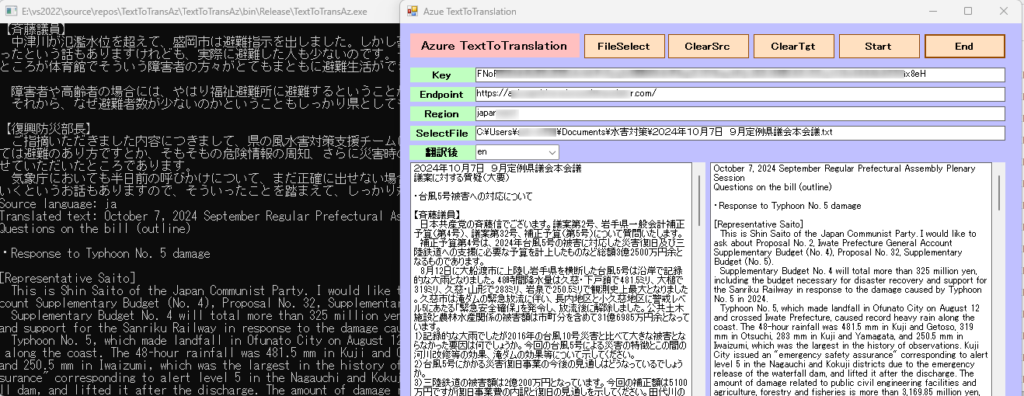
テキストを Azure TextTranslation を利用して翻訳しました。翻訳後、テキストボックスに表示されます。アプリの実行フォルダーにテキストデータ(ファイル名は、TEXT )が作成されます。
October 7, 2024 September Regular Prefectural Assembly Plenary Session
Questions on the bill (outline)
・Response to Typhoon No. 5 damage
[Representative Saito]
This is Shin Saito of the Japan Communist Party. I would like to ask about Proposal No. 2, Iwate Prefecture General Account Supplementary Budget (No. 4), Proposal No. 32, Supplementary Budget (No. 5).
Supplementary Budget No. 4 will total more than 325 million yen, including the budget necessary for disaster recovery and support for the Sanriku Railway in response to the damage caused by Typhoon No. 5 in 2024.
Typhoon No. 5, which made landfall in Ofunato City on August 12 and crossed Iwate Prefecture, caused record heavy rain along the coast. The 48-hour rainfall was 481.5 mm in Kuji and Getoso, 319 mm in Otsuchi, 283 mm in Kuji and Yamagata, and 250.5 mm in Iwaizumi, which was the largest in the history of observations. Kuji City issued an "emergency safety assurance" corresponding to alert level 5 in the Nagauchi and Kokuji districts due to the emergency release of the waterfall dam, and lifted it after the discharge. The amount of damage related to public civil engineering facilities and agriculture, forestry and fisheries is more than 3,169.85 million yen, including municipalities.
Azure Translator とは
Foundry Tools の Azure Translator は、 Foundry Tools ファミリの一部であり、任意のオペレーティング システムで使用できるクラウドベースのニューラル機械翻訳サービスです。 Translator は、世界中の何千もの企業が言語翻訳やその他の言語関連の業務に使用する多くの Microsoft 製品とサービスを提供しています。
前提条件
Azureサブスクリプション。
既存の Translator サービスまたは Cognitive Services リソース。Translator リソースの作成に従って Translator リソースを作成できます。
endpoint、API keyおよびは、Azure PortaRegionの Cognitive Services リソースまたは Translator サービス リソース情報から取得できます。
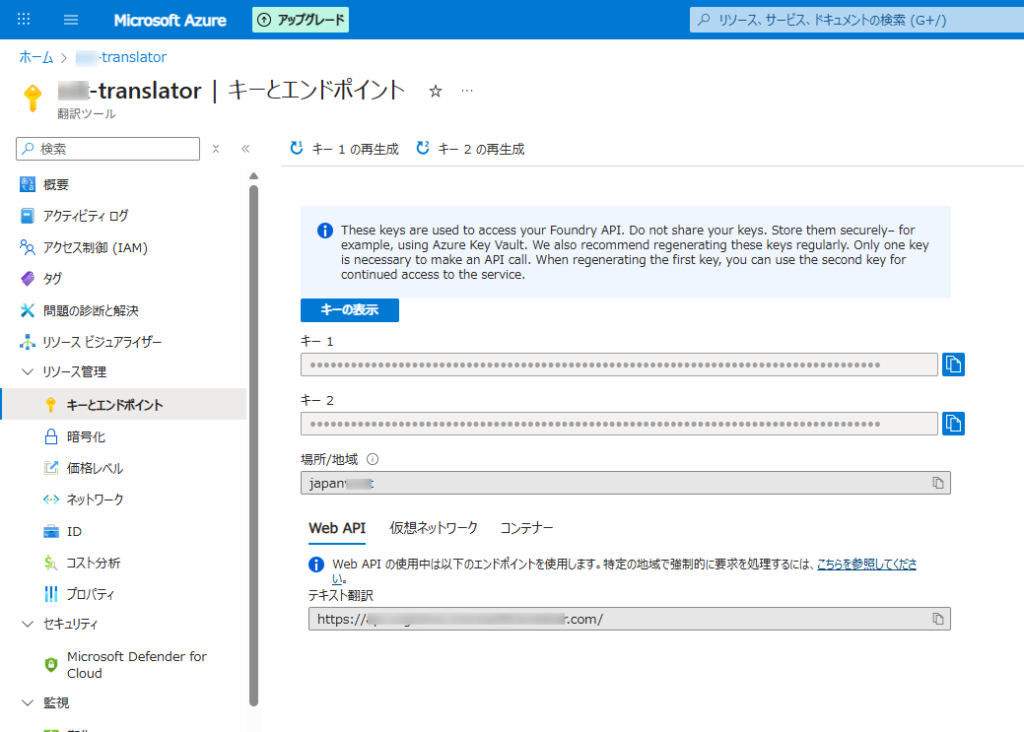
- Azure アカウントと音声リソース:
- 有効な Azure サブスクリプションが必要です。無料で作成できます。
- Azure ポータルで、新しい「Tranlation」サービス リソースを作成します。
- 作成したら、リソースの「キーとエンドポイント」セクションに移動し、キー 1 またはキー 2 とエンドポイントをコピーします。
- 開発環境:
- 適切な Microsoft Visual C++ 再頒布可能パッケージがインストールされたVisual Studio (2015、2017、2019、または 2022) 。
- 互換性のある .NET プラットフォーム (.NET Core、.NET 5+、.NET Standard 2.0 など) を対象とする C# プロジェクト。
- Azure.AI.Translation.Text NuGet パッケージをインストールします。NuGet パッケージ マネージャー コンソールからインストールできます。
Form1
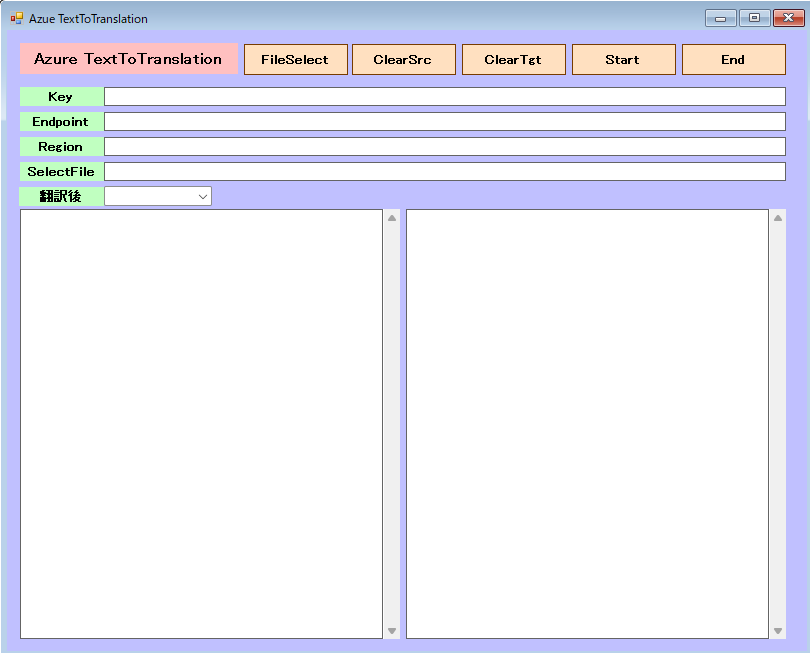
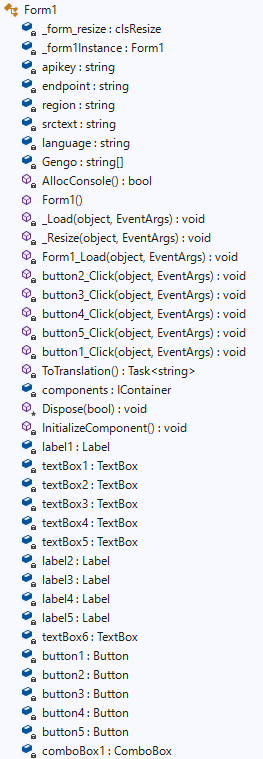
Azure.AI.Translation.Text を導入。

Form1.cs
using Azure;
using Azure.AI.Translation.Text;
using System;
using System.Collections.Generic;
using System.ComponentModel;
using System.Data;
using System.Drawing;
using System.Globalization;
using System.IO;
using System.Linq;
using System.Text;
using System.Threading.Tasks;
using System.Windows.Forms;

namespace TextToTransAz
{
    public partial class Form1 : Form
    {
        //control clsResize 画面表示を拡大縮小します。
        clsResize _form_resize;

        //Form1オブジェクトを保持するためのフィールド
        private static Form1 _form1Instance;
        //

        private static string apikey = "your key"; // Replace with your key
        private static string endpoint = "your endpoint/"; // Replace with your endpoint
        private static string region = "your region"; // Replace with your region (e.g., "global" or specific region)
        private static string srctext = "";
        private static string language = "ja";

        //翻訳言語の設定
        String[] Gengo = new String[5]  { "ja", "en", "ko", "fr", "it" };

        [System.Runtime.InteropServices.DllImport("kernel32.dll")]
        private static extern bool AllocConsole();

        public Form1()
        {
            InitializeComponent();
            //clsResize
            _form_resize = new clsResize(this); //I put this after the initialize event to be sure that all controls are initialized properly

            this.Load += new EventHandler(_Load); //This will be called after the initialization // form_load
            this.Resize += new EventHandler(_Resize); //form_resize
            //

            AllocConsole();
            string filePath = System.IO.Directory.GetCurrentDirectory() + @"\KeyText.txt";

            if (File.Exists(filePath))
            {
                StreamReader sr = new StreamReader(filePath, Encoding.GetEncoding("Shift_JIS"));

                int i = 0;
                string linetext = "";
                while (sr.Peek() != -1)
                {
                    linetext = sr.ReadLine();
                    i += 1;
                    if (i == 1)
                    {
                        apikey = linetext;
                    }
                    else if (i == 2)
                    {
                        endpoint = linetext;
                    }
                    else if (i == 3)
                    {
                        region = linetext;
                    }
                    Console.WriteLine(linetext);
                }

                sr.Close();

            }
            else
            {
                //Console.WriteLine("ファイルが存在しません");
            }
            textBox2.Text = apikey;
            textBox3.Text = endpoint;
            textBox4.Text = region;

            File.WriteAllText(System.IO.Directory.GetCurrentDirectory() + @"\Text.txt", "");

            for (int i = 0; i < Gengo.Length; i = i + 1)
            {
                //Console.WriteLine("{0}番目の要素の値は{1}です。", i + 1, Gengo[i]);
                // コンボボックスに項目を追加する
                comboBox1.Items.Add(Gengo[i]);

            }

            // 初期値を設定する(日本語を選択する)
            comboBox1.SelectedIndex = 0;

        }

        //clsResize _Load
        private void _Load(object sender, EventArgs e)
        {
            _form_resize._get_initial_size();

        }

        //clsResize _Resize
        private void _Resize(object sender, EventArgs e)
        {
            _form_resize._resize();
        }

        private void Form1_Load(object sender, EventArgs e)
        {

        }

        private void button2_Click(object sender, EventArgs e)
        {
            this.Close();
        }

        private void button3_Click(object sender, EventArgs e)
        {
            textBox6.Text = "";
        }

        private void button4_Click(object sender, EventArgs e)
        {
            textBox1.Text = "";
        }

        private void button5_Click(object sender, EventArgs e)
        {
            //OpenFileDialogクラスのインスタンスを作成
            OpenFileDialog ofd = new OpenFileDialog();

            //はじめのファイル名を指定する
            //はじめに「ファイル名」で表示される文字列を指定する
            ofd.FileName = "default.pdf";
            //はじめに表示されるフォルダを指定する
            //指定しない(空の文字列)の時は、現在のディレクトリが表示される
            ofd.InitialDirectory = System.Environment.CurrentDirectory + @"\";
            //[ファイルの種類]に表示される選択肢を指定する
            //指定しないとすべてのファイルが表示される
            ofd.Filter = "TEXTファイル(*.txt)|*.txt|すべてのファイル(*.*)|*.*";
            //[ファイルの種類]ではじめに選択されるものを指定する
            //2番目の「すべてのファイル」が選択されているようにする
            ofd.FilterIndex = 1;
            //タイトルを設定する
            ofd.Title = "開くファイルを選択してください";
            //ダイアログボックスを閉じる前に現在のディレクトリを復元するようにする
            ofd.RestoreDirectory = true;
            //存在しないファイルの名前が指定されたとき警告を表示する
            //デフォルトでTrueなので指定する必要はない
            ofd.CheckFileExists = true;
            //存在しないパスが指定されたとき警告を表示する
            //デフォルトでTrueなので指定する必要はない
            ofd.CheckPathExists = true;

            //ダイアログを表示する
            if (ofd.ShowDialog() == DialogResult.OK)
            {
                //OKボタンがクリックされたとき、選択されたファイル名を表示する
                Console.WriteLine(ofd.FileName);

                textBox5.Text = ofd.FileName;

                StreamReader sr = new StreamReader(ofd.FileName, Encoding.GetEncoding("UTF-8"));

                string str = sr.ReadToEnd();

                sr.Close();

                Console.WriteLine(str);

                textBox1.Text= str;

            }
        }

        private async void button1_Click(object sender, EventArgs e)
        {
            apikey = textBox2.Text;
            endpoint = textBox3.Text;
            srctext = textBox1.Text;
            language = Gengo[comboBox1.SelectedIndex];
            button1.Enabled = false;

            textBox6.Text = await ToTranslation();

            button1.Enabled = true;

        }

        async static Task<string> ToTranslation()
        {
            var client = new TextTranslationClient(new AzureKeyCredential(apikey), new Uri(endpoint), region);

            string textToTranslate = srctext;
            string targetLanguage = language;

            var sb = new StringBuilder();

            try
            {
                Response<IReadOnlyList<TranslatedTextItem>> response = await client.TranslateAsync(targetLanguage, textToTranslate);
                IReadOnlyList<TranslatedTextItem> translations = response.Value;
                TranslatedTextItem translation = translations[0];

                Console.WriteLine($"Source language: {translation.DetectedLanguage.Language}");
                Console.WriteLine($"Translated text: {translation.Translations[0].Text}");
                sb.Append(translation.Translations[0].Text);

                File.AppendAllText(System.IO.Directory.GetCurrentDirectory() + @"\Text.txt", translation.Translations[0].Text);

            }
            catch (Exception ex)
            {
                Console.WriteLine($"Error: {ex.Message}");
            }

            return sb.ToString();

        }


    }

}
clsResize.cs
using System;
using System.Collections.Generic;
using System.Linq;
using System.Text;
using System.Threading.Tasks;
using System.Windows.Forms;

public class clsResize
{
    List<System.Drawing.Rectangle> _arr_control_storage = new List<System.Drawing.Rectangle>();
    private bool showRowHeader = false;
    public clsResize(Form _form_)
    {
        form = _form_; //the calling form
        _formSize = _form_.ClientSize; //Save initial form size
        _fontsize = _form_.Font.Size; //Font size

        //ADD
        var _controls = _get_all_controls(form);//call the enumerator
        FontTable = new Dictionary<string, float>();
        ControlTable = new Dictionary<string, System.Drawing.Rectangle>();
        foreach (Control control in _controls) //Loop through the controls
        {
            FontTable.Add(control.Name, control.Font.Size);
            ControlTable.Add(control.Name, control.Bounds);
        }
        //ADD

    }

    //ADD
    Dictionary<string, float> FontTable;
    Dictionary<string, System.Drawing.Rectangle> ControlTable;
    //ADD

    private float _fontsize { get; set; }

    private System.Drawing.SizeF _formSize { get; set; }

    private Form form { get; set; }

    public void _get_initial_size() //get initial size//
    {
        var _controls = _get_all_controls(form);//call the enumerator
        foreach (Control control in _controls) //Loop through the controls
        {
            _arr_control_storage.Add(control.Bounds); //saves control bounds/dimension
            //If you have datagridview
            if (control.GetType() == typeof(DataGridView))
                _dgv_Column_Adjust(((DataGridView)control), showRowHeader);
        }
    }

    public void _resize() //Set the resize
    {
        double _form_ratio_width = (double)form.ClientSize.Width / (double)_formSize.Width; //ratio could be greater or less than 1
        double _form_ratio_height = (double)form.ClientSize.Height / (double)_formSize.Height; // this one too
        var _controls = _get_all_controls(form); //reenumerate the control collection
        int _pos = -1;//do not change this value unless you know what you are doing
        foreach (Control control in _controls)
        {

            //ADD
            this._fontsize = FontTable[control.Name]; //<-取得したコントロールのフォントサイズ値で上書きするためにこれを追加
            //ADD

            // do some math calc
            _pos += 1;//increment by 1;
            System.Drawing.Size _controlSize = new System.Drawing.Size((int)(_arr_control_storage[_pos].Width * _form_ratio_width),
                (int)(_arr_control_storage[_pos].Height * _form_ratio_height)); //use for sizing

            System.Drawing.Point _controlposition = new System.Drawing.Point((int)
            (_arr_control_storage[_pos].X * _form_ratio_width), (int)(_arr_control_storage[_pos].Y * _form_ratio_height));//use for location

            //set bounds
            control.Bounds = new System.Drawing.Rectangle(_controlposition, _controlSize); //Put together

            //Assuming you have a datagridview inside a form()
            //if you want to show the row header, replace the false statement of
            //showRowHeader on top/public declaration to true;
            if (control.GetType() == typeof(DataGridView))
                _dgv_Column_Adjust(((DataGridView)control), showRowHeader);


            //Font AutoSize
            control.Font = new System.Drawing.Font(form.Font.FontFamily,
             (float)(((Convert.ToDouble(_fontsize) * _form_ratio_width) / 2) +
              ((Convert.ToDouble(_fontsize) * _form_ratio_height) / 2)));

        }
    }

    private void _dgv_Column_Adjust(DataGridView dgv, bool _showRowHeader) //if you have Datagridview
    //and want to resize the column base on its dimension.
    {
        int intRowHeader = 0;
        const int Hscrollbarwidth = 5;
        if (_showRowHeader)
            intRowHeader = dgv.RowHeadersWidth;
        else
            dgv.RowHeadersVisible = false;

        for (int i = 0; i < dgv.ColumnCount; i++)
        {
            if (dgv.Dock == DockStyle.Fill) //in case the datagridview is docked
                dgv.Columns[i].Width = ((dgv.Width - intRowHeader) / dgv.ColumnCount);
            else
                dgv.Columns[i].Width = ((dgv.Width - intRowHeader - Hscrollbarwidth) / dgv.ColumnCount);
        }
    }


    private static IEnumerable<Control> _get_all_controls(Control c)
    {
        return c.Controls.Cast<Control>().SelectMany(item =>
            _get_all_controls(item)).Concat(c.Controls.Cast<Control>()).Where(control =>
            control.Name != string.Empty);
    }
}
から翻訳(Azure)C# テキストを Azure TextTranslation を利用して翻訳しました。翻訳後、テキストボックスに表示されます。アプリの実行フォルダーにテキ)