
マイク音声からテキスト化(Azure)C#
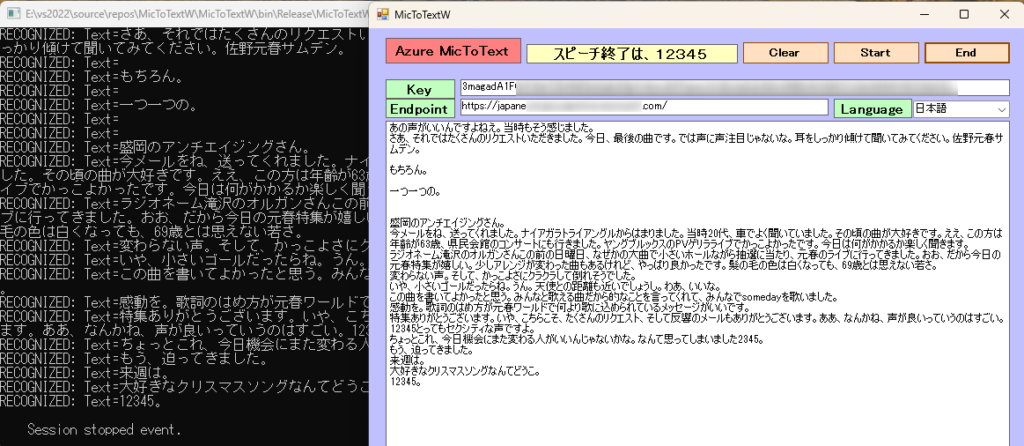
ラジオの音声をマイクで拾いながら実行。曲の歌詞は、難しいようです。会話は、うまくテキスト化できました。終了は、無音のタイミングで”12345”と発声すると終了し、テキストボックスに表示されます。アプリの実行フォルダーにテキストデータ(ファイル名は、TEXT。内容は、追記されます。)が作成されます。
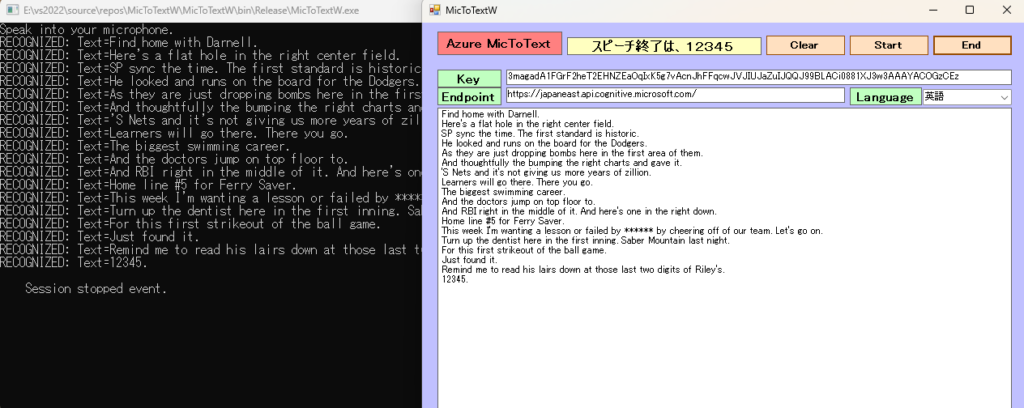
TVの音声をマイクで拾いながら実行。大リーグの中継実況は、うまくテキスト化できました。終了は、無音のタイミングで”onetwothreefourfive”と発声すると終了し、テキストボックスに表示されます。アプリの実行フォルダーにテキストデータ(ファイル名は、TEXT。内容は、追記されます。)が作成されます。
音声テキスト変換の概要
Foundry Tools サービスの Azure Speech は、高度な音声テキスト変換機能を提供します。 この機能では、リアルタイムおよびバッチの両方の文字起こしをサポートしており、オーディオ ストリームをテキストに変換するための汎用性の高いソリューションを実現できます。
リアルタイム文字起こし
リアルタイムの音声テキスト変換では、マイクまたはファイルからオーディオを認識すると、その文字起こしを行います。
Microsoft Azure AI Speech SDKを使用するこれには、Azure Portal での Azure Speech リソースの設定、資格情報の取得、
SpeechRecognizerC# アプリケーションでの SDK のクラスの使用が含まれます。
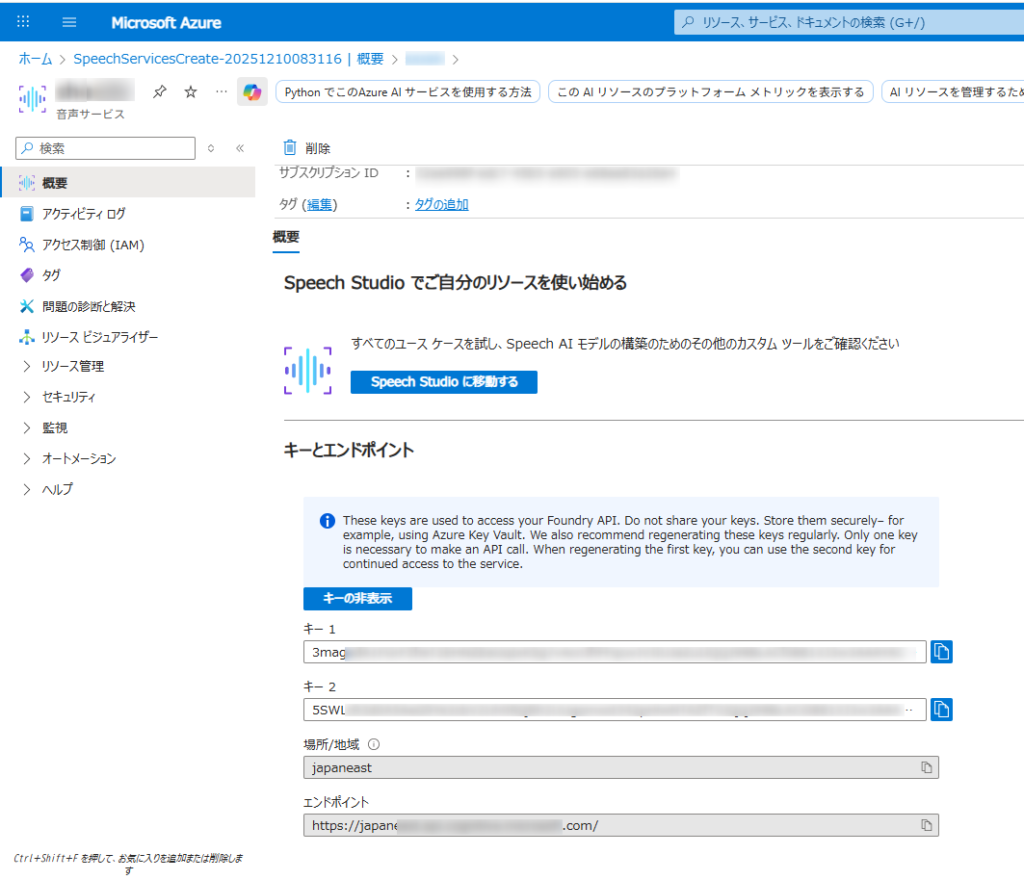
- Azure アカウントと音声リソース:
- 有効な Azure サブスクリプションが必要です。無料で作成できます。
- Azure ポータルで、新しい「Speech」サービス リソースを作成します。
- 作成したら、リソースの「キーとエンドポイント」セクションに移動し、キー 1 またはキー 2 とエンドポイントをコピーします。
- 開発環境:
- 適切な Microsoft Visual C++ 再頒布可能パッケージがインストールされたVisual Studio (2015、2017、2019、または 2022) 。
- 互換性のある .NET プラットフォーム (.NET Core、.NET 5+、.NET Standard 2.0 など) を対象とする C# プロジェクト。
- Microsoft.CognitiveServices.Speech NuGet パッケージをインストールします。NuGet パッケージ マネージャー コンソールからインストールできます。
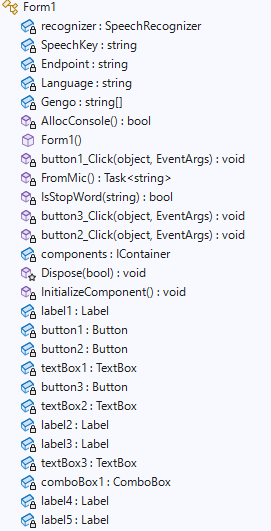
Form1
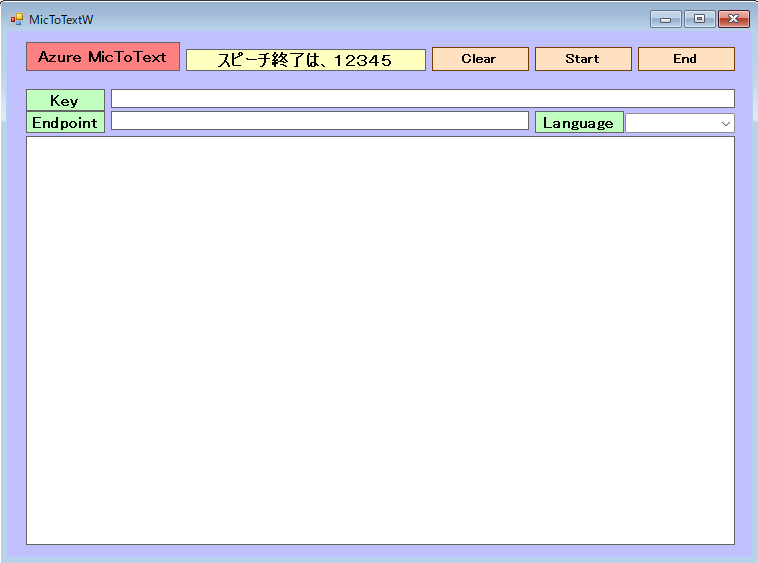
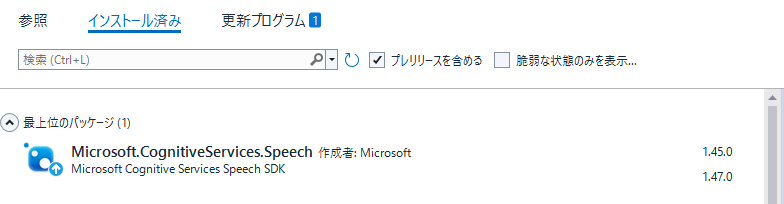
Microsoft.CognitiveServices.Speechのバージョンは、1.47ではなく1.45を導入。Formにて、1.47はSpeechConfig実行時にエラーが出て処理できません。(2025-12-11時点で)
Form1.cs
using Microsoft.CognitiveServices.Speech;
using Microsoft.CognitiveServices.Speech.Audio;
using System;
using System.Collections.Generic;
using System.ComponentModel;
using System.Data;
using System.Drawing;
using System.IO;
using System.Linq;
using System.Net;
using System.Text;
using System.Threading.Tasks;
using System.Windows.Forms;
using static System.Windows.Forms.VisualStyles.VisualStyleElement;

namespace MicToTextW
{
    public partial class Form1 : Form
    {
        private SpeechRecognizer recognizer;
        private static string SpeechKey = "3magad***********************************      "; // Replace with your key
        private static string Endpoint = "https://japan*****************************t.com/";   // Replace with your region (e.g., "westus")
        private static string Language = "ja-JP";
        //翻訳言語の設定
        String[] Gengo = new String[6] { "01", "ja-JP", "日本語", "02", "en-US", "英語" };

        //コンソール表示設定
        [System.Runtime.InteropServices.DllImport("kernel32.dll")]
        private static extern bool AllocConsole();

        public Form1()
        {
            InitializeComponent();

            //コンソール表示
            AllocConsole();

            textBox2.Text = SpeechKey;
            textBox3.Text = Endpoint;
            for (int i = 2; i < Gengo.Length; i = i + 3)
            {
                //Console.WriteLine("{0}番目の要素の値は{1}です。", i + 1, Gengo[i]);
                // コンボボックスに項目を追加する
                comboBox1.Items.Add(Gengo[i]);
            }

            // 初期値を設定する(日本語を選択する)
            comboBox1.SelectedIndex = 0;

        }

        private async void button1_Click(object sender, EventArgs e)
        {
            SpeechKey = textBox2.Text;
            Endpoint = textBox3.Text;
            Language = Gengo[comboBox1.SelectedIndex * 3 + 1];

            button1.Enabled = false;
            textBox1.Text  += await FromMic();
            button1.Enabled = true;
        }

        async static Task<string> FromMic()
        {
            //string Endpoint = "https://japaneast****************************";
            //string SpeechKey = "3maga***************************************";
            var speechConfig = SpeechConfig.FromEndpoint(new Uri(Endpoint), SpeechKey);
            speechConfig.SpeechRecognitionLanguage = Language; //language; //"ja-JP","en-US";

            var stopRecognition = new TaskCompletionSource<int>();
            var sb = new StringBuilder();

            Console.WriteLine("Speak into your microphone.");

            using (var audioConfig = AudioConfig.FromDefaultMicrophoneInput())
            {
                using (var speechRecognizer = new SpeechRecognizer(speechConfig, audioConfig))
                {

                    speechRecognizer.Recognized += (s, e) =>
                    {
                        if (e.Result.Reason == ResultReason.RecognizedSpeech)
                        {
                            Console.WriteLine($"RECOGNIZED: Text={e.Result.Text}");
                            sb.Append(e.Result.Text + "\r\n");

                            File.AppendAllText(System.IO.Directory.GetCurrentDirectory() + @"\Text.txt", e.Result.Text + "\r\n");

               //音声入力の終了の言葉か判断します。
                            if (IsStopWord(e.Result.Text))
                            {
                                stopRecognition.TrySetResult(0);
                            }
                        }
                        else if (e.Result.Reason == ResultReason.NoMatch)
                        {
                            Console.WriteLine($"NOMATCH: Speech could not be recognized.");
                        }
                    };

                    speechRecognizer.Canceled += (s, e) =>
                    {
                        Console.WriteLine($"CANCELED: Reason={e.Reason}");

                        if (e.Reason == CancellationReason.Error)
                        {
                            Console.WriteLine($"CANCELED: ErrorCode={e.ErrorCode}");
                            Console.WriteLine($"CANCELED: ErrorDetails={e.ErrorDetails}");
                            Console.WriteLine($"CANCELED: Did you set the speech resource key and endpoint values?");
                        }

                        stopRecognition.TrySetResult(0);
                    };

                    speechRecognizer.SessionStopped += (s, e) =>
                    {
                        Console.WriteLine("\n    Session stopped event.");
                        stopRecognition.TrySetResult(0);
                    };


                    // Starts continuous recognition. Uses StopContinuousRecognitionAsync() to stop recognition.
                    await speechRecognizer.StartContinuousRecognitionAsync().ConfigureAwait(false);

                    // Waits for completion.
                    // Use Task.WaitAny to keep the task rooted.
                    Task.WaitAny(new[] { stopRecognition.Task });

                    await speechRecognizer.StopContinuousRecognitionAsync().ConfigureAwait(false);

                }

            }
            return sb.ToString();
        }

    //音声入力終了用の合言葉 12345 英語の場合は、onetwothreefourfive
        private static bool IsStopWord(string message)
        {
            return message == "12345。" || message == "12345.";
        }


        private void button3_Click(object sender, EventArgs e)
        {
            textBox1.Text = "";

        }

        private void button2_Click(object sender, EventArgs e)
        {
            this.Close();
        }


        /*  SpeechConfigのチェック

            // Azureポータルから取得したエンドポイントURIとサブスクリプションキーを設定します
            // string Endpoint = "https://japaneast****************************";
            // string SpeechKey = "3magad***********************************";

            try
            {
                // FromEndpoint メソッドを使用して SpeechConfig インスタンスを作成します
                // エンドポイントURIは Uri 型で指定します
                var config = SpeechConfig.FromEndpoint(new Uri(Endpoint), SpeechKey);

                // 必要に応じて、他のプロパティ(例: 言語)を設定します
                // config.SpeechRecognitionLanguage = "ja-JP";

                // SpeechConfig を使用して他の Speech SDK オブジェクト (例: SpeechRecognizer) を作成し、処理を続行します
                // ... (例: using var recognizer = new SpeechRecognizer(config); )

                MessageBox.Show("SpeechConfig が正常に作成されました。");
            }
            catch (Exception ex)
            {
                MessageBox.Show($"エラーが発生しました: {ex.Message}");
            }
        */

    }

}
C# ラジオの音声をマイクで拾いながら実行。曲の歌詞は、難しいようです。会話は、うまくテキスト化できました。終了は、無音のタイミングで”12345”と発声すると終)