
google antigravityでmusic playerを作成
要求を入力して MusicPlayer を作成しました。コードレスでここまで出来ます。
c#で音楽再生ソフトを作成してください。再生リストありでお願いします。
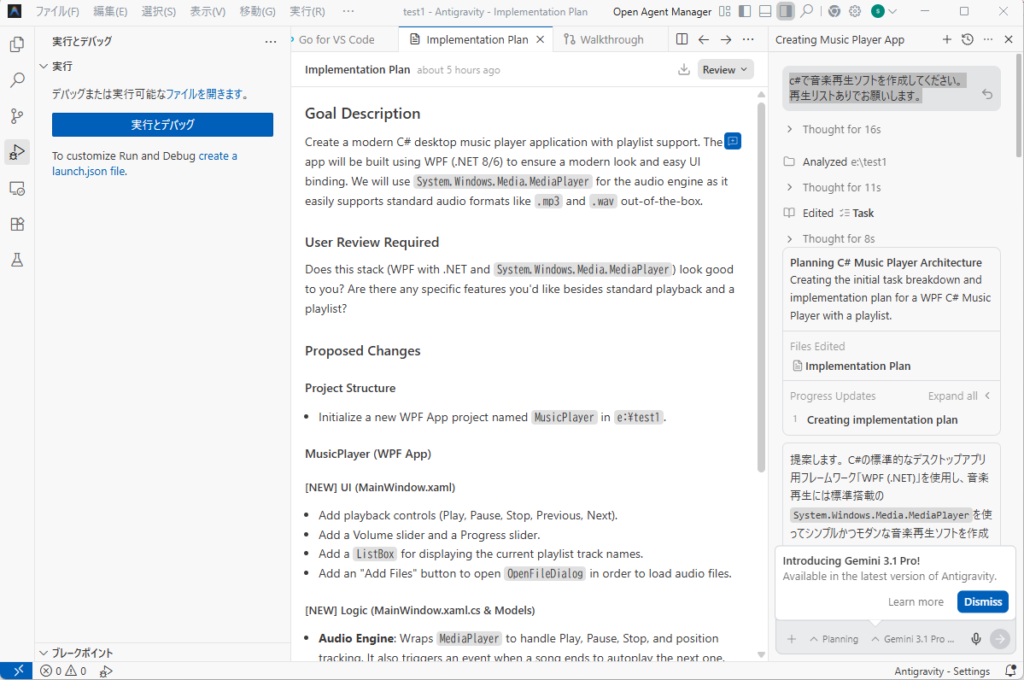
Goal Description
Create a modern C# desktop music player application with playlist support. The app will be built using WPF (.NET 8/6) to ensure a modern look and easy UI binding. We will use System.Windows.Media.MediaPlayer for the audio engine as it easily supports standard audio formats like .mp3 and .wav out-of-the-box.

User Review Required
Does this stack (WPF with .NET and System.Windows.Media.MediaPlayer) look good to you? Are there any specific features you'd like besides standard playback and a playlist?

Proposed Changes
Project Structure
Initialize a new WPF App project named MusicPlayer in e:\test1.
MusicPlayer (WPF App)
[NEW] UI (MainWindow.xaml)
Add playback controls (Play, Pause, Stop, Previous, Next).
Add a Volume slider and a Progress slider.
Add a ListBox for displaying the current playlist track names.
Add an "Add Files" button to open OpenFileDialog in order to load audio files.
[NEW] Logic (MainWindow.xaml.cs & Models)
Audio Engine: Wraps MediaPlayer to handle Play, Pause, Stop, and position tracking. It also triggers an event when a song ends to autoplay the next one.
Playlist State: Maintains an ObservableCollection<Track> where Track holds file path and display name.
Events: Handles UI interactions to manipulate the MediaPlayer and the playlist.
Verification Plan
Manual Verification
Launch the application using dotnet run.
Use the "Add Files" button to add test .mp3 or .wav files.
Verify that selecting a track and clicking "Play" starts playback.
Verify that the Play, Pause, Stop, Next, and Previous controls work properly.
Verify that the next track plays automatically when the current one finishes.
作成された Music Player の追加要望を入力
playlistの保存ボタンとplaylist読込処理を追加
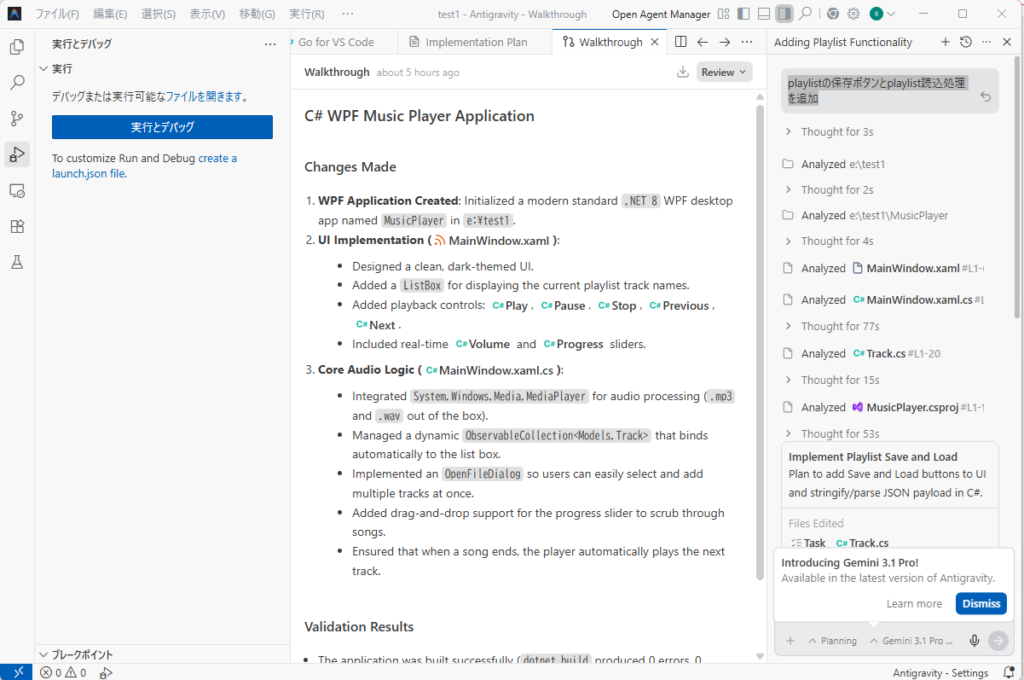
C# WPF Music Player Application
Changes Made
WPF Application Created: Initialized a modern standard .NET 8 WPF desktop app named MusicPlayer in e:\test1.
UI Implementation (
MainWindow.xaml
):
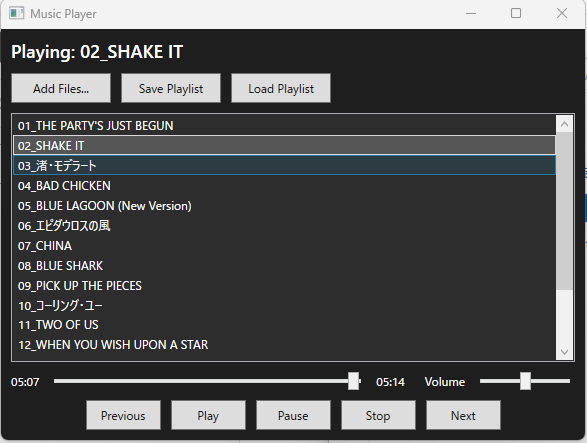
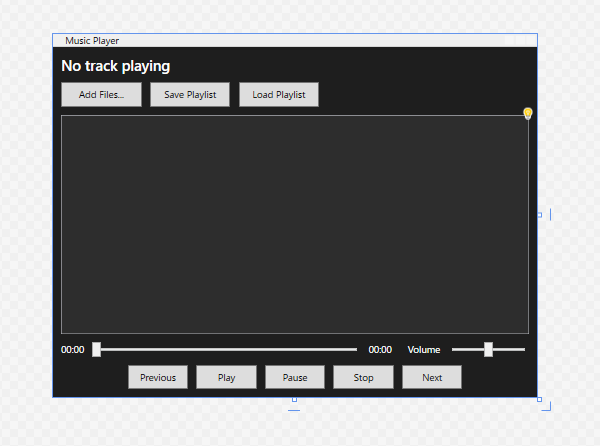
Designed a clean, dark-themed UI.
Added a ListBox for displaying the current playlist track names.
Added playback controls:
Play
,
Pause
,
Stop
,
Previous
,
Next
.
Included real-time
Volume
 and
Progress
 sliders.
Core Audio Logic (
MainWindow.xaml.cs
):
Integrated System.Windows.Media.MediaPlayer for audio processing (.mp3 and .wav out of the box).
Managed a dynamic ObservableCollection<Models.Track> that binds automatically to the list box.
Implemented an OpenFileDialog so users can easily select and add multiple tracks at once.
Added drag-and-drop support for the progress slider to scrub through songs.
Ensured that when a song ends, the player automatically plays the next track.
Validation Results
The application was built successfully (dotnet build produced 0 errors, 0 warnings).
Manual Verification: Run dotnet run inside the e:\test1\MusicPlayer directory to launch the app.

Comment
Ctrl+Alt+M
完成した Music Player
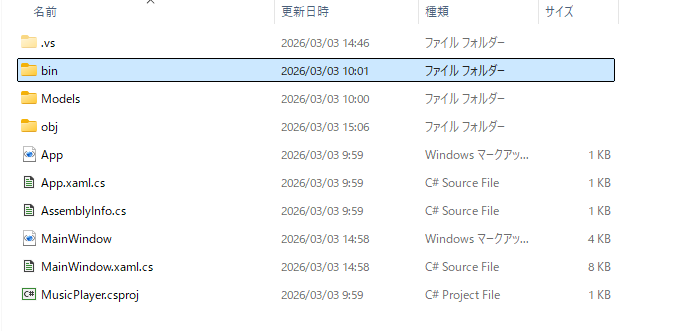
フォルダーの内容
using Microsoft.Win32;
using MusicPlayer.Models;
using System;
using System.Collections.ObjectModel;
using System.IO;
using System.Text.Json;
using System.Windows;
using System.Windows.Controls.Primitives;
using System.Windows.Media;
using System.Windows.Threading;

namespace MusicPlayer;

public partial class MainWindow : Window
{
    private MediaPlayer _mediaPlayer = new MediaPlayer();
    private ObservableCollection<Models.Track> _playlist = new ObservableCollection<Models.Track>();
    private DispatcherTimer _timer;
    private bool _isDraggingSlider = false;
    private int _currentTrackIndex = -1;

    public MainWindow()
    {
        InitializeComponent();

        lbPlaylist.ItemsSource = _playlist;

        _mediaPlayer.MediaOpened += MediaPlayer_MediaOpened;
        _mediaPlayer.MediaEnded += MediaPlayer_MediaEnded;

        _timer = new DispatcherTimer();
        _timer.Interval = TimeSpan.FromMilliseconds(200);
        _timer.Tick += Timer_Tick;
    }

    private void BtnAddFiles_Click(object sender, RoutedEventArgs e)
    {
        OpenFileDialog openFileDialog = new OpenFileDialog
        {
            Multiselect = true,
            Filter = "Audio Files (*.mp3;*.wav)|*.mp3;*.wav|All files (*.*)|*.*"
        };

        if (openFileDialog.ShowDialog() == true)
        {
            foreach (string filename in openFileDialog.FileNames)
            {
                var title = System.IO.Path.GetFileNameWithoutExtension(filename);
                _playlist.Add(new Models.Track(filename, title));
            }
        }
    }

    private void BtnSavePlaylist_Click(object sender, RoutedEventArgs e)
    {
        SaveFileDialog saveFileDialog = new SaveFileDialog
        {
            Filter = "Playlist Files (*.json)|*.json|All files (*.*)|*.*",
            DefaultExt = "json"
        };

        if (saveFileDialog.ShowDialog() == true)
        {
            try
            {
                var options = new JsonSerializerOptions { WriteIndented = true };
                string jsonString = JsonSerializer.Serialize(_playlist, options);
                File.WriteAllText(saveFileDialog.FileName, jsonString);
                MessageBox.Show("Playlist saved successfully.", "Success", MessageBoxButton.OK, MessageBoxImage.Information);
            }
            catch (Exception ex)
            {
                MessageBox.Show($"Error saving playlist: {ex.Message}", "Error", MessageBoxButton.OK, MessageBoxImage.Error);
            }
        }
    }

    private void BtnLoadPlaylist_Click(object sender, RoutedEventArgs e)
    {
        OpenFileDialog openFileDialog = new OpenFileDialog
        {
            Filter = "Playlist Files (*.json)|*.json|All files (*.*)|*.*"
        };

        if (openFileDialog.ShowDialog() == true)
        {
            try
            {
                string jsonString = File.ReadAllText(openFileDialog.FileName);
                var loadedPlaylist = JsonSerializer.Deserialize<ObservableCollection<Models.Track>>(jsonString);

                if (loadedPlaylist != null)
                {
                    _playlist.Clear();
                    foreach (var track in loadedPlaylist)
                    {
                        _playlist.Add(track);
                    }
                    _currentTrackIndex = -1;
                    _mediaPlayer.Stop();
                    lblCurrentTrack.Text = "No track playing";
                    sliderProgress.Value = 0;
                }
            }
            catch (Exception ex)
            {
                MessageBox.Show($"Error loading playlist: {ex.Message}", "Error", MessageBoxButton.OK, MessageBoxImage.Error);
            }
        }
    }

    private void LbPlaylist_MouseDoubleClick(object sender, System.Windows.Input.MouseButtonEventArgs e)
    {
        if (lbPlaylist.SelectedIndex >= 0)
        {
            PlayTrack(lbPlaylist.SelectedIndex);
        }
    }

    private void PlayTrack(int index)
    {
        if (index >= 0 && index < _playlist.Count)
        {
            _currentTrackIndex = index;
            lbPlaylist.SelectedIndex = index;
            Models.Track track = _playlist[index];

            _mediaPlayer.Open(new Uri(track.FilePath));
            _mediaPlayer.Play();
            _timer.Start();

            lblCurrentTrack.Text = $"Playing: {track.Title}";
            _mediaPlayer.Volume = sliderVolume.Value;
        }
    }

    private void BtnPlay_Click(object sender, RoutedEventArgs e)
    {
        if (_currentTrackIndex == -1 && _playlist.Count > 0)
        {
            PlayTrack(0);
        }
        else if (_currentTrackIndex >= 0)
        {
            _mediaPlayer.Play();
            _timer.Start();
        }
    }

    private void BtnPause_Click(object sender, RoutedEventArgs e)
    {
        _mediaPlayer.Pause();
    }

    private void BtnStop_Click(object sender, RoutedEventArgs e)
    {
        _mediaPlayer.Stop();
        _mediaPlayer.Position = TimeSpan.Zero;
        sliderProgress.Value = 0;
    }

    private void BtnPrevious_Click(object sender, RoutedEventArgs e)
    {
        if (_currentTrackIndex > 0)
        {
            PlayTrack(_currentTrackIndex - 1);
        }
    }

    private void BtnNext_Click(object sender, RoutedEventArgs e)
    {
        if (_currentTrackIndex < _playlist.Count - 1)
        {
            PlayTrack(_currentTrackIndex + 1);
        }
    }

    private void MediaPlayer_MediaOpened(object? sender, EventArgs e)
    {
        if (_mediaPlayer.NaturalDuration.HasTimeSpan)
        {
            TimeSpan duration = _mediaPlayer.NaturalDuration.TimeSpan;
            sliderProgress.Maximum = duration.TotalSeconds;
            lblTotalTime.Text = duration.ToString(@"mm\:ss");
        }
    }

    private void MediaPlayer_MediaEnded(object? sender, EventArgs e)
    {
        if (_currentTrackIndex < _playlist.Count - 1)
        {
            PlayTrack(_currentTrackIndex + 1);
        }
        else
        {
            _mediaPlayer.Stop();
            _timer.Stop();
        }
    }

    private void Timer_Tick(object? sender, EventArgs e)
    {
        if (_mediaPlayer.Source != null && _mediaPlayer.NaturalDuration.HasTimeSpan && !_isDraggingSlider)
        {
            sliderProgress.Value = _mediaPlayer.Position.TotalSeconds;
            lblCurrentTime.Text = _mediaPlayer.Position.ToString(@"mm\:ss");
        }
    }

    private void SliderProgress_DragStarted(object sender, DragStartedEventArgs e)
    {
        _isDraggingSlider = true;
    }

    private void SliderProgress_DragCompleted(object sender, DragCompletedEventArgs e)
    {
        _isDraggingSlider = false;
        _mediaPlayer.Position = TimeSpan.FromSeconds(sliderProgress.Value);
    }

    private void SliderProgress_ValueChanged(object sender, RoutedPropertyChangedEventArgs<double> e)
    {
        if (_isDraggingSlider)
        {
            lblCurrentTime.Text = TimeSpan.FromSeconds(sliderProgress.Value).ToString(@"mm\:ss");
        }
    }

    private void SliderVolume_ValueChanged(object sender, RoutedPropertyChangedEventArgs<double> e)
    {
        _mediaPlayer.Volume = sliderVolume.Value;
    }
}
<Window x:Class="MusicPlayer.MainWindow"
        xmlns="http://schemas.microsoft.com/winfx/2006/xaml/presentation"
        xmlns:x="http://schemas.microsoft.com/winfx/2006/xaml"
        xmlns:d="http://schemas.microsoft.com/expression/blend/2008"
        xmlns:mc="http://schemas.openxmlformats.org/markup-compatibility/2006"
        xmlns:local="clr-namespace:MusicPlayer"
        mc:Ignorable="d"
        Title="Music Player" Height="450" Width="600"
        Background="#1e1e1e" Foreground="White">
    <Grid Margin="10">
        <Grid.RowDefinitions>
            <RowDefinition Height="Auto"/>
            <RowDefinition Height="Auto"/>
            <RowDefinition Height="*"/>
            <RowDefinition Height="Auto"/>
            <RowDefinition Height="Auto"/>
        </Grid.RowDefinitions>

        <!-- Current Track Info -->
        <TextBlock x:Name="lblCurrentTrack" Grid.Row="0" Text="No track playing"
                   FontSize="18" FontWeight="Bold" Margin="0,0,0,10"
                   TextTrimming="CharacterEllipsis"/>

        <!-- Playlist Actions -->
        <StackPanel Grid.Row="1" Orientation="Horizontal" Margin="0,0,0,10">
            <Button Content="Add Files..." Width="100" Height="30" Margin="0,0,10,0" Click="BtnAddFiles_Click"/>
            <Button Content="Save Playlist" Width="100" Height="30" Margin="0,0,10,0" Click="BtnSavePlaylist_Click"/>
            <Button Content="Load Playlist" Width="100" Height="30" Click="BtnLoadPlaylist_Click"/>
        </StackPanel>

        <!-- Playlist -->
        <ListBox x:Name="lbPlaylist" Grid.Row="2" Background="#2d2d2d" Foreground="White"
                 Margin="0,0,0,10" MouseDoubleClick="LbPlaylist_MouseDoubleClick"/>

        <!-- Progress and Volume -->
        <Grid Grid.Row="3" Margin="0,0,0,10">
            <Grid.ColumnDefinitions>
                <ColumnDefinition Width="Auto"/>
                <ColumnDefinition Width="*"/>
                <ColumnDefinition Width="Auto"/>
                <ColumnDefinition Width="Auto"/>
                <ColumnDefinition Width="100"/>
            </Grid.ColumnDefinitions>

            <TextBlock x:Name="lblCurrentTime" Grid.Column="0" Text="00:00" Margin="0,0,10,0" VerticalAlignment="Center"/>
            <Slider x:Name="sliderProgress" Grid.Column="1" Margin="0,0,10,0"
                    VerticalAlignment="Center" Minimum="0" Maximum="100"
                    Thumb.DragStarted="SliderProgress_DragStarted"
                    Thumb.DragCompleted="SliderProgress_DragCompleted"
                    ValueChanged="SliderProgress_ValueChanged"/>
            <TextBlock x:Name="lblTotalTime" Grid.Column="2" Text="00:00" Margin="0,0,20,0" VerticalAlignment="Center"/>

            <TextBlock Grid.Column="3" Text="Volume" Margin="0,0,10,0" VerticalAlignment="Center"/>
            <Slider x:Name="sliderVolume" Grid.Column="4" VerticalAlignment="Center"
                    Minimum="0" Maximum="1" Value="0.5" ValueChanged="SliderVolume_ValueChanged"/>
        </Grid>

        <!-- Playback Controls -->
        <StackPanel Grid.Row="4" Orientation="Horizontal" HorizontalAlignment="Center">
            <Button Content="Previous" Width="75" Height="30" Margin="0,0,10,0" Click="BtnPrevious_Click"/>
            <Button Content="Play" Width="75" Height="30" Margin="0,0,10,0" Click="BtnPlay_Click"/>
            <Button Content="Pause" Width="75" Height="30" Margin="0,0,10,0" Click="BtnPause_Click"/>
            <Button Content="Stop" Width="75" Height="30" Margin="0,0,10,0" Click="BtnStop_Click"/>
            <Button Content="Next" Width="75" Height="30" Click="BtnNext_Click"/>
        </StackPanel>
    </Grid>
</Window>
