
画像圧縮ソフト C#
AI による概要
C#で画像を圧縮するには、主にImageSharp(推奨)、SkiaSharp、または旧来のSystem.Drawingを使用します。
System.Drawingを利用した圧縮ソフトです。
実行画面
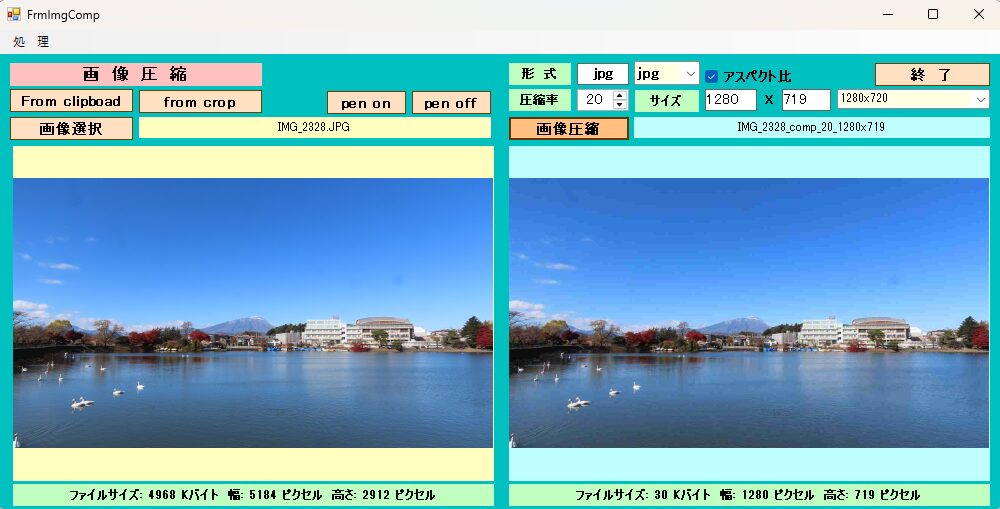
機 能
形式:bmp png tiff gif jpg 圧縮率:1~100 アスペクト比維持か否か サイズ:入力値どうり
[From clipboad]:クリップボード経由で画像を取り込みます。
[from crop]:元画像を画面上で切り取り指定し(マウス操作により赤線で囲みます)取り込みます。
[pen on]:赤ペンで描画します。
[pen off]:赤ペン描画をやめます。
画面設計 FrmImgComp
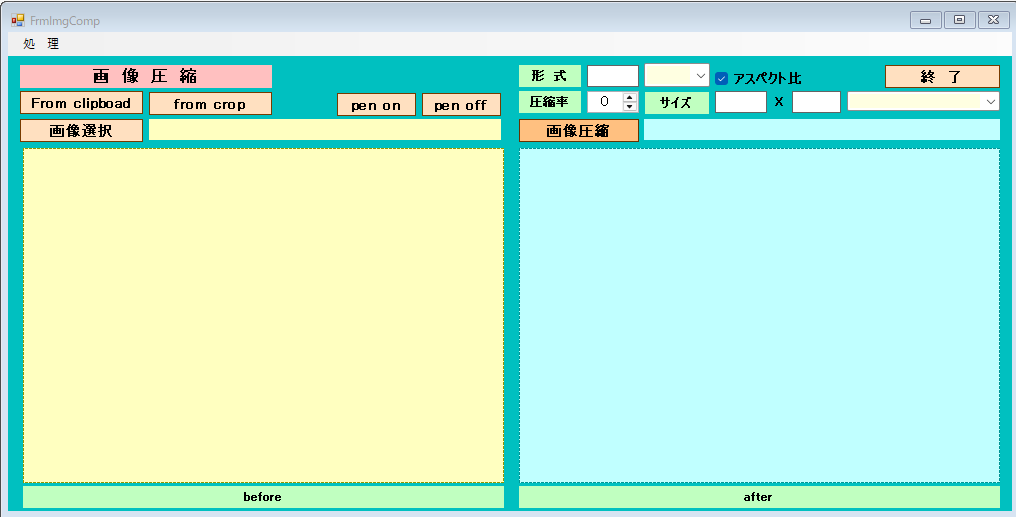
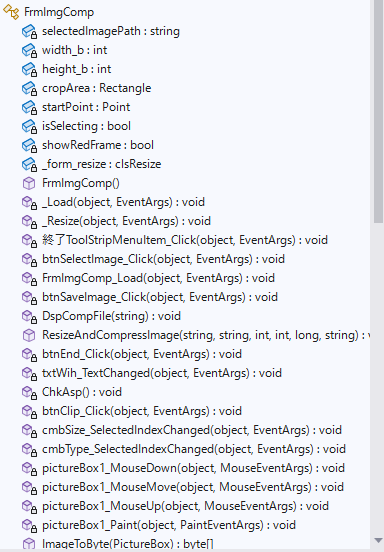
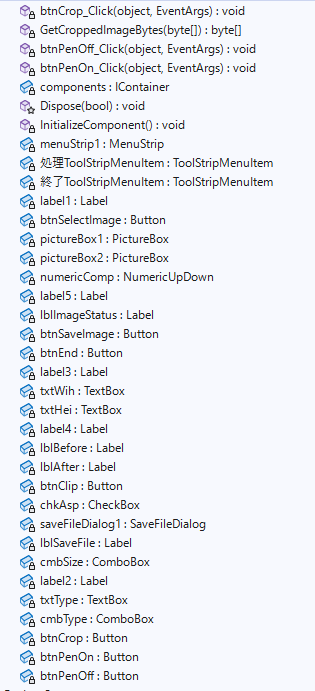
コード FrmImgComp.cs
using DocumentFormat.OpenXml.Drawing.Charts;
using DocumentFormat.OpenXml.Drawing.Wordprocessing;
using DocumentFormat.OpenXml.Spreadsheet;
using DocumentFormat.OpenXml.Vml;
using System;
using System.Collections.Generic;
using System.ComponentModel;
using System.Data;
using System.Drawing;
using System.Drawing.Drawing2D;
using System.Drawing.Imaging;
using System.IO;
using System.Linq;
using System.Runtime.InteropServices;
using System.Security.Cryptography;
using System.Text;
using System.Threading.Tasks;
using System.Windows.Forms;
using static iTextSharp.awt.geom.Point2D;
namespace FrmChatV2
{
public partial class FrmImgComp : Form
{
private string selectedImagePath;
int width_b;
int height_b;
private System.Drawing.Rectangle cropArea; // 選択された範囲を保持
private Point startPoint; // マウスを押し下げた位置
private bool isSelecting = false; // 選択中かどうか
bool showRedFrame = true; // paintの線 trueなら表示、falseなら非表示
//control clsResize
clsResize _form_resize;
public FrmImgComp()
{
InitializeComponent();
_form_resize = new clsResize(this); //I put this after the initialize event to be sure that all controls are initialized properly
this.Load += new EventHandler(_Load); //This will be called after the initialization // form_load
this.Resize += new EventHandler(_Resize); //form_resize
numericComp.Value = 20;
txtWih.Text = "1280";
txtHei.Text = "720";
chkAsp.Checked = true;
cmbSize.Items.Add("640x480");
cmbSize.Items.Add("800x600");
cmbSize.Items.Add("1024x768");
cmbSize.Items.Add("1280x720");
cmbSize.Items.Add("1920x1080");
cmbSize.SelectedIndex = 3;
cmbType.Items.Add("bmp");
cmbType.Items.Add("png");
cmbType.Items.Add("gif");
cmbType.Items.Add("tiff");
cmbType.Items.Add("jpg");
cmbType.SelectedIndex = 4;
}
//clsResize _Load
private void _Load(object sender, EventArgs e)
{
_form_resize._get_initial_size();
}
//clsResize _Resize
private void _Resize(object sender, EventArgs e)
{
_form_resize._resize();
}
private void 終了ToolStripMenuItem_Click(object sender, EventArgs e)
{
this.Close();
}
private void btnSelectImage_Click(object sender, EventArgs e)
{
showRedFrame = true; // ペン(フラグ)をオンにする
using (OpenFileDialog ofd = new OpenFileDialog())
{
ofd.Filter = "画像ファイル|*.jpg;*.jpeg;*.png;*.gif;*.bmp;*.tiff";
if (ofd.ShowDialog() == DialogResult.OK)
{
selectedImagePath = ofd.FileName;
lblImageStatus.Text = System.IO.Path.GetFileName(selectedImagePath); // ファイル名を表示
// 選択された画像をプレビュー枠に表示
pictureBox1.Image = System.Drawing.Image.FromFile(ofd.FileName);
System.IO.FileInfo fileInfo = new System.IO.FileInfo(ofd.FileName);
long fileSizeInBytes = fileInfo.Length;
lblBefore.Text=($"ファイルサイズ: {fileSizeInBytes/1000} Kバイト");
using (Image image = Image.FromFile(ofd.FileName))
{
// 幅と高さを取得
width_b = image.Width;
height_b = image.Height;
lblBefore.Text+= ($" 幅: {width_b} ピクセル");
lblBefore.Text+= ($" 高さ: {height_b} ピクセル");
}
ChkAsp();
}
}
}
private void FrmImgComp_Load(object sender, EventArgs e)
{
}
private void btnSaveImage_Click(object sender, EventArgs e)
{
if (pictureBox2.Image != null)
{
pictureBox2.Image.Dispose();
pictureBox2.Image = null;
}
string dirSource = System.IO.Path.GetDirectoryName(selectedImagePath); // ディレクトリー名を表示
string fileSource = System.IO.Path.GetFileNameWithoutExtension(selectedImagePath); //拡張子なしファイル名
ChkAsp();
long quality = Convert.ToInt32(numericComp.Value);
int wid = Convert.ToInt32(txtWih.Text);
int hei = Convert.ToInt32(txtHei.Text);
DateTime dt = DateTime.Now;
string result = dt.ToString("_yyyyMMdd_HHmmss");
result = "_" + Convert.ToString(numericComp.Value) + "_" + txtWih.Text + "x" + txtHei.Text;
string destPath = dirSource + "/" + fileSource + "_comp" + result + "." + txtType.Text;
//SaveFileDialogクラスのインスタンスを作成
SaveFileDialog sfd = new SaveFileDialog();
//はじめのファイル名を指定する
//はじめに「ファイル名」で表示される文字列を指定する
sfd.FileName = fileSource + "_comp" + result + "." + txtType.Text;
//はじめに表示されるフォルダを指定する
sfd.InitialDirectory = dirSource;
//[ファイルの種類]に表示される選択肢を指定する
//指定しない(空の文字列)の時は、現在のディレクトリが表示される
sfd.Filter = "bmpファイル(*.bmp)|*.bmp|pngファイル(*.png)|*.png|gifファイル(*.gif)|*.gif|tiffファイル(*.tiff)|*.tiff|jpgファイル(*.jpg)|*.jpg|すべてのファイル(*.*)|*.*";
//[ファイルの種類]ではじめに選択されるものを指定する
//2番目の「すべてのファイル」が選択されているようにする
if (txtType.Text == "bmp")
{
sfd.FilterIndex = 1;
}
else if (txtType.Text == "png")
{
sfd.FilterIndex = 2;
}
else if (txtType.Text == "gif")
{
sfd.FilterIndex = 3;
}
else if (txtType.Text == "tiff")
{
sfd.FilterIndex = 4;
}
else if (txtType.Text == "jpg")
{
sfd.FilterIndex = 5;
}
//タイトルを設定する
sfd.Title = "保存先のファイルを選択してください";
//ダイアログボックスを閉じる前に現在のディレクトリを復元するようにする
sfd.RestoreDirectory = true;
//既に存在するファイル名を指定したとき警告する
//デフォルトでTrueなので指定する必要はない
sfd.OverwritePrompt = true;
//存在しないパスが指定されたとき警告を表示する
//デフォルトでTrueなので指定する必要はない
sfd.CheckPathExists = true;
//ダイアログを表示する
if (sfd.ShowDialog() == DialogResult.OK)
{
//圧縮ファイル作成
ResizeAndCompressImage(selectedImagePath, destPath, wid, hei, quality,txtType.Text);
lblSaveFile.Text = System.IO.Path.GetFileNameWithoutExtension(sfd.FileName);
//画像表示
DspCompFile(destPath);
}
}
private void DspCompFile(string destPath)
{
// ここでファイルを使用する
pictureBox2.Image = System.Drawing.Image.FromFile(destPath);
System.IO.FileInfo fileInfo = new System.IO.FileInfo(destPath);
long fileSizeInBytes = fileInfo.Length;
lblAfter.Text = ($"ファイルサイズ: {fileSizeInBytes / 1000} Kバイト");
using (Image image = Image.FromFile(destPath))
{
// 幅と高さを取得
int width = image.Width;
int height = image.Height;
lblAfter.Text += ($" 幅: {width} ピクセル");
lblAfter.Text += ($" 高さ: {height} ピクセル");
}
}
public void ResizeAndCompressImage(string sourcePath, string destPath, int width, int height, long quality,string type)
{
using (Bitmap sourceImage = new Bitmap(sourcePath))
using (Bitmap resizedImage = new Bitmap(width, height))
using (Graphics g = Graphics.FromImage(resizedImage))
{
// 高品質な縮小設定
g.InterpolationMode = InterpolationMode.HighQualityBicubic;
g.DrawImage(sourceImage, 0, 0, width, height);
// JPEG圧縮パラメータの設定
EncoderParameters encoderParams = new EncoderParameters(1);
encoderParams.Param[0] = new EncoderParameter(System.Drawing.Imaging.Encoder.Quality, quality);
if (type == "jpg")
{
// JPEGエンコーダの取得
ImageCodecInfo jpgEncoder = ImageCodecInfo.GetImageDecoders()
.First(c => c.FormatID == ImageFormat.Jpeg.Guid);
// 保存
resizedImage.Save(destPath, jpgEncoder, encoderParams);
}
else if (type == "bmp")
{
// BMPエンコーダの取得
ImageCodecInfo bmpEncoder = ImageCodecInfo.GetImageDecoders()
.First(c => c.FormatID == ImageFormat.Bmp.Guid);
// 保存
resizedImage.Save(destPath, bmpEncoder, encoderParams);
}
else if (type == "png")
{
// PNGエンコーダの取得
ImageCodecInfo pngEncoder = ImageCodecInfo.GetImageDecoders()
.First(c => c.FormatID == ImageFormat.Png.Guid);
// 保存
resizedImage.Save(destPath, pngEncoder, encoderParams);
}
else if (type == "gif")
{
// PNGエンコーダの取得
ImageCodecInfo pngEncoder = ImageCodecInfo.GetImageDecoders()
.First(c => c.FormatID == ImageFormat.Gif.Guid);
// 保存
resizedImage.Save(destPath, pngEncoder, encoderParams);
}
else if (type == "tiff")
{
// PNGエンコーダの取得
ImageCodecInfo pngEncoder = ImageCodecInfo.GetImageDecoders()
.First(c => c.FormatID == ImageFormat.Tiff.Guid);
// 保存
resizedImage.Save(destPath, pngEncoder, encoderParams);
}
}
}
private void btnEnd_Click(object sender, EventArgs e)
{
this.Close();
}
private void txtWih_TextChanged(object sender, EventArgs e)
{
ChkAsp();
}
//aspect
private void ChkAsp()
{
if (height_b != 0 && width_b != 0 && chkAsp.Checked == true)
{
int w = Convert.ToInt16(txtWih.Text);
int h = w * height_b / width_b;
txtHei.Text = Convert.ToString(h);
}
}
private void btnClip_Click(object sender, EventArgs e)
{
if (Clipboard.ContainsImage())
{
// クリップボードから画像を取得してPictureBoxにセット
pictureBox1.Image = Clipboard.GetImage();
// 画像全体が見えるようにサイズモードを調整(任意)
pictureBox1.SizeMode = PictureBoxSizeMode.Zoom;
// PictureBoxに画像がある場合のみ保存
if (pictureBox1.Image != null)
{
// ファイルダイアログなどでパスを取得する前提
string currentDir = System.IO.Directory.GetCurrentDirectory();
DateTime dt = DateTime.Now;
string result = dt.ToString("_yyyyMMdd_HHmmss");
selectedImagePath = currentDir + @"\saved_image" + result + ".png" ;
// PNG形式で保存する例
pictureBox1.Image.Save(selectedImagePath, ImageFormat.Png);
System.IO.FileInfo fileInfo = new System.IO.FileInfo(selectedImagePath);
long fileSizeInBytes = fileInfo.Length;
lblBefore.Text = ($"ファイルサイズ: {fileSizeInBytes / 1000} Kバイト");
lblImageStatus.Text = "saved_image" + result + ".png"; ;
using (Image image = Image.FromFile(selectedImagePath))
{
// 幅と高さを取得
width_b = image.Width;
height_b = image.Height;
lblBefore.Text += ($" 幅: {width_b} ピクセル");
lblBefore.Text += ($" 高さ: {height_b} ピクセル");
}
ChkAsp();
}
}
else
{
MessageBox.Show("クリップボードに画像がありません。");
}
}
private void cmbSize_SelectedIndexChanged(object sender, EventArgs e)
{
string [] size = cmbSize.Text.Split('x');
txtWih.Text = size[0];
txtHei.Text = size[1];
}
private void cmbType_SelectedIndexChanged(object sender, EventArgs e)
{
txtType.Text = cmbType.Text;
}
private void pictureBox1_MouseDown(object sender, MouseEventArgs e)
{
isSelecting = true;
startPoint = e.Location;
}
private void pictureBox1_MouseMove(object sender, MouseEventArgs e)
{
if (isSelecting == true)
{
int x = Math.Min(startPoint.X, e.X);
int y = Math.Min(startPoint.Y, e.Y);
int width = Math.Abs(startPoint.X - e.X);
int height = Math.Abs(startPoint.Y - e.Y);
cropArea = new System.Drawing.Rectangle(x, y, width, height);
pictureBox1.Invalidate(); // 再描画を指示
}
}
private void pictureBox1_MouseUp(object sender, MouseEventArgs e)
{
// MouseUpイベントなどでチェック
if (cropArea.Width < 100 || cropArea.Height < 50)
{
MessageBox.Show("選択範囲が小さすぎます。もう少し広く囲んでください。");
cropArea = System.Drawing.Rectangle.Empty; // リセット
}
isSelecting = false;
}
private void pictureBox1_Paint(object sender, PaintEventArgs e)
{
if (showRedFrame == true && cropArea != null && cropArea.Width > 0 && cropArea.Height > 0)
{
using (Pen pen = new Pen(System.Drawing.Color.Red, 1))
{
e.Graphics.DrawRectangle(pen, cropArea);
}
}
}
//pictureBoxをバイト配列へ
public byte[] ImageToByte(PictureBox pb)
{
// PictureBoxに画像がない場合はnullまたは空のバイト配列を返す
if (pb.Image == null) return null;
// MemoryStreamを使用して画像データを一時的に保存
using (MemoryStream ms = new MemoryStream())
{
// 画像のフォーマットを指定して保存 (ここではPNG)
pb.Image.Save(ms, ImageFormat.Png);
return ms.ToArray(); // バイト配列に変換
}
}
//切り取りをpictureBoxへ描画
private void btnCrop_Click(object sender, EventArgs e)
{
// カメラから取得した後...
// PictureBoxに画像がない場合はnullまたは空のバイト配列を返す
if (pictureBox1.Image == null) { return; }
byte[] imageBytes = ImageToByte(pictureBox1);
// ★トリミング実行!
byte[] finalBytes = GetCroppedImageBytes(imageBytes);
// ★ PictureBoxに表示
using (MemoryStream ms = new MemoryStream(finalBytes))
{
pictureBox1.Image = Image.FromStream(ms);
// ファイルダイアログなどでパスを取得する前提
string currentDir = System.IO.Directory.GetCurrentDirectory();
DateTime dt = DateTime.Now;
string result = dt.ToString("_yyyyMMdd_HHmmss");
selectedImagePath = currentDir + @"\crop_image" + result + ".png";
// PNG形式で保存する例
pictureBox1.Image.Save(selectedImagePath, ImageFormat.Png);
System.IO.FileInfo fileInfo = new System.IO.FileInfo(selectedImagePath);
long fileSizeInBytes = fileInfo.Length;
lblBefore.Text = ($"ファイルサイズ: {fileSizeInBytes / 1000} Kバイト");
lblImageStatus.Text = "crop_image" + result + ".png"; ;
using (Image image = Image.FromFile(selectedImagePath))
{
// 幅と高さを取得
width_b = image.Width;
height_b = image.Height;
lblBefore.Text += ($" 幅: {width_b} ピクセル");
lblBefore.Text += ($" 高さ: {height_b} ピクセル");
}
ChkAsp();
showRedFrame = false; // フラグをオフにする
pictureBox1.Invalidate(); // 再描画を指示(これで赤枠が消える)
}
}
private byte[] GetCroppedImageBytes(byte[] originalBytes)
{
// 【重要】PCで別作業中にウィンドウが最小化されると、サイズが0になり計算が狂います。
// その場合は、座標計算をせず、前回の正常な設定で無理やり切り出すか、処理をスキップします。
if (pictureBox1.ClientSize.Width <= 0 || pictureBox1.ClientSize.Height <= 0)
{
// もしサイズが取れないなら、今回はアップロードを諦めて終了する
return null;
}
using (var ms = new MemoryStream(originalBytes))
using (var originalBitmap = new Bitmap(ms))
{
if (cropArea.Width <= 0 || cropArea.Height <= 0) return originalBytes;
// 1. 座標計算(以前のロジック維持)
float pbRatio = (float)pictureBox1.ClientSize.Width / pictureBox1.ClientSize.Height;
float imgRatio = (float)originalBitmap.Width / originalBitmap.Height;
float displayWidth, displayHeight, offsetX = 0, offsetY = 0;
if (imgRatio > pbRatio)
{
displayWidth = pictureBox1.ClientSize.Width;
displayHeight = displayWidth / imgRatio;
offsetY = (pictureBox1.ClientSize.Height - displayHeight) / 2;
}
else
{
displayHeight = pictureBox1.ClientSize.Height;
displayWidth = displayHeight * imgRatio;
offsetX = (pictureBox1.ClientSize.Width - displayWidth) / 2;
}
double ratio = (double)originalBitmap.Width / displayWidth;
System.Drawing.Rectangle realArea = new System.Drawing.Rectangle(
(int)((cropArea.X - offsetX) * ratio),
(int)((cropArea.Y - offsetY) * ratio),
(int)(cropArea.Width * ratio),
(int)(cropArea.Height * ratio)
);
realArea.Intersect(new System.Drawing.Rectangle(0, 0, originalBitmap.Width, originalBitmap.Height));
if (realArea.Width <= 0 || realArea.Height <= 0) return originalBytes;
// 追加:計算後の切り出し範囲が異常(例えば全画面の真ん中など)になっていないかチェック
if (realArea.Width <= 10 || realArea.Height <= 10)
{
// 異常に小さい場合は、あえて転送せずにログを残す
return null;
}
// --- ここから描画処理を追加 ---
using (Bitmap cropped = originalBitmap.Clone(realArea, originalBitmap.PixelFormat))
{
using (var msOutput = new MemoryStream())
{
cropped.Save(msOutput, System.Drawing.Imaging.ImageFormat.Jpeg);
return msOutput.ToArray();
}
}
// --- 描画処理ここまで ---
}
}
private void btnPenOff_Click(object sender, EventArgs e)
{
//showRedFrame = false; // ペン(フラグ)をオフにする
cropArea = System.Drawing.Rectangle.Empty; // リセット
pictureBox1.Invalidate(); // 再描画を指示(これで赤枠が消える)
}
private void btnPenOn_Click(object sender, EventArgs e)
{
showRedFrame = true; // ペン(フラグ)をオンにする
pictureBox1.Invalidate(); // 再描画を指示(これで赤枠が消える)
}
}
}
clsResize
using System;
using System.Collections.Generic;
using System.Linq;
using System.Text;
using System.Threading.Tasks;

using System;
using System.Collections.Generic;
using System.Linq;
using System.Text;
using System.Windows.Forms;

public class clsResize
{
    List<System.Drawing.Rectangle> _arr_control_storage = new List<System.Drawing.Rectangle>();
    private bool showRowHeader = false;
    public clsResize(Form _form_)
    {
        form = _form_; //the calling form
        _formSize = _form_.ClientSize; //Save initial form size
        _fontsize = _form_.Font.Size; //Font size

        //ADD
        var _controls = _get_all_controls(form);//call the enumerator
        FontTable = new Dictionary<string, float>();
        ControlTable = new Dictionary<string, System.Drawing.Rectangle>();
        foreach (Control control in _controls) //Loop through the controls
        {
            FontTable.Add(control.Name, control.Font.Size);
            ControlTable.Add(control.Name, control.Bounds);
        }
        //ADD

    }

    //ADD
    Dictionary<string, float> FontTable;
    Dictionary<string, System.Drawing.Rectangle> ControlTable;
    //ADD

    private float _fontsize { get; set; }

    private System.Drawing.SizeF _formSize { get; set; }

    private Form form { get; set; }

    public void _get_initial_size() //get initial size//
    {
        var _controls = _get_all_controls(form);//call the enumerator
        foreach (Control control in _controls) //Loop through the controls
        {
            _arr_control_storage.Add(control.Bounds); //saves control bounds/dimension
            //If you have datagridview
            if (control is DataGridView dgv)
                _dgv_Column_Adjust(dgv, showRowHeader);
            //if (control.GetType() == typeof(DataGridViewEx))
            //    _dgv_Column_Adjust(((DataGridViewEx)control), showRowHeader);
        }
    }

    public void _resize() //Set the resize
    {
        form.SuspendLayout();//2026-1-28
        double _form_ratio_width = (double)form.ClientSize.Width / (double)_formSize.Width; //ratio could be greater or less than 1
        double _form_ratio_height = (double)form.ClientSize.Height / (double)_formSize.Height; // this one too
        var _controls = _get_all_controls(form); //reenumerate the control collection
        int _pos = -1;//do not change this value unless you know what you are doing
        foreach (Control control in _controls)
        {

            //ADD
            this._fontsize = FontTable[control.Name]; //<-取得したコントロールのフォントサイズ値で上書きするためにこれを追加
            //ADD

            // do some math calc
            _pos += 1;//increment by 1;
            System.Drawing.Size _controlSize = new System.Drawing.Size((int)(_arr_control_storage[_pos].Width * _form_ratio_width),
                (int)(_arr_control_storage[_pos].Height * _form_ratio_height)); //use for sizing

            System.Drawing.Point _controlposition = new System.Drawing.Point((int)
            (_arr_control_storage[_pos].X * _form_ratio_width), (int)(_arr_control_storage[_pos].Y * _form_ratio_height));//use for location

            //set bounds
            control.Bounds = new System.Drawing.Rectangle(_controlposition, _controlSize); //Put together

            //Assuming you have a datagridview inside a form()
            //if you want to show the row header, replace the false statement of
            //showRowHeader on top/public declaration to true;
            if (control is DataGridView dgv)
                _dgv_Column_Adjust(dgv, showRowHeader);
            //if (control.GetType() == typeof(DataGridViewEx))
            //    _dgv_Column_Adjust(((DataGridViewEx)control), showRowHeader);


            //Font AutoSize
            // 計算結果を変数に代入
            double calculatedSize = ((Convert.ToDouble(_fontsize) * _form_ratio_width) / 2) +
                                     ((Convert.ToDouble(_fontsize) * _form_ratio_height) / 2);

            // 0以下にならないよう、最小値を指定(ここでは最小 9.0f としています)
            float finalFontSize = (float)Math.Max(calculatedSize, 9.0);

            // フォントを適用
            control.Font = new System.Drawing.Font(form.Font.FontFamily, finalFontSize);
            /*
            control.Font = new System.Drawing.Font(form.Font.FontFamily,
             (float)(((Convert.ToDouble(_fontsize) * _form_ratio_width) / 2) +
              ((Convert.ToDouble(_fontsize) * _form_ratio_height) / 2)));
            */
        }
        form.ResumeLayout();//2026-1-28
    }

    private void _dgv_Column_Adjust(DataGridView dgv, bool _showRowHeader) //if you have Datagridview
    //and want to resize the column base on its dimension.
    {
        /*2026-1-28
        int intRowHeader = 0;
        const int Hscrollbarwidth = 5;
        if (_showRowHeader)
            intRowHeader = dgv.RowHeadersWidth;
        else
            dgv.RowHeadersVisible = false;

        for (int i = 0; i < dgv.ColumnCount; i++)
        {
            if (dgv.Dock == DockStyle.Fill) //in case the datagridview is docked
                dgv.Columns[i].Width = ((dgv.Width - intRowHeader) / dgv.ColumnCount);
            else
                dgv.Columns[i].Width = ((dgv.Width - intRowHeader - Hscrollbarwidth) / dgv.ColumnCount);
        }
        */  //2026-1-18

        // 1. 行ヘッダーの表示設定だけを行う
        dgv.RowHeadersVisible = _showRowHeader;

        // 2. 個別の列幅設定を維持しつつ、全体のバランスを取る設定
        // すでに DataSource がセットされている場合のみ実行
        if (dgv.ColumnCount > 0)
        {
            // 全体のモードを一旦 None にして、個別の Width 指定を有効にする
            dgv.AutoSizeColumnsMode = DataGridViewAutoSizeColumnsMode.None;

            // もし「本文(OcrText)」という列があるなら、それだけを「伸びる設定」にする
            if (dgv.Columns.Contains("OcrText"))
            {
                dgv.Columns["OcrText"].AutoSizeMode = DataGridViewAutoSizeColumnMode.Fill;
            }

            // その他の「FileName」などは、フォームの比率に合わせて幅を計算し直す
            // ※均等割り(/ dgv.ColumnCount)をしないのがポイントです
        }

    }


    private static IEnumerable<Control> _get_all_controls(Control c)
    {
        return c.Controls.Cast<Control>().SelectMany(item =>
            _get_all_controls(item)).Concat(c.Controls.Cast<Control>()).Where(control =>
            control.Name != string.Empty);
    }
}
、SkiaSharp、または旧来のSystem.Drawingを使用します。 System.Drawi)