
Azure Ocr C#
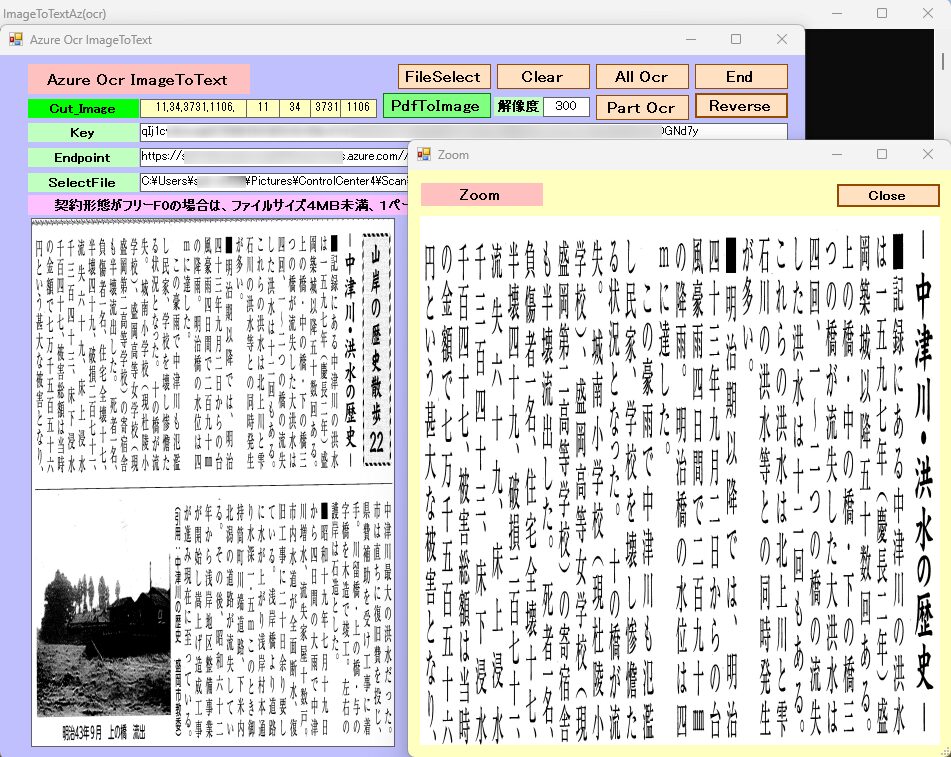
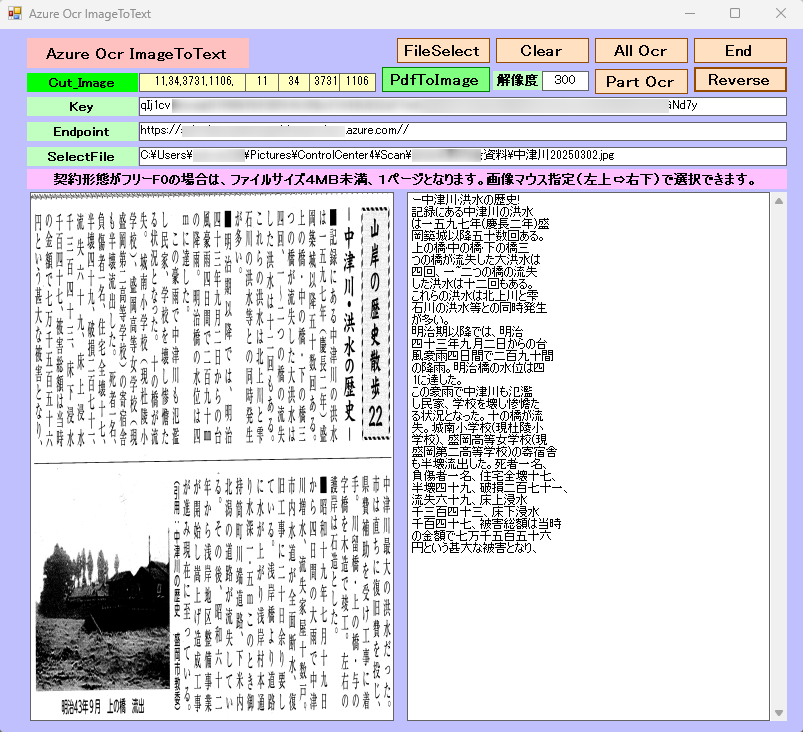
Azure Document Intelligence を利用したOCRソフト。基本は、画像ファイルを処理します。PDFファイルを利用した場合は、[ PdfToImage ] クリックでいったんPDFからJPEGへ変換してから、JPEGファイルを選択します。契約形態がフリー(F0)の場合は、ファイルサイズ4MB未満、1枚のみです。4MB以上の場合は、画像の選択範囲を設定して部分的にOCR処理します。日本語の縦書き文章は、何故か左から右に処理するので認識後、行を逆順に並び替えることができます。部分的にOCR処理ができるので細かく認識できます。[ Cut_Image ]をクリックすると選択範囲をZOOMします。この範囲を [ Part Ocr ] で認識します。[ Reverse ]をクリックすると逆順になります。
Document Intelligence モデルを使用する
Foundry Tools の Azure ドキュメント インテリジェンスは、機械学習を使用してドキュメントから主要なテキストと構造要素を抽出するクラウドベースの Foundry Tools サービスです。 テクノロジを学習するときに、無料サービスを使用することをお勧めします。 無料のページは 1 か月あたり 500 ページに制限されていることに注意してください。
前提条件
Azure サブスクリプション。無料で作成できます。
Foundry Tools またはドキュメント インテリジェンス リソース。 単一サービスまたはマルチサービス。 Free 価格レベル (F0) を使用してサービスを試用し、後から運用環境用の有料レベルにアップグレードすることができます。
アプリケーションを Azure ドキュメント インテリジェンスに接続するために作成するリソースのキーとエンドポイント。
- Azure アカウントと音声リソース:
- 有効な Azure サブスクリプションが必要です。無料で作成できます。
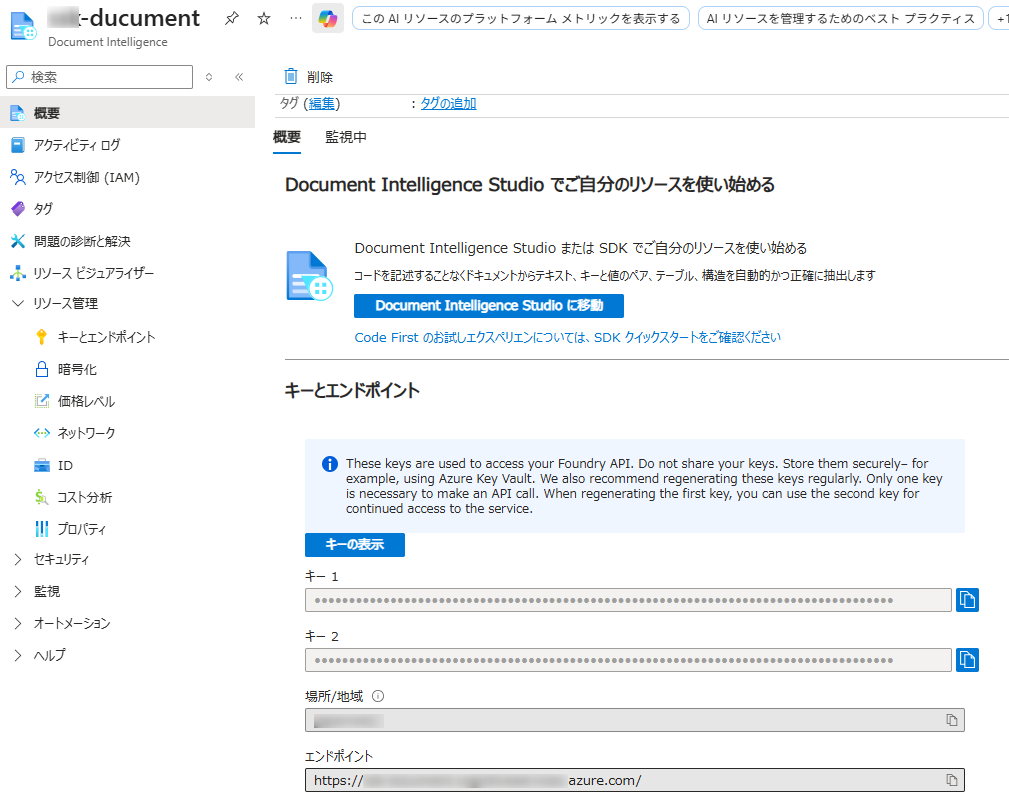
- Azure ポータルで、新しい「Document Intelligence」サービス リソースを作成します。
- 作成したら、リソースの「キーとエンドポイント」セクションに移動し、キー 1 またはキー 2 とエンドポイントをコピーします。
- 開発環境:
- 適切な Microsoft Visual C++ 再頒布可能パッケージがインストールされたVisual Studio (2015、2017、2019、または 2022) 。
- 互換性のある .NET プラットフォーム (.NET Core、.NET 5+、.NET Standard 2.0 など) を対象とする C# プロジェクト。
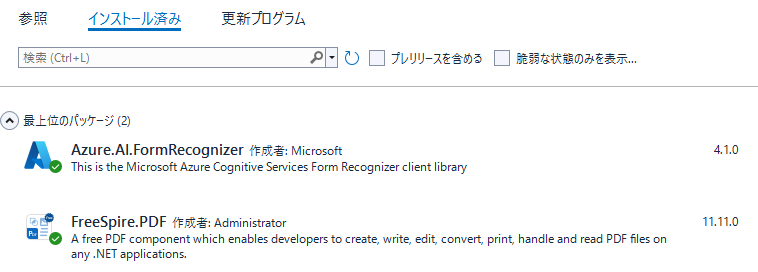
- Azure.AI.FormRecognizer NuGet パッケージをインストールします。NuGet パッケージ マネージャー コンソールからインストールできます。
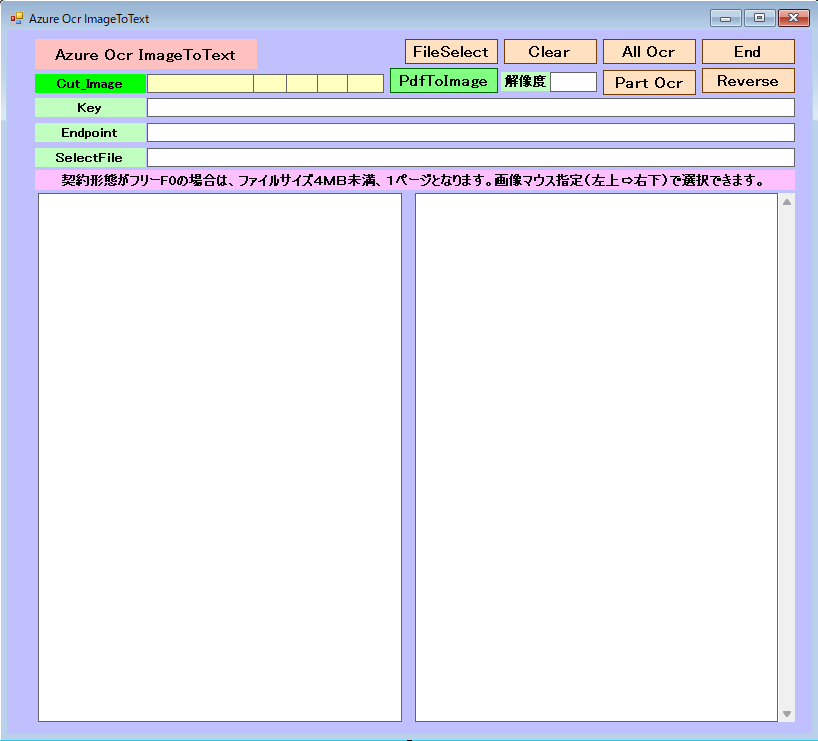
Form1
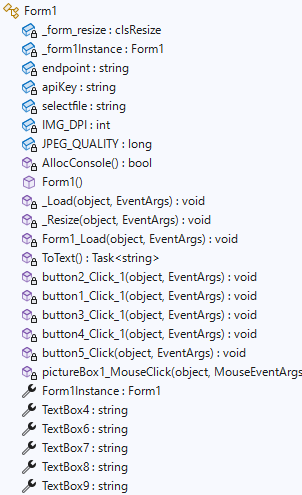
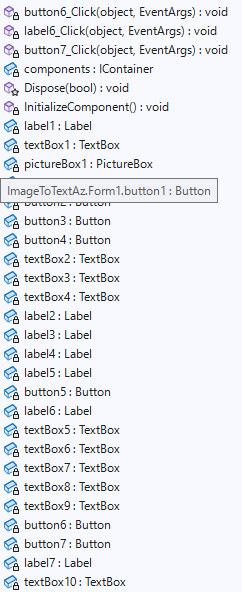
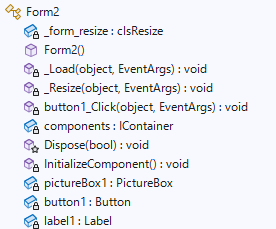
Form2

「 Azure.AI.FormRecognizer 」 「 FreeSpire.PDF 」 を導入。
Form1.cs
using Azure;
//using Azure.AI.DocumentIntelligence;
using Azure.AI.FormRecognizer.DocumentAnalysis;
using Microsoft.Extensions.Azure;
using Spire.Pdf;
using Spire.Pdf.Graphics;
using Spire.Pdf.Utilities;
using System;
using System.Collections.Generic;
using System.ComponentModel;
using System.Data;
using System.Drawing;
using System.Drawing.Imaging;
using System.IO;
using System.Linq;
using System.Security.Cryptography;
using System.Text;
using System.Threading.Tasks;
using System.Windows.Forms;
namespace ImageToTextAz
{
public partial class Form1 : Form
{
//control clsResize 画面表示を拡大縮小します。
clsResize _form_resize;
//Form1オブジェクトを保持するためのフィールド
private static Form1 _form1Instance;
//
private static string endpoint = "your endpoint";
private static string apiKey = "your key";
private static string selectfile = "";
//解像度
private int IMG_DPI = 300;
private long JPEG_QUALITY = 100;
[System.Runtime.InteropServices.DllImport("kernel32.dll")]
private static extern bool AllocConsole();
public Form1()
{
InitializeComponent();
Form1.Form1Instance = this;
//clsResize
_form_resize = new clsResize(this); //I put this after the initialize event to be sure that all controls are initialized properly
this.Load += new EventHandler(_Load); //This will be called after the initialization // form_load
this.Resize += new EventHandler(_Resize); //form_resize
//
AllocConsole();
string filePath = System.IO.Directory.GetCurrentDirectory() + @"\KeyText.txt";
if (File.Exists(filePath))
{
StreamReader sr = new StreamReader(filePath, Encoding.GetEncoding("UTF-8"));
int i = 0;
string linetext = "";
while (sr.Peek() != -1)
{
linetext = sr.ReadLine();
i += 1;
if (i == 1)
{
apiKey = linetext;
}
else if (i == 2)
{
endpoint = linetext;
}
Console.WriteLine(linetext);
}
sr.Close();
}
else
{
//Console.WriteLine("ファイルが存在しません");
}
textBox2.Text = apiKey;
textBox3.Text = endpoint;
textBox10.Text =IMG_DPI.ToString();
File.WriteAllText(System.IO.Directory.GetCurrentDirectory() + @"\Text.txt", "");
}
//clsResize _Load
private void _Load(object sender, EventArgs e)
{
_form_resize._get_initial_size();
}
//clsResize _Resize
private void _Resize(object sender, EventArgs e)
{
_form_resize._resize();
}
private void Form1_Load(object sender, EventArgs e)
{
}
async static Task<string> ToText()
{
var client = new DocumentAnalysisClient(new Uri(endpoint), new AzureKeyCredential(apiKey));
var sb = new StringBuilder();
// F0の制限 2ページ 4MB以下
var fileStream = File.OpenRead(selectfile);
var stopRecognition = new TaskCompletionSource<int>();
// ローカルファイルまたは URL から解析
var operation = await client.AnalyzeDocumentAsync(WaitUntil.Completed, "prebuilt-read", fileStream);
var result = operation.Value;
foreach (var page in result.Pages)
{
foreach (var line in page.Lines)
{
Console.WriteLine(line.Content);
sb.Append(line.Content + "\n\r" + "\n\r");
File.AppendAllText(System.IO.Directory.GetCurrentDirectory() + @"\Text.txt", line.Content + "\n");
}
}
stopRecognition.TrySetResult(0);
return sb.ToString();
}
private void button2_Click_1(object sender, EventArgs e)
{
this.Close();
}
private async void button1_Click_1(object sender, EventArgs e)
{
apiKey = textBox2.Text;
endpoint = textBox3.Text;
selectfile = textBox4.Text;
if (File.Exists(selectfile))
{
button1.Enabled = false;
textBox1.Text = await ToText();
button1.Enabled = true;
}
else
{
MessageBox.Show("選択ファイルがありません。", "選択ファイルエラー"); ;
}
}
private void button3_Click_1(object sender, EventArgs e)
{
textBox1.Text = "";
}
private void button4_Click_1(object sender, EventArgs e)
{
//OpenFileDialogクラスのインスタンスを作成
OpenFileDialog ofd = new OpenFileDialog();
//はじめのファイル名を指定する
//はじめに「ファイル名」で表示される文字列を指定する
ofd.FileName = ""; // "default.pdf";
//はじめに表示されるフォルダを指定する
//指定しない(空の文字列)の時は、現在のディレクトリが表示される
ofd.InitialDirectory = System.Environment.CurrentDirectory + @"\";
//[ファイルの種類]に表示される選択肢を指定する
//指定しないとすべてのファイルが表示される
ofd.Filter = "BMPファイル(*.bmp)|*.bmp|JPEGファイル(*.jpg)|*.jpg|PNGファイル(*.png)|*.png|すべてのファイル(*.*)|*.*";
//[ファイルの種類]ではじめに選択されるものを指定する
//2番目の「すべてのファイル」が選択されているようにする
ofd.FilterIndex = 2;
//タイトルを設定する
ofd.Title = "開くファイルを選択してください";
//ダイアログボックスを閉じる前に現在のディレクトリを復元するようにする
ofd.RestoreDirectory = true;
//存在しないファイルの名前が指定されたとき警告を表示する
//デフォルトでTrueなので指定する必要はない
ofd.CheckFileExists = true;
//存在しないパスが指定されたとき警告を表示する
//デフォルトでTrueなので指定する必要はない
ofd.CheckPathExists = true;
//ダイアログを表示する
if (ofd.ShowDialog() == DialogResult.OK)
{
//OKボタンがクリックされたとき、選択されたファイル名を表示する
Console.WriteLine(ofd.FileName);
FileInfo file = new FileInfo(ofd.FileName);
long size = file.Length;
size = size / 1024; //KB
if (size >= 4000)
{
MessageBox.Show("ファイルサイズは、" + size + "KBです。全選択不可です。", "ファイルサイズエラー");
pictureBox1.Image = System.Drawing.Image.FromFile(ofd.FileName);
textBox4.Text = ofd.FileName;
button1.Enabled = false;
}
else if (size < 4000)
{
pictureBox1.Image = System.Drawing.Image.FromFile(ofd.FileName);
textBox4.Text = ofd.FileName;
button1.Enabled = true;
}
}
}
private void button5_Click(object sender, EventArgs e)
{
// LINQを使用して逆順にし、配列に変換して戻す
textBox1.Lines = textBox1.Lines.Reverse().ToArray();
// テキストボックスの内容から空行とスペースのみの行を削除
textBox1.Text = string.Join(Environment.NewLine,
textBox1.Lines.Where(line => !string.IsNullOrWhiteSpace(line)));
}
//画像クリック
private void pictureBox1_MouseClick(object sender, MouseEventArgs e)
{
try
{
System.Drawing.Image img = pictureBox1.Image;
Point pos = new Point(0, 0);
pos.X = e.Location.X * img.Width / pictureBox1.Width;
pos.Y = e.Location.Y * img.Height / pictureBox1.Height;
textBox5.Text += textBox5.Text + pos.X + "," + pos.Y + ",";
string[] xy = textBox5.Text.Split(',');
if (xy.Length > 4)
{
textBox6.Text = xy[xy.Length - 5];
textBox7.Text = xy[xy.Length - 4];
textBox8.Text = xy[xy.Length - 3];
textBox9.Text = xy[xy.Length - 2];
textBox5.Text = xy[xy.Length - 5] + ",";
textBox5.Text += xy[xy.Length - 4] + ",";
textBox5.Text += xy[xy.Length - 3] + ",";
textBox5.Text += xy[xy.Length - 2] + ",";
}
}
catch (Exception)
{
;
}
}
//Form1オブジェクトを取得、設定するためのプロパティ
public static Form1 Form1Instance
{
get
{
return _form1Instance;
}
set
{
_form1Instance = value;
}
}
//TextBox4.Textを取得、設定するためのプロパティ
public string TextBox4
{
get
{
return textBox4.Text;
}
set
{
textBox4.Text = value;
}
}
//TextBox6.Textを取得、設定するためのプロパティ
public string TextBox6
{
get
{
return textBox6.Text;
}
set
{
textBox3.Text = value;
}
}
//TextBox7.Textを取得、設定するためのプロパティ
public string TextBox7
{
get
{
return textBox7.Text;
}
set
{
textBox7.Text = value;
}
}
//TextBox8.Textを取得、設定するためのプロパティ
public string TextBox8
{
get
{
return textBox8.Text;
}
set
{
textBox8.Text = value;
}
}
//TextBox9.Textを取得、設定するためのプロパティ
public string TextBox9
{
get
{
return textBox9.Text;
}
set
{
textBox9.Text = value;
}
}
private async void button6_Click(object sender, EventArgs e)
{
if (textBox6.Text == "" || textBox7.Text == ""|| textBox8.Text == ""|| textBox9.Text == "")
{
MessageBox.Show("画像ポジションエラー。選択不可です。", "画像ポジションエラー");
return;
}
if (Int32.Parse(textBox6.Text) > Int32.Parse(textBox8.Text)|| Int32.Parse(textBox7.Text) > Int32.Parse(textBox9.Text))
{
MessageBox.Show("画像ポジションエラー。選択不可です。", "画像ポジションエラー");
return;
}
//元画像
Bitmap source;
source = new Bitmap(textBox4.Text);
//切り取るサイズ
int x1 = Int32.Parse(textBox6.Text);
int y1 = Int32.Parse(textBox7.Text);
int x2 = Int32.Parse(textBox8.Text);
int y2 = Int32.Parse(textBox9.Text);
Console.WriteLine(x1 + "," + y1 + "," + x2 + "," + y2);
System.Drawing.Rectangle rect;
rect = new System.Drawing.Rectangle(x1, y1, x2 - x1 + 5, y2 - y1 + 5);
//切り取り後の画像
Bitmap trimed;
trimed = source.Clone(rect, source.PixelFormat);
//保存
trimed.Save("trimed.jpg");
source.Dispose();
trimed.Dispose();
string ImagePath = System.Environment.CurrentDirectory + @"\trimed.jpg";
FileInfo file = new FileInfo(ImagePath);
long size = file.Length;
size = size / 1024; //KB
if (size >= 4000)
{
MessageBox.Show("ファイルサイズは、" + size + "KBです。選択不可です。", "ファイルサイズエラー");
return;
}
apiKey = textBox2.Text;
endpoint = textBox3.Text;
selectfile = ImagePath;
button6.Enabled = false;
textBox1.Text += await ToText();
button6.Enabled = true;
}
private void label6_Click(object sender, EventArgs e)
{
Form2 form2 = new Form2();
form2.ShowDialog(this);
form2.Dispose();
}
//PdfToImage
private void button7_Click(object sender, EventArgs e)
{
//解像度設定
try
{
IMG_DPI = int.Parse(textBox10.Text);
}
catch (Exception)
{
IMG_DPI = 300;
}
//OpenFileDialogクラスのインスタンスを作成
OpenFileDialog ofd = new OpenFileDialog();
//はじめのファイル名を指定する
//はじめに「ファイル名」で表示される文字列を指定する
ofd.FileName = "default.pdf";
//はじめに表示されるフォルダを指定する
//指定しない(空の文字列)の時は、現在のディレクトリが表示される
ofd.InitialDirectory = System.Environment.CurrentDirectory + @"\";
//[ファイルの種類]に表示される選択肢を指定する
//指定しないとすべてのファイルが表示される
ofd.Filter = "PDFファイル(*.pdf)|*.pdf|すべてのファイル(*.*)|*.*";
//[ファイルの種類]ではじめに選択されるものを指定する
//2番目の「すべてのファイル」が選択されているようにする
ofd.FilterIndex = 1;
//タイトルを設定する
ofd.Title = "開くファイルを選択してください";
//ダイアログボックスを閉じる前に現在のディレクトリを復元するようにする
ofd.RestoreDirectory = true;
//存在しないファイルの名前が指定されたとき警告を表示する
//デフォルトでTrueなので指定する必要はない
ofd.CheckFileExists = true;
//存在しないパスが指定されたとき警告を表示する
//デフォルトでTrueなので指定する必要はない
ofd.CheckPathExists = true;
//ダイアログを表示する
if (ofd.ShowDialog() == DialogResult.OK)
{
//OKボタンがクリックされたとき、選択されたファイル名を表示する
Console.WriteLine(ofd.FileName);
string pdfpath = System.IO.Path.GetDirectoryName(ofd.FileName);
string pdfname = System.IO.Path.GetFileNameWithoutExtension(ofd.FileName);
//Create a PdfDocument instance
PdfDocument pdf = new PdfDocument();
//Load a sample PDF document
pdf.LoadFromFile(ofd.FileName);
/*
//Convert the first page to an image and set the image Dpi
Image image = pdf.SaveAsImage(0, PdfImageType.Bitmap, 300, 300);
//Save the image as a JPG file
image.Save(pdfpath + "\\" + pdfname + ".jpg", ImageFormat.Jpeg);
*/
//Loop through each page in the PDF
for (int i = 0; i < pdf.Pages.Count; i++)
{
//Convert all pages to images and set the image Dpi
Image image = pdf.SaveAsImage(i, PdfImageType.Bitmap, IMG_DPI,IMG_DPI);
//Save images as PNG format to a specified folder
String file = String.Format(pdfpath + "\\" + pdfname + "-{0}.jpg", i);
image.Save(file, ImageFormat.Jpeg);
}
}
}
/*
private async void buttonX_Click(object sender, EventArgs e)
{
apiKey = textBox2.Text;
endpoint = textBox3.Text;
selectfile = textBox4.Text;
button1.Enabled = false;
textBox1.Text = await ToText2();
button1.Enabled = true;
}
async static Task<string> ToText2()
{
var client = new DocumentIntelligenceClient(new Uri(endpoint), new AzureKeyCredential(apiKey));
var sb = new StringBuilder();
// F0の制限 2ページ 4MB以下
var fileStream = File.OpenRead(selectfile);
var file = new FileInfo(selectfile);
var fileUri = new Uri(file.FullName);
Console.WriteLine(fileUri);
var stopRecognition = new TaskCompletionSource<int>();
// Use the "prebuilt-read" or "prebuilt-layout" model
string modelId = "prebuilt-read";
// Start the analysis
var operation = await client.AnalyzeDocumentAsync(WaitUntil.Completed, modelId,fileUri);
Azure.AI.DocumentIntelligence.AnalyzeResult result = operation.Value;
// Iterate through pages and lines
foreach (var page in result.Pages)
{
foreach (var line in page.Lines)
{
// For RTL languages, the 'Content' string is already ordered RTL
Console.WriteLine($"Detected text: {line.Content}");
stopRecognition.TrySetResult(0);
}
}
return sb.ToString();
}
*/
}
}
Form2.cs
using System;
using System.Collections.Generic;
using System.ComponentModel;
using System.Data;
using System.Drawing;
using System.Linq;
using System.Text;
using System.Threading.Tasks;
using System.Windows.Forms;

namespace ImageToTextAz
{
    public partial class Form2 : Form
    {
        //control clsResize 画面表示を拡大縮小します。
        clsResize _form_resize;

        public Form2()
        {
            InitializeComponent();


            //clsResize
            _form_resize = new clsResize(this); //I put this after the initialize event to be sure that all controls are initialized properly

            this.Load += new EventHandler(_Load); //This will be called after the initialization // form_load
            this.Resize += new EventHandler(_Resize); //form_resize
            //

            //元画像
            Bitmap source;
            source = new Bitmap(Form1.Form1Instance.TextBox4);

            //切り取るサイズ
            int x1 = Int32.Parse(Form1.Form1Instance.TextBox6);
            int y1 = Int32.Parse(Form1.Form1Instance.TextBox7);
            int x2 = Int32.Parse(Form1.Form1Instance.TextBox8);
            int y2 = Int32.Parse(Form1.Form1Instance.TextBox9);

            Rectangle rect;
            rect = new Rectangle(x1, y1, x2 - x1 + 5, y2 - y1 + 5);

            //切り取り後の画像
            Bitmap trimed;
            trimed = source.Clone(rect, source.PixelFormat);

            //画像を表示する
            pictureBox1.Image = trimed;

        }

        //clsResize _Load
        private void _Load(object sender, EventArgs e)
        {
            _form_resize._get_initial_size();

        }

        //clsResize _Resize
        private void _Resize(object sender, EventArgs e)
        {
            _form_resize._resize();
        }

        private void button1_Click(object sender, EventArgs e)
        {
            this.Close();
        }

    }
}
clsResize.cs
using System;
using System.Collections.Generic;
using System.Linq;
using System.Text;
using System.Threading.Tasks;
using System.Windows.Forms;

public class clsResize
{
    List<System.Drawing.Rectangle> _arr_control_storage = new List<System.Drawing.Rectangle>();
    private bool showRowHeader = false;
    public clsResize(Form _form_)
    {
        form = _form_; //the calling form
        _formSize = _form_.ClientSize; //Save initial form size
        _fontsize = _form_.Font.Size; //Font size

        //ADD
        var _controls = _get_all_controls(form);//call the enumerator
        FontTable = new Dictionary<string, float>();
        ControlTable = new Dictionary<string, System.Drawing.Rectangle>();
        foreach (Control control in _controls) //Loop through the controls
        {
            FontTable.Add(control.Name, control.Font.Size);
            ControlTable.Add(control.Name, control.Bounds);
        }
        //ADD

    }

    //ADD
    Dictionary<string, float> FontTable;
    Dictionary<string, System.Drawing.Rectangle> ControlTable;
    //ADD

    private float _fontsize { get; set; }

    private System.Drawing.SizeF _formSize { get; set; }

    private Form form { get; set; }

    public void _get_initial_size() //get initial size//
    {
        var _controls = _get_all_controls(form);//call the enumerator
        foreach (Control control in _controls) //Loop through the controls
        {
            _arr_control_storage.Add(control.Bounds); //saves control bounds/dimension
            //If you have datagridview
            if (control.GetType() == typeof(DataGridView))
                _dgv_Column_Adjust(((DataGridView)control), showRowHeader);
        }
    }

    public void _resize() //Set the resize
    {
        double _form_ratio_width = (double)form.ClientSize.Width / (double)_formSize.Width; //ratio could be greater or less than 1
        double _form_ratio_height = (double)form.ClientSize.Height / (double)_formSize.Height; // this one too
        var _controls = _get_all_controls(form); //reenumerate the control collection
        int _pos = -1;//do not change this value unless you know what you are doing
        foreach (Control control in _controls)
        {

            //ADD
            this._fontsize = FontTable[control.Name]; //<-取得したコントロールのフォントサイズ値で上書きするためにこれを追加
            //ADD

            // do some math calc
            _pos += 1;//increment by 1;
            System.Drawing.Size _controlSize = new System.Drawing.Size((int)(_arr_control_storage[_pos].Width * _form_ratio_width),
                (int)(_arr_control_storage[_pos].Height * _form_ratio_height)); //use for sizing

            System.Drawing.Point _controlposition = new System.Drawing.Point((int)
            (_arr_control_storage[_pos].X * _form_ratio_width), (int)(_arr_control_storage[_pos].Y * _form_ratio_height));//use for location

            //set bounds
            control.Bounds = new System.Drawing.Rectangle(_controlposition, _controlSize); //Put together

            //Assuming you have a datagridview inside a form()
            //if you want to show the row header, replace the false statement of
            //showRowHeader on top/public declaration to true;
            if (control.GetType() == typeof(DataGridView))
                _dgv_Column_Adjust(((DataGridView)control), showRowHeader);


            //Font AutoSize
            control.Font = new System.Drawing.Font(form.Font.FontFamily,
             (float)(((Convert.ToDouble(_fontsize) * _form_ratio_width) / 2) +
              ((Convert.ToDouble(_fontsize) * _form_ratio_height) / 2)));

        }
    }

    private void _dgv_Column_Adjust(DataGridView dgv, bool _showRowHeader) //if you have Datagridview
    //and want to resize the column base on its dimension.
    {
        int intRowHeader = 0;
        const int Hscrollbarwidth = 5;
        if (_showRowHeader)
            intRowHeader = dgv.RowHeadersWidth;
        else
            dgv.RowHeadersVisible = false;

        for (int i = 0; i < dgv.ColumnCount; i++)
        {
            if (dgv.Dock == DockStyle.Fill) //in case the datagridview is docked
                dgv.Columns[i].Width = ((dgv.Width - intRowHeader) / dgv.ColumnCount);
            else
                dgv.Columns[i].Width = ((dgv.Width - intRowHeader - Hscrollbarwidth) / dgv.ColumnCount);
        }
    }


    private static IEnumerable<Control> _get_all_controls(Control c)
    {
        return c.Controls.Cast<Control>().SelectMany(item =>
            _get_all_controls(item)).Concat(c.Controls.Cast<Control>()).Where(control =>
            control.Name != string.Empty);
    }
}