
テキストをニューラル音声で読み上げ (Azure) C#
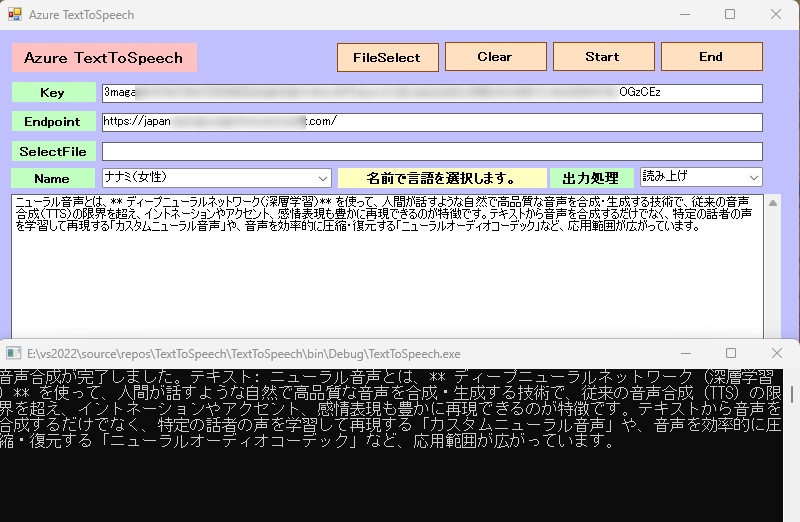
FileSelectボタンからテキストファィルを選択したり、直接テキストを入力します。日本語の場合は、Nameボックスから日本人を選択します。アメリカ人を選択してもそれなりに読み上げます。Startでニューラル音声で読み上げます。出力処理を音声保存に変えると、アプリディレクトリーにTEXTWAVE.wavを作成します。10分を超える長い音声ファイルを作成したい場合: `SpeechSynthesizer` には10分という制限があるため、[バッチ合成API](https://learn.microsoft.com/en-us/azure/ai-services/speech-service/batch-synthesis)の使用を検討してください。
テキストを音声に変換する
Foundry Tools の Azure Speech を使用すると、人間のような音声を合成してテキストを読み取るアプリケーションを実行できます。 音声の変更や読み上げるテキストの入力を行い、出力をお使いのコンピューターのスピーカーで聞くことができます。
音声のサポート 抜粋
ja-JP | 日本語(日本) | ja-JP-NanamiNeural(女性)ja-JP-KeitaNeural(男性)ja-JP-AoiNeural(女性)ja-JP-DaichiNeural(男性)ja-JP-MayuNeural(女性)ja-JP-NaokiNeural(男性)ja-JP-ShioriNeural(女性) |
en-US | 英語(米国) | en-US-AvaNeural(女性)en-US-AndrewNeural(男性)en-US-EmmaNeural(女性en-US-BrianNeural)en-US-JennyNeural(男性)en-US-GuyNeural(女性)en-US-AriaNeural(男性)en-US-DavisNeural(女性)en-US-JaneNeural(男性)en-US-JasonNeural(女性)en-US-KaiNeural(男性)en-US-LunaNeural(女性)en-US-SaraNeural(en-US-TonyNeural男性)en-US-NancyNeural(女性) |
Microsoft Azure AI Speech SDKを使用するこれには、Azure Portal での Azure Speech リソースの設定、資格情報の取得、
SpeechRecognizerC# アプリケーションでの SDK のクラスの使用が含まれます。
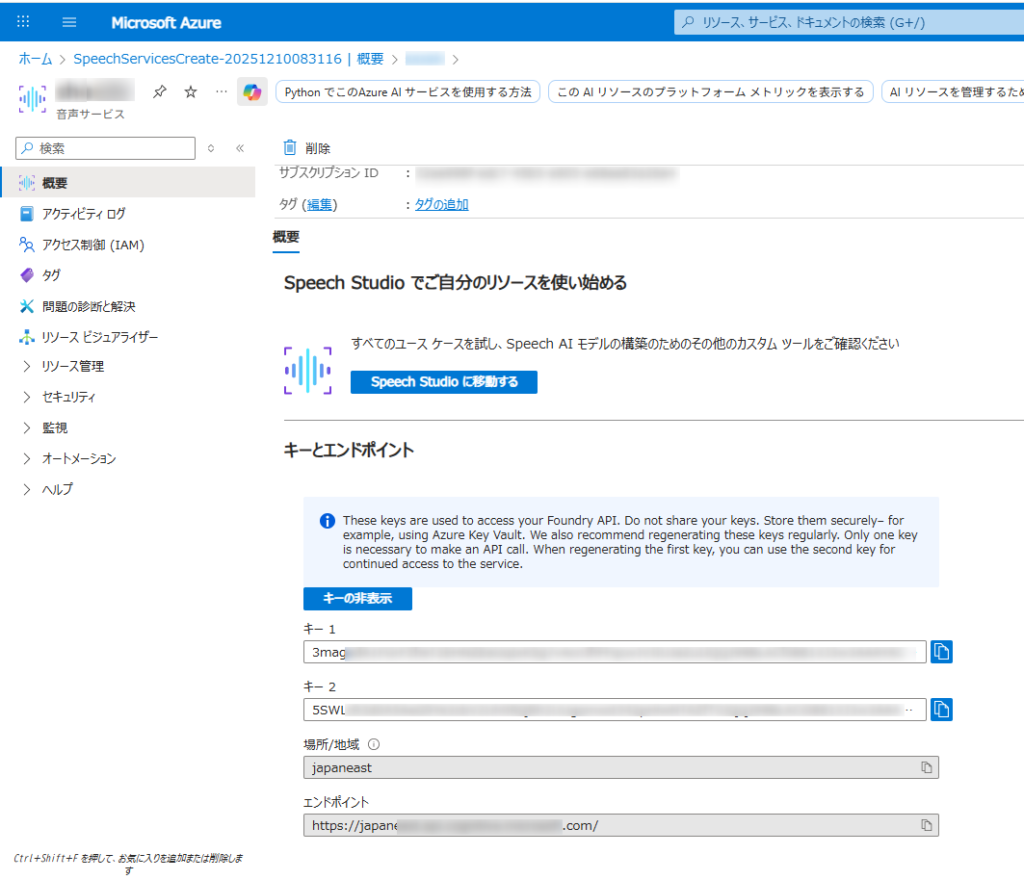
- Azure アカウントと音声リソース:
- 有効な Azure サブスクリプションが必要です。無料で作成できます。
- Azure ポータルで、新しい「Speech」サービス リソースを作成します。
- 作成したら、リソースの「キーとエンドポイント」セクションに移動し、キー 1 またはキー 2 とエンドポイントをコピーします。
- 開発環境:
- 適切な Microsoft Visual C++ 再頒布可能パッケージがインストールされたVisual Studio (2015、2017、2019、または 2022) 。
- 互換性のある .NET プラットフォーム (.NET Core、.NET 5+、.NET Standard 2.0 など) を対象とする C# プロジェクト。
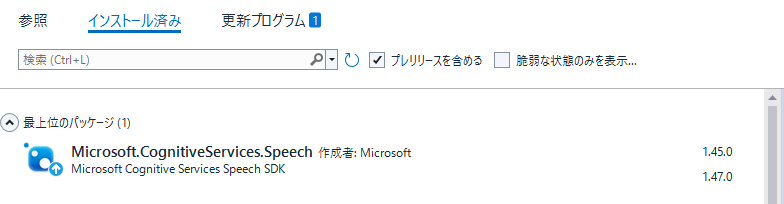
- Microsoft.CognitiveServices.Speech NuGet パッケージをインストールします。NuGet パッケージ マネージャー コンソールからインストールできます。
Form1
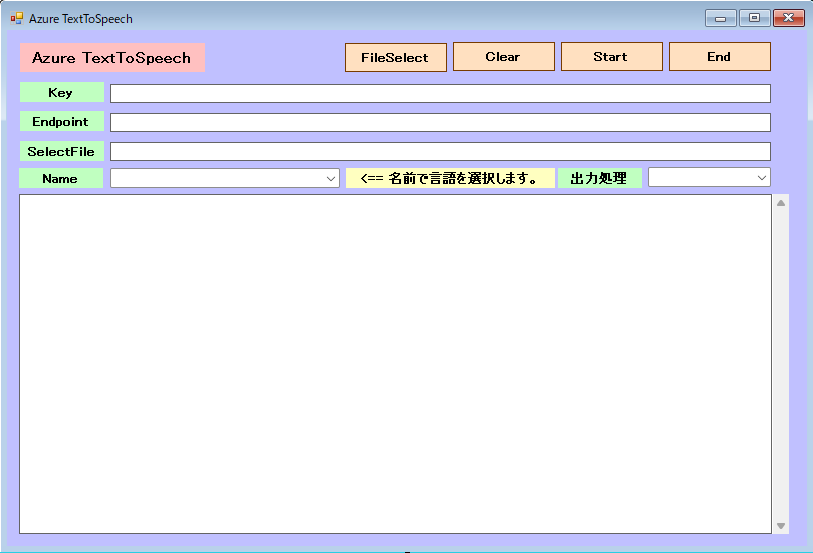
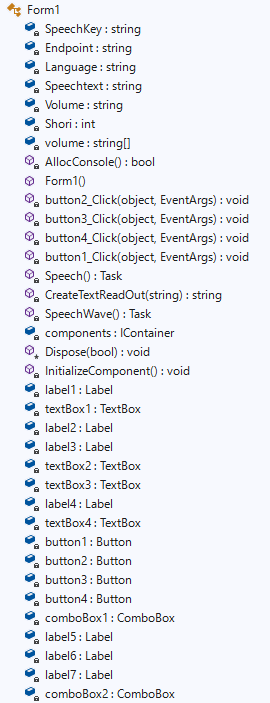
Microsoft.CognitiveServices.Speechのバージョンは、1.47ではなく1.45を導入。Formにて、1.47はSpeechConfig実行時にエラーが出て処理できません。(2025-12-11時点で)
Form1.cs
using System;
using System.Collections.Generic;
using System.ComponentModel;
using System.Data;
using System.Drawing;
using System.IO;
using System.Linq;
using System.Text;
using System.Threading.Tasks;
using System.Windows.Forms;
using static System.Windows.Forms.VisualStyles.VisualStyleElement;
using Microsoft.CognitiveServices.Speech;
using Microsoft.CognitiveServices.Speech.Audio;
using System.Diagnostics.Eventing.Reader;

namespace TextToSpeech
{
    public partial class Form1 : Form
    {
        //private SpeechRecognizer recognizer;
        private static string SpeechKey = "3maga************************************zCEz"; // Replace with your key
        private static string Endpoint = "https://japan*****************************com/";   // Replace with your region (e.g., "westus")
        private static string Language = "ja-JP";
        private static string Speechtext = "";
        private static string Volume = "";
        private static int Shori = 0;

        //翻訳言語の設定
        String[] volume = new String[44] { "ja-JP-NanamiNeural","ナナミ(女性)",
                                           "ja-JP-KeitaNeural","ケイタ(男性)",
                                           "ja-JP-AoiNeural","アオイ(女性)",
                                           "ja-JP-DaichiNeural","ダイチ(男性)",
                                           "ja-JP-MayuNeural","マユ(女性)",
                                           "ja-JP-NaokiNeural","ナオキ(男性)",
                                           "ja-JP-ShioriNeural","シオリ(女性)",
                                           "en-US-AvaNeural","Ava(女性)",
                                           "en-US-AndrewNeural","Andrew(男性)",
                                           "en-US-EmmaNeural","Emma(女性)",
                                           "en-US-BrianNeural","Brian(男性)",
                                           "en-US-JennyNeural","Jenny(女性)",
                                           "en-US-GuyNeural","Guy(男性)",
                                           "en-US-AriaNeural","Aria(女性)",
                                           "en-US-DavisNeural","Davis(男性)",
                                           "en-US-JaneNeural","Jane(女性)",
                                           "en-US-JasonNeural","Jason(男性)",
                                           "en-US-KaiNeural","Kai(男性)",
                                           "en-US-LunaNeural","Luna(女性)",
                                           "en-US-SaraNeural","Sara(女性)",
                                           "en-US-TonyNeural","Tony(男性)",
                                           "en-US-NancyNeural","Nancy(女性)"
                                        };


        [System.Runtime.InteropServices.DllImport("kernel32.dll")]
        private static extern bool AllocConsole();

        public Form1()
        {
            InitializeComponent();
            AllocConsole();
            textBox2.Text = SpeechKey;
            textBox3.Text = Endpoint;
            for (int i = 1; i < volume.Length; i = i + 2)
            {
                //Console.WriteLine("{0}番目の要素の値は{1}です。", i + 1, volime[i]);
                // コンボボックスに項目を追加する
                comboBox1.Items.Add(volume[i]);
            }

            // 初期値を設定する(日本語ナナミを選択する)
            comboBox1.SelectedIndex = 0;

            comboBox2.Items.Add("読み上げ");
            comboBox2.Items.Add("音声保存");
            //読み上げを選択
            comboBox2.SelectedIndex = 0;

        }

        private void button2_Click(object sender, EventArgs e)
        {
            this.Close();
        }

        private void button3_Click(object sender, EventArgs e)
        {
            textBox1.Text = "";
        }

        private void button4_Click(object sender, EventArgs e)
        {
            //OpenFileDialogクラスのインスタンスを作成
            OpenFileDialog ofd = new OpenFileDialog();

            //はじめのファイル名を指定する
            //はじめに「ファイル名」で表示される文字列を指定する
            ofd.FileName = "";
            //はじめに表示されるフォルダを指定する
            //指定しない(空の文字列)の時は、現在のディレクトリが表示される
            ofd.InitialDirectory = @"C:\";
            //[ファイルの種類]に表示される選択肢を指定する
            //指定しないとすべてのファイルが表示される
            ofd.Filter = "テキストファイル(*.txt)|*.txt|すべてのファイル(*.*)|*.*";
            //[ファイルの種類]ではじめに選択されるものを指定する
            //2番目の「Waveファイル」が選択されているようにする
            ofd.FilterIndex = 1;
            //タイトルを設定する
            ofd.Title = "開くファイルを選択してください";
            //ダイアログボックスを閉じる前に現在のディレクトリを復元するようにする
            ofd.RestoreDirectory = true;
            //存在しないファイルの名前が指定されたとき警告を表示する
            //デフォルトでTrueなので指定する必要はない
            ofd.CheckFileExists = true;
            //存在しないパスが指定されたとき警告を表示する
            //デフォルトでTrueなので指定する必要はない
            ofd.CheckPathExists = true;

            //ダイアログを表示する
            if (ofd.ShowDialog() == DialogResult.OK)
            {
                //OKボタンがクリックされたとき、選択されたファイル名を表示する
                Console.WriteLine(ofd.FileName);
                textBox4.Text = ofd.FileName;

                // ファイルを開く&文字化け防止
                StreamReader file = new StreamReader(textBox4.Text, Encoding.GetEncoding("UTF-8"));//UTF-8 shift-jis
                if (file == null)
                {
                    Console.WriteLine("ファイルを開けませんでした。");
                    return;
                }

                // ファイルを読み込む
                textBox1.Text = file.ReadToEnd();

                // ファイルを閉じる
                file.Close();

                // ファイルを閉じてから読み込んだ値を表示
                Console.WriteLine(textBox1.Text);
            }

        }

        private async void button1_Click(object sender, EventArgs e)
        {
            SpeechKey = textBox2.Text;
            Endpoint = textBox3.Text;
            Volume = volume[comboBox1.SelectedIndex * 2];
            Shori = comboBox2.SelectedIndex;

            Speechtext = textBox1.Text;

            button1.Enabled = false;

            if (Shori == 0)
            {
                await Speech();
            }
            else if (Shori == 1) {
                {
                    await SpeechWave();
                }
            }

            button1.Enabled = true;

        }

        //読み上げ
        static async Task Speech()
        {
            var speechconfig = SpeechConfig.FromEndpoint(new Uri(Endpoint), SpeechKey);

            /* 使用する音声の名前を指定することで言語を選択
               SpeechSynthesisLanguage プロパティも存在しますが、
               基本的には具体的な音声名 (SpeechSynthesisVoiceName) を指定する方が、
               意図した通りのアクセントや話者を確実に選択できます。
            */

            // 例: 日本語の "Nanami" という音声を選択
            //speechconfig.SpeechSynthesisVoiceName = "ja-JP-NanamiNeural";

            // または、米語の "Jenny" という音声を選択
            //speechconfig.SpeechSynthesisVoiceName = "en-US-JennyNeural";

            //音声選択
            speechconfig.SpeechSynthesisVoiceName = Volume;

            // SpeechSynthesizer を作成
            using (var synthesizer = new SpeechSynthesizer(speechconfig))
            {
              // 音声合成を実行
              var result = await synthesizer.SpeakTextAsync(Speechtext);

              if (result.Reason == ResultReason.SynthesizingAudioCompleted)
                 {
                    Console.WriteLine($"音声合成が完了しました。テキスト: {Speechtext}");
                 }
              else if (result.Reason == ResultReason.Canceled)
                 {
                    var cancellation = SpeechSynthesisCancellationDetails.FromResult(result);
                    Console.WriteLine($"エラー: {cancellation.Reason}");
                 }
            }

        }

        //音声ファイル作成
        static async Task SpeechWave()
        {
            var speechconfig = SpeechConfig.FromEndpoint(new Uri(Endpoint), SpeechKey);

            /* 使用する音声の名前を指定することで言語を選択
               SpeechSynthesisLanguage プロパティも存在しますが、
               基本的には具体的な音声名 (SpeechSynthesisVoiceName) を指定する方が、
               意図した通りのアクセントや話者を確実に選択できます。
            */

            // 例: 日本語の "Nanami" という音声を選択
            //speechconfig.SpeechSynthesisVoiceName = "ja-JP-NanamiNeural";

            // または、米語の "Jenny" という音声を選択
            //speechconfig.SpeechSynthesisVoiceName = "en-US-JennyNeural";

            //音声選択
            speechconfig.SpeechSynthesisVoiceName = Volume;

            //Wave音声ファイルを指定
            var audioConfig = AudioConfig.FromWavFileOutput(System.IO.Directory.GetCurrentDirectory() + @"\TextWave.wav");

            // SpeechSynthesizer を作成
            using (var synthesizer = new SpeechSynthesizer(speechconfig, audioConfig))
            {
                // 音声合成を実行
                var result = await synthesizer.SpeakTextAsync(Speechtext);

                if (result.Reason == ResultReason.SynthesizingAudioCompleted)
                {
                    Console.WriteLine($"音声合成が完了しました。テキスト: {Speechtext}");
                }
                else if (result.Reason == ResultReason.Canceled)
                {
                    var cancellation = SpeechSynthesisCancellationDetails.FromResult(result);
                    Console.WriteLine($"エラー: {cancellation.Reason}");
                }
            }

        }

    }

}
 C# FileSelectボタンからテキストファィルを選択したり、直接テキストを入力します。日本語の場合は、Nameボックスから日本人を選択します。)