
マイクから音声を翻訳(Azure)C#
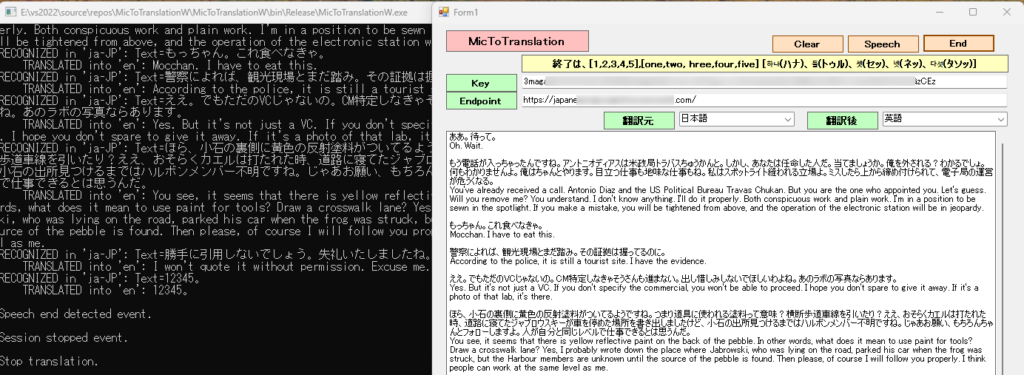
翻訳元の指定を無視して、自動的に翻訳元を指定候補の中から選択します。(AutoDetectSourceLanguageConfigに候補を指定します。AutoDetectSourceLanguageConfigを指定しない場合は、指定した翻訳元の言語になります。)
通報を受けて、パトカーが例の場へ向かった。
After receiving the report, a police car headed to the place of the incident.
あの歌手がお金を盗もうとした数。
The number that the singer tried to steal money.
で、かつてどこへ行きたかった。
So, where did I want to go?
景観の話じゃ、車にバックを詰め込んで、ガソリンマークタンだって、あんたたちの上にの結婚密告したんだもん。
Speaking of landscapes, I packed my bag in my car and even told you about my marriage with gasoline mark tans.
もう、男にはいられない。
I can't be a man anymore.
触る前に努めていた場合というか、こういうの本性が出たという。
It is said that if you tried to do it before touching it, this kind of nature came out.
金の方式が望む麻薬の方式である。
It is the drug method that the money method wants.
私がジョニーをこぶした?まあ、そうだとしても驚かないね。
Did I punch Johnny? Well, I wouldn't be surprised if that were the case.
えっと、ジョニーは音楽業界に友達がいるといったデモテープ聞かせるって、バーへ盗みに行ったんじゃない?
Well, didn't Johnny go to the bar to steal a demo tape saying that he had friends in the music industry?
でも、お金を見たらここから抜け出せる。って思ったの。
But if you see money, you can get out of here. I thought.
TVの音声をマイクで拾いながら実行。テレビドラマは、日本語で英語に翻訳されました。終了は、一時停止して無音のタイミングで”12345”と発声すると終了し、テキストボックスに翻訳元と翻訳後が表示されます。アプリの実行フォルダーにテキストデータ(ファイル名は、TEXT。内容は、追記されます。)が作成されます。韓国語の翻訳終了は、”ハナ トゥル セッ ネッ タソッ"、英語は"one two three four five" です。
音声翻訳とは何か
Foundry Tools の Azure Speech を使用した翻訳の利点と機能について説明します。 Speech サービスは、音声ストリームのリアルタイムの多言語音声変換と音声テキスト変換をサポートします。
言語識別は、サポートされている言語の一覧と照合する際に、オーディオで話されている言語を識別するために使用されます。
候補言語
AutoDetectSourceLanguageConfig オブジェクトを使用して候補言語を指定します。 少なくとも 1 つの候補がオーディオに含まれていると想定しています。 開始時点の LID には最大 4 つの言語を含めることができ、継続的 LID には最大 10 の言語を含めることができます。 音声サービスは、提供された候補言語がオーディオに含まれていない場合でも、それらのうちの 1 つを返します。 たとえば、fr-FR (フランス語) と en-US (英語) が候補として指定されているが、ドイツ語が話されている場合、サービスからは fr-FR または en-US が返されます。
ダッシュ (-) 区切りで完全なロケールを指定する必要がありますが、言語識別では基本言語ごとに 1 つのロケールのみが使用されます。 同じ言語に対して複数のロケール (en-US と en-GB など) を含めないでください。
Speech SDK または Speech CLI を使用すると、アプリケーション、ツール、デバイスから、提供されたオーディオのソース トランスクリプションや翻訳出力にアクセスできます。 音声の検出中には中間トランスクリプションと翻訳結果が返され、最終的な結果は、合成された音声に変換することができます。
Microsoft Azure AI Speech SDKを使用するこれには、Azure Portal での Azure Speech リソースの設定、資格情報の取得、
TranslationRecognizerC# アプリケーションでの SDK のクラスの使用が含まれます。
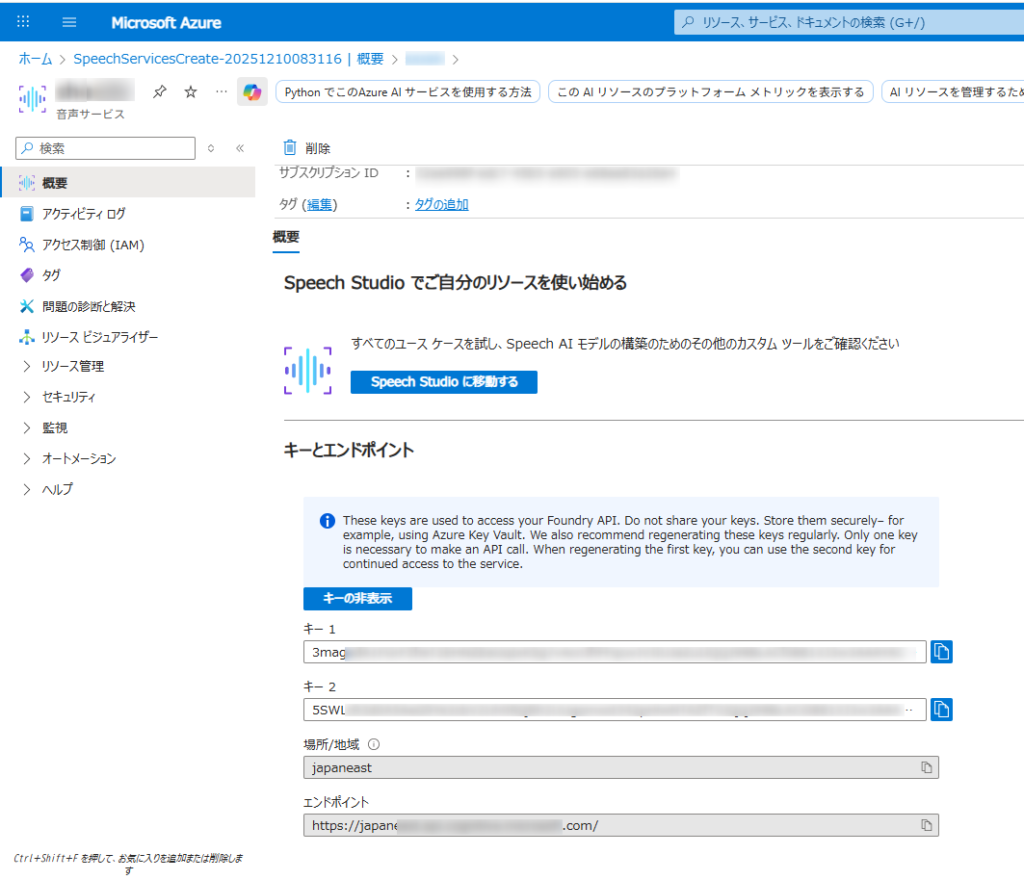
- Azure アカウントと音声リソース:
- 有効な Azure サブスクリプションが必要です。無料で作成できます。
- Azure ポータルで、新しい「Speech」サービス リソースを作成します。
- 作成したら、リソースの「キーとエンドポイント」セクションに移動し、キー 1 またはキー 2 とエンドポイントをコピーします。
- 開発環境:
- 適切な Microsoft Visual C++ 再頒布可能パッケージがインストールされたVisual Studio (2015、2017、2019、または 2022) 。
- 互換性のある .NET プラットフォーム (.NET Core、.NET 5+、.NET Standard 2.0 など) を対象とする C# プロジェクト。
- Microsoft.CognitiveServices.Speech NuGet パッケージをインストールします。NuGet パッケージ マネージャー コンソールからインストールできます。
Form1
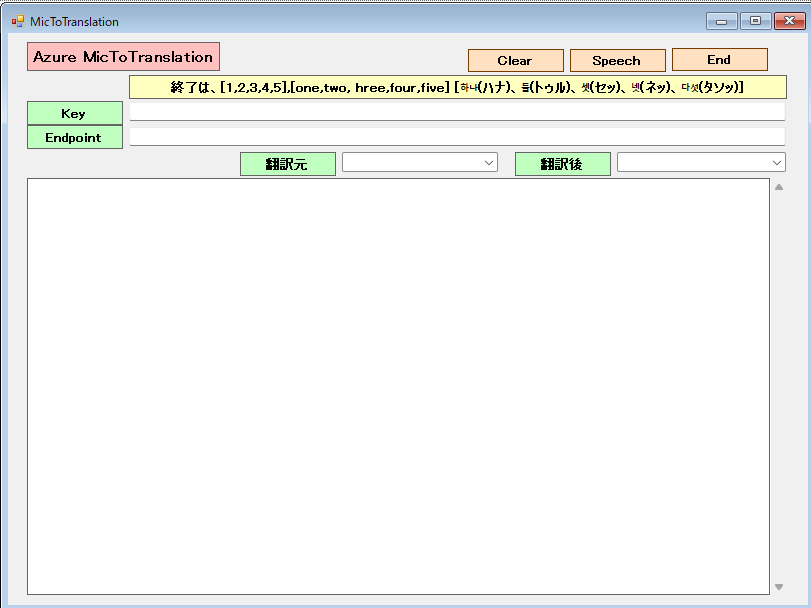
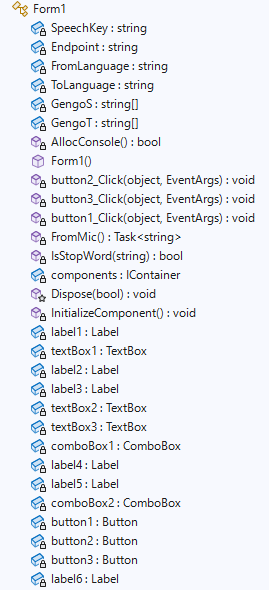
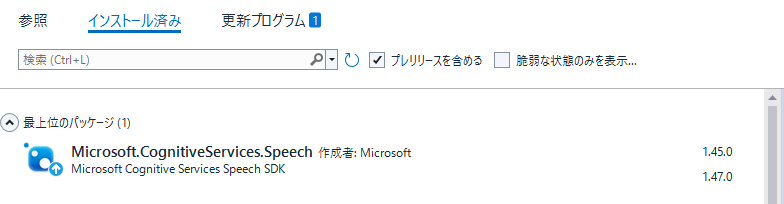
Microsoft.CognitiveServices.Speechのバージョンは、1.47ではなく1.45を導入。Formにて、1.47はSpeechConfig実行時にエラーが出て処理できません。(2025-12-11時点で)
Form1.cs
using Microsoft.CognitiveServices.Speech;
using Microsoft.CognitiveServices.Speech.Audio;
using Microsoft.CognitiveServices.Speech.Translation;
using System;
using System.Collections.Generic;
using System.ComponentModel;
using System.Data;
using System.Drawing;
using System.IO;
using System.Linq;
using System.Text;
using System.Threading.Tasks;
using System.Windows.Forms;
using System.Xml.Linq;

namespace MicToTranslationW
{
    public partial class Form1 : Form
    {
        private static string SpeechKey = "3magadA*********************************GzCEz"; // Replace with your key
        private static string Endpoint = "https://japa*****************************.com/";   // Replace with your region (e.g., "westus")
        private static string FromLanguage = "en-US";
        private static string ToLanguage = "ja";
        //翻訳言語の設定
        String[] GengoS = new String[9] { "01", "ja-JP", "日本語", "02", "en-US", "英語", "03", "ko-KR", "韓国語" };
        String[] GengoT = new String[6] { "01", "ja", "日本語", "02", "en", "英語" };
        [System.Runtime.InteropServices.DllImport("kernel32.dll")]
        private static extern bool AllocConsole();


        public Form1()
        {
            InitializeComponent();
            AllocConsole();
            textBox2.Text = SpeechKey;
            textBox3.Text = Endpoint;
            for (int i = 2; i < GengoS.Length; i = i + 3)
            {
                //Console.WriteLine("{0}番目の要素の値は{1}です。", i + 1, Gengo[i]);
                // コンボボックスに項目を追加する
                comboBox1.Items.Add(GengoS[i]);
            }
            for (int i = 2; i < GengoT.Length; i = i + 3)
            {
                //Console.WriteLine("{0}番目の要素の値は{1}です。", i + 1, Gengo[i]);
                // コンボボックスに項目を追加する
                comboBox2.Items.Add(GengoT[i]);
            }
            // 初期値を設定する(日本語を選択する)
            comboBox1.SelectedIndex = 1;
            comboBox2.SelectedIndex = 0;

        }

        //終了End
        private void button2_Click(object sender, EventArgs e)
        {
            this.Close();
        }

        //消去Clear
        private void button3_Click(object sender, EventArgs e)
        {
            textBox1.Text = "";
        }

        //翻訳Speech
        private async void button1_Click(object sender, EventArgs e)
        {
            SpeechKey = textBox2.Text;
            Endpoint = textBox3.Text;
            FromLanguage = GengoS[comboBox1.SelectedIndex * 3 + 1];
            ToLanguage = GengoT[comboBox2.SelectedIndex * 3 + 1];

            button1.Enabled = false;
            textBox1.Text += await FromMic();
            button1.Enabled = true;

        }
        async static Task<string> FromMic()
        {
            //string Endpoint = "https://japaneast****************************";
            //string SpeechKey = "3maga***************************************";
            var speechconfig = SpeechTranslationConfig.FromEndpoint(new Uri(Endpoint), SpeechKey);
            // Source language is required, but currently ignored.
            speechconfig.SpeechRecognitionLanguage = FromLanguage;
            speechconfig.AddTargetLanguage(ToLanguage);

            //翻訳元の指定を無視して、自動的に翻訳元を指定候補の中から選択します。
            var autoDetectSourceLanguageConfig = AutoDetectSourceLanguageConfig.FromLanguages(new string[] { "ja-JP","en-US","ko-kR"});

            var stopTranslation = new TaskCompletionSource<int>();
            var sb = new StringBuilder();

            Console.WriteLine("Speak into your microphone.");

            using (var audioConfig = AudioConfig.FromDefaultMicrophoneInput())
            {
         //翻訳元が自動的に指定候補より選択されます。
                using (var translationRecognizer = new TranslationRecognizer(speechconfig,autoDetectSourceLanguageConfig, audioConfig))
         //using (var translationRecognizer = new TranslationRecognizer(speechconfig, audioConfig)) 指定した翻訳元の言語になります。
                {

                    translationRecognizer.Recognized += (s, e) =>
                    {
                        if (e.Result.Reason == ResultReason.TranslatedSpeech)
                        {

                            var lidResult = e.Result.Properties.GetProperty(PropertyId.SpeechServiceConnection_AutoDetectSourceLanguageResult);
                            Console.WriteLine($"RECOGNIZED in '{lidResult}': Text={e.Result.Text}");
                            if (e.Result.Text != "")
                            {
                                sb.Append(e.Result.Text + "\r\n");
                                File.AppendAllText(System.IO.Directory.GetCurrentDirectory() + @"\Text.txt", e.Result.Text + "\r\n");
                                foreach (var element in e.Result.Translations)
                                {
                                    Console.WriteLine($"    TRANSLATED into '{element.Key}': {element.Value}");
                                    sb.Append(element.Value + "\r\n" + "" + "\r\n");
                                    File.AppendAllText(System.IO.Directory.GetCurrentDirectory() + @"\Text.txt", element.Value + "\r\n" + "" + "\r\n");
                                }
                            }
                            if (IsStopWord(e.Result.Text))
                            {
                                stopTranslation.TrySetResult(0);
                            }
                        }
                        else if (e.Result.Reason == ResultReason.RecognizedSpeech)
                        {
                            Console.WriteLine($"RECOGNIZED: Text={e.Result.Text}");
                            if (e.Result.Text != "")
                            {
                                sb.Append(e.Result.Text + "\r\n");
                                File.AppendAllText(System.IO.Directory.GetCurrentDirectory() + @"\Text.txt", e.Result.Text + "\r\n");
                                Console.WriteLine($"    Speech not translated.");
                                sb.Append("    Speech not translated." + "\r\n" + "" + "\r\n");
                                File.AppendAllText(System.IO.Directory.GetCurrentDirectory() + @"\Text.txt", "    Speech not translated." + "\r\n" + "" + "\r\n");
                            }
                        }
                        else if (e.Result.Reason == ResultReason.NoMatch)
                        {
                            Console.WriteLine($"NOMATCH: Speech could not be recognized.");
                        }
                    };

                    translationRecognizer.Canceled += (s, e) =>
                    {
                        Console.WriteLine($"CANCELED: Reason={e.Reason}");

                        if (e.Reason == CancellationReason.Error)
                        {
                            Console.WriteLine($"CANCELED: ErrorCode={e.ErrorCode}");
                            Console.WriteLine($"CANCELED: ErrorDetails={e.ErrorDetails}");
                            Console.WriteLine($"CANCELED: Did you set the speech resource key and endpoint values?");
                        }

                        stopTranslation.TrySetResult(0);
                    };

                    translationRecognizer.SpeechStartDetected += (s, e) => {
                        Console.WriteLine("\nSpeech start detected event.");
                    };

                    translationRecognizer.SpeechEndDetected += (s, e) => {
                        Console.WriteLine("\nSpeech end detected event.");
                    };

                    translationRecognizer.SessionStarted += (s, e) => {
                        Console.WriteLine("\nSession started event.");
                    };

                    translationRecognizer.SessionStopped += (s, e) => {
                        Console.WriteLine("\nSession stopped event.");
                        Console.WriteLine($"\nStop translation.");
                        stopTranslation.TrySetResult(0);
                    };

                    // Starts continuous recognition. Uses StopContinuousRecognitionAsync() to stop recognition.
                    await translationRecognizer.StartContinuousRecognitionAsync().ConfigureAwait(false);

                    // Waits for completion.
                    // Use Task.WaitAny to keep the task rooted.
                    Task.WaitAny(new[] { stopTranslation.Task });

                    await translationRecognizer.StopContinuousRecognitionAsync().ConfigureAwait(false);

                }

            }
            return sb.ToString();
        }

        private static bool IsStopWord(string message)
        {
            return message == "12345。" || message == "12345.";
        }


    }
}
C# 翻訳元の指定を無視して、自動的に翻訳元を指定候補の中から選択します。(AutoDetectSourceLanguageConfigに候補を指定します。AutoD)